Hoofdstuk 62Object Constraints
Alle 29 constraints, gegroepeerd per soort
De Object Constraint Properties-tab (het ketting-icoon) voegt Constraints (beperkingen) toe: regels die de transform van een object live sturen op basis van een ander object, zonder dat je zelf hoeft te keyframen. Blender heeft er 29, in vier groepen: Motion Tracking, Transform, Tracking en Relationship. Bone-constraints (dezelfde 29, maar dan per bot in een armature) staan in dezelfde tabellen — de instellingen zijn identiek, alleen het target-object verandert.
 RECCONCEPT00:00:00:00schoolium
Wat een constraint is, en hoe de stapel werkt
Een Constraint berekent, elk frame opnieuw, een aanpassing op de transform van een object — bovenop wat je zelf met keyframes of handmatig instelt. Net als modifiers staan constraints in een stapel die van boven naar beneden wordt doorgerekend: elke constraint werkt op het resultaat van de constraint erboven. Influence regelt hoe sterk een constraint meetelt (0 tot 1, ook animeerbaar), en het oogje zet 'm tijdelijk helemaal uit zonder 'm te verwijderen.
Het cruciale verschil met parenting: een constraint kan losgekoppeld, opnieuw geordend of qua sterkte gemengd worden zonder de objecthiërarchie te breken, en één object kan meerdere constraints tegelijk dragen die elkaar aanvullen.
 RECBLENDER 5.1 · CONSTRAINT00:00:00:001920×1080
Motion Tracking en Tracking
Motion Tracking-constraints koppelen een object aan het resultaat van een cameratracking (deel K); Tracking-constraints laten een object naar een ander object wijzen of erlangs volgen. Elke tabel is rechtstreeks uit Blender 5.1 uitgelezen.
| Instelling | Type | Standaard | Bereik | Wat hij doet (tooltip uit Blender) |
|---|---|---|---|---|
| Name | STRING | – | – | Constraint name |
| Type | ENUM | CAMERA_SOLVER | Camera Solver, Follow Track, Object Solver, Copy Location, Copy Rotation, Copy Scale, Copy Transforms, Limit Distance, Limit Location, Limit Rotation, Limit Scale, Maintain Volume, Transformation, Transform Cache, Clamp To, Damped Track, Inverse Kinematics, Locked Track, Spline IK, Stretch To, Track To, Action, Armature, Child Of, Floor, Follow Path, Geometry Attribute, Pivot, Shrinkwrap | |
| Override Constraint | BOOLEAN | aan | – | In a local override object, whether this constraint comes from the linked reference object, or is local to the override |
| Owner Space | ENUM | WORLD | World Space, Custom Space, Pose Space, Local With Parent, Local Space | Space that owner is evaluated in |
| Target Space | ENUM | WORLD | World Space, Custom Space, Pose Space, Local With Parent, Local Space, Local Space (Owner Orientation) | Space that target is evaluated in |
| Object | POINTER | – | – | Object for Custom Space |
| Sub-Target | STRING | – | – | Armature bone, mesh or lattice vertex group, ... |
| Disable | BOOLEAN | uit | – | Enable/Disable Constraint |
| Enabled | BOOLEAN | aan | – | Use the results of this constraint |
| Expanded | BOOLEAN | uit | – | Constraint's panel is expanded in UI |
| Valid | BOOLEAN | aan | – | Constraint has valid settings and can be evaluated |
| Active | BOOLEAN | uit | – | Constraint is the one being edited |
| Influence | FLOAT | 0 | 0 – 1 | Amount of influence constraint will have on the final solution |
| Lin error | FLOAT | 0 | -10000 – 10000 | Amount of residual error in Blender space unit for constraints that work on position |
| Rotation error | FLOAT | 0 | -10000 – 10000 | Amount of residual error in radians for constraints that work on orientation |
| Movie Clip | POINTER | – | – | Movie Clip to get tracking data from |
| Active Clip | BOOLEAN | uit | – | Use active clip defined in scene |
| Instelling | Type | Standaard | Bereik | Wat hij doet (tooltip uit Blender) |
|---|---|---|---|---|
| Name | STRING | – | – | Constraint name |
| Type | ENUM | CAMERA_SOLVER | Camera Solver, Follow Track, Object Solver, Copy Location, Copy Rotation, Copy Scale, Copy Transforms, Limit Distance, Limit Location, Limit Rotation, Limit Scale, Maintain Volume, Transformation, Transform Cache, Clamp To, Damped Track, Inverse Kinematics, Locked Track, Spline IK, Stretch To, Track To, Action, Armature, Child Of, Floor, Follow Path, Geometry Attribute, Pivot, Shrinkwrap | |
| Override Constraint | BOOLEAN | aan | – | In a local override object, whether this constraint comes from the linked reference object, or is local to the override |
| Owner Space | ENUM | WORLD | World Space, Custom Space, Pose Space, Local With Parent, Local Space | Space that owner is evaluated in |
| Target Space | ENUM | WORLD | World Space, Custom Space, Pose Space, Local With Parent, Local Space, Local Space (Owner Orientation) | Space that target is evaluated in |
| Object | POINTER | – | – | Object for Custom Space |
| Sub-Target | STRING | – | – | Armature bone, mesh or lattice vertex group, ... |
| Disable | BOOLEAN | uit | – | Enable/Disable Constraint |
| Enabled | BOOLEAN | aan | – | Use the results of this constraint |
| Expanded | BOOLEAN | uit | – | Constraint's panel is expanded in UI |
| Valid | BOOLEAN | aan | – | Constraint has valid settings and can be evaluated |
| Active | BOOLEAN | uit | – | Constraint is the one being edited |
| Influence | FLOAT | 0 | 0 – 1 | Amount of influence constraint will have on the final solution |
| Lin error | FLOAT | 0 | -10000 – 10000 | Amount of residual error in Blender space unit for constraints that work on position |
| Rotation error | FLOAT | 0 | -10000 – 10000 | Amount of residual error in radians for constraints that work on orientation |
| Movie Clip | POINTER | – | – | Movie Clip to get tracking data from |
| Track | STRING | – | – | Movie tracking track to follow |
| Active Clip | BOOLEAN | uit | – | Use active clip defined in scene |
| 3D Position | BOOLEAN | uit | – | Use 3D position of track to parent to |
| Object | STRING | – | – | Movie tracking object to follow (if empty, camera object is used) |
| Camera | POINTER | – | – | Camera to which motion is parented (if empty active scene camera is used) |
| Depth Object | POINTER | – | – | Object used to define depth in camera space by projecting onto surface of this object |
| Frame Method | ENUM | STRETCH | Stretch, Fit, Crop | How the footage fits in the camera frame |
| Undistort | BOOLEAN | uit | – | Parent to undistorted position of 2D track |
| Instelling | Type | Standaard | Bereik | Wat hij doet (tooltip uit Blender) |
|---|---|---|---|---|
| Name | STRING | – | – | Constraint name |
| Type | ENUM | CAMERA_SOLVER | Camera Solver, Follow Track, Object Solver, Copy Location, Copy Rotation, Copy Scale, Copy Transforms, Limit Distance, Limit Location, Limit Rotation, Limit Scale, Maintain Volume, Transformation, Transform Cache, Clamp To, Damped Track, Inverse Kinematics, Locked Track, Spline IK, Stretch To, Track To, Action, Armature, Child Of, Floor, Follow Path, Geometry Attribute, Pivot, Shrinkwrap | |
| Override Constraint | BOOLEAN | aan | – | In a local override object, whether this constraint comes from the linked reference object, or is local to the override |
| Owner Space | ENUM | WORLD | World Space, Custom Space, Pose Space, Local With Parent, Local Space | Space that owner is evaluated in |
| Target Space | ENUM | WORLD | World Space, Custom Space, Pose Space, Local With Parent, Local Space, Local Space (Owner Orientation) | Space that target is evaluated in |
| Object | POINTER | – | – | Object for Custom Space |
| Sub-Target | STRING | – | – | Armature bone, mesh or lattice vertex group, ... |
| Disable | BOOLEAN | uit | – | Enable/Disable Constraint |
| Enabled | BOOLEAN | aan | – | Use the results of this constraint |
| Expanded | BOOLEAN | uit | – | Constraint's panel is expanded in UI |
| Valid | BOOLEAN | aan | – | Constraint has valid settings and can be evaluated |
| Active | BOOLEAN | uit | – | Constraint is the one being edited |
| Influence | FLOAT | 0 | 0 – 1 | Amount of influence constraint will have on the final solution |
| Lin error | FLOAT | 0 | -10000 – 10000 | Amount of residual error in Blender space unit for constraints that work on position |
| Rotation error | FLOAT | 0 | -10000 – 10000 | Amount of residual error in radians for constraints that work on orientation |
| Movie Clip | POINTER | – | – | Movie Clip to get tracking data from |
| Active Clip | BOOLEAN | uit | – | Use active clip defined in scene |
| Set Inverse Pending | BOOLEAN | uit | – | Set to true to request recalculation of the inverse matrix |
| Object | STRING | – | – | Movie tracking object to follow |
| Camera | POINTER | – | – | Camera to which motion is parented (if empty active scene camera is used) |
| Instelling | Type | Standaard | Bereik | Wat hij doet (tooltip uit Blender) |
|---|---|---|---|---|
| Name | STRING | – | – | Constraint name |
| Type | ENUM | CAMERA_SOLVER | Camera Solver, Follow Track, Object Solver, Copy Location, Copy Rotation, Copy Scale, Copy Transforms, Limit Distance, Limit Location, Limit Rotation, Limit Scale, Maintain Volume, Transformation, Transform Cache, Clamp To, Damped Track, Inverse Kinematics, Locked Track, Spline IK, Stretch To, Track To, Action, Armature, Child Of, Floor, Follow Path, Geometry Attribute, Pivot, Shrinkwrap | |
| Override Constraint | BOOLEAN | aan | – | In a local override object, whether this constraint comes from the linked reference object, or is local to the override |
| Owner Space | ENUM | WORLD | World Space, Custom Space, Pose Space, Local With Parent, Local Space | Space that owner is evaluated in |
| Target Space | ENUM | WORLD | World Space, Custom Space, Pose Space, Local With Parent, Local Space, Local Space (Owner Orientation) | Space that target is evaluated in |
| Object | POINTER | – | – | Object for Custom Space |
| Sub-Target | STRING | – | – | Armature bone, mesh or lattice vertex group, ... |
| Disable | BOOLEAN | uit | – | Enable/Disable Constraint |
| Enabled | BOOLEAN | aan | – | Use the results of this constraint |
| Expanded | BOOLEAN | uit | – | Constraint's panel is expanded in UI |
| Valid | BOOLEAN | aan | – | Constraint has valid settings and can be evaluated |
| Active | BOOLEAN | uit | – | Constraint is the one being edited |
| Influence | FLOAT | 0 | 0 – 1 | Amount of influence constraint will have on the final solution |
| Lin error | FLOAT | 0 | -10000 – 10000 | Amount of residual error in Blender space unit for constraints that work on position |
| Rotation error | FLOAT | 0 | -10000 – 10000 | Amount of residual error in radians for constraints that work on orientation |
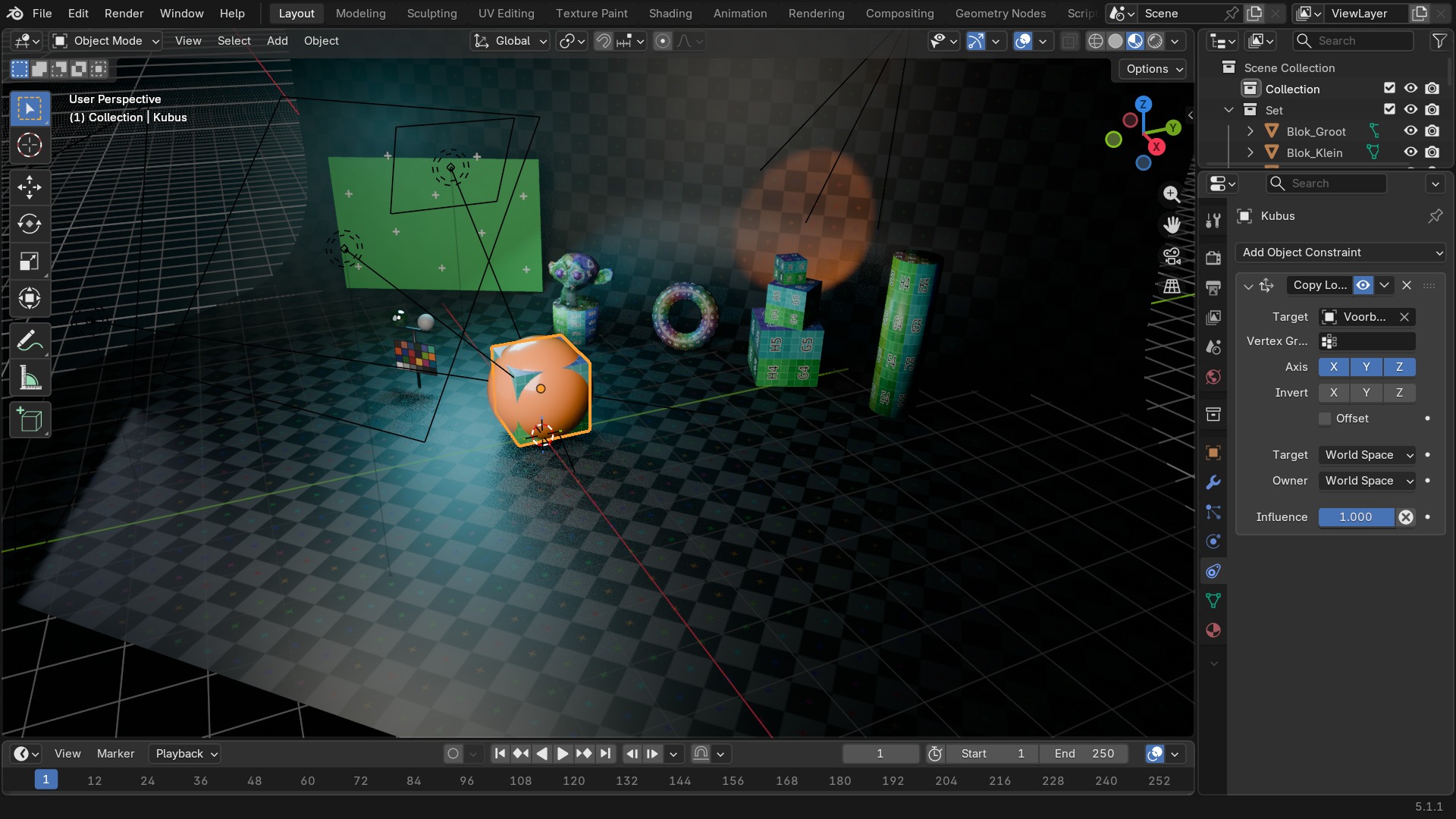
| Target | POINTER | – | – | Target Object (Curves only) |
| Main Axis | ENUM | CLAMPTO_AUTO | Auto, X, Y, Z | Main axis of movement |
| Cyclic | BOOLEAN | uit | – | Treat curve as cyclic curve (no clamping to curve bounding box) |
| Instelling | Type | Standaard | Bereik | Wat hij doet (tooltip uit Blender) |
|---|---|---|---|---|
| Name | STRING | – | – | Constraint name |
| Type | ENUM | CAMERA_SOLVER | Camera Solver, Follow Track, Object Solver, Copy Location, Copy Rotation, Copy Scale, Copy Transforms, Limit Distance, Limit Location, Limit Rotation, Limit Scale, Maintain Volume, Transformation, Transform Cache, Clamp To, Damped Track, Inverse Kinematics, Locked Track, Spline IK, Stretch To, Track To, Action, Armature, Child Of, Floor, Follow Path, Geometry Attribute, Pivot, Shrinkwrap | |
| Override Constraint | BOOLEAN | aan | – | In a local override object, whether this constraint comes from the linked reference object, or is local to the override |
| Owner Space | ENUM | WORLD | World Space, Custom Space, Pose Space, Local With Parent, Local Space | Space that owner is evaluated in |
| Target Space | ENUM | WORLD | World Space, Custom Space, Pose Space, Local With Parent, Local Space, Local Space (Owner Orientation) | Space that target is evaluated in |
| Object | POINTER | – | – | Object for Custom Space |
| Sub-Target | STRING | – | – | Armature bone, mesh or lattice vertex group, ... |
| Disable | BOOLEAN | uit | – | Enable/Disable Constraint |
| Enabled | BOOLEAN | aan | – | Use the results of this constraint |
| Expanded | BOOLEAN | uit | – | Constraint's panel is expanded in UI |
| Valid | BOOLEAN | aan | – | Constraint has valid settings and can be evaluated |
| Active | BOOLEAN | uit | – | Constraint is the one being edited |
| Influence | FLOAT | 0 | 0 – 1 | Amount of influence constraint will have on the final solution |
| Lin error | FLOAT | 0 | -10000 – 10000 | Amount of residual error in Blender space unit for constraints that work on position |
| Rotation error | FLOAT | 0 | -10000 – 10000 | Amount of residual error in radians for constraints that work on orientation |
| Head/Tail | FLOAT | 0 | 0 – 1 | Target along length of bone: Head is 0, Tail is 1 |
| Follow B-Bone | BOOLEAN | uit | – | Follow shape of B-Bone segments when calculating Head/Tail position |
| Target | POINTER | – | – | Target object |
| Sub-Target | STRING | – | – | Armature bone, mesh or lattice vertex group, ... |
| Track Axis | ENUM | TRACK_X | X, Y, Z, -X, -Y, -Z | Axis that points to the target object |
| Instelling | Type | Standaard | Bereik | Wat hij doet (tooltip uit Blender) |
|---|---|---|---|---|
| Name | STRING | – | – | Constraint name |
| Type | ENUM | CAMERA_SOLVER | Camera Solver, Follow Track, Object Solver, Copy Location, Copy Rotation, Copy Scale, Copy Transforms, Limit Distance, Limit Location, Limit Rotation, Limit Scale, Maintain Volume, Transformation, Transform Cache, Clamp To, Damped Track, Inverse Kinematics, Locked Track, Spline IK, Stretch To, Track To, Action, Armature, Child Of, Floor, Follow Path, Geometry Attribute, Pivot, Shrinkwrap | |
| Override Constraint | BOOLEAN | aan | – | In a local override object, whether this constraint comes from the linked reference object, or is local to the override |
| Owner Space | ENUM | WORLD | World Space, Custom Space, Pose Space, Local With Parent, Local Space | Space that owner is evaluated in |
| Target Space | ENUM | WORLD | World Space, Custom Space, Pose Space, Local With Parent, Local Space, Local Space (Owner Orientation) | Space that target is evaluated in |
| Object | POINTER | – | – | Object for Custom Space |
| Sub-Target | STRING | – | – | Armature bone, mesh or lattice vertex group, ... |
| Disable | BOOLEAN | uit | – | Enable/Disable Constraint |
| Enabled | BOOLEAN | aan | – | Use the results of this constraint |
| Expanded | BOOLEAN | uit | – | Constraint's panel is expanded in UI |
| Valid | BOOLEAN | aan | – | Constraint has valid settings and can be evaluated |
| Active | BOOLEAN | uit | – | Constraint is the one being edited |
| Influence | FLOAT | 0 | 0 – 1 | Amount of influence constraint will have on the final solution |
| Lin error | FLOAT | 0 | -10000 – 10000 | Amount of residual error in Blender space unit for constraints that work on position |
| Rotation error | FLOAT | 0 | -10000 – 10000 | Amount of residual error in radians for constraints that work on orientation |
| Head/Tail | FLOAT | 0 | 0 – 1 | Target along length of bone: Head is 0, Tail is 1 |
| Follow B-Bone | BOOLEAN | uit | – | Follow shape of B-Bone segments when calculating Head/Tail position |
| Target | POINTER | – | – | Target object |
| Sub-Target | STRING | – | – | Armature bone, mesh or lattice vertex group, ... |
| Track Axis | ENUM | TRACK_X | X, Y, Z, -X, -Y, -Z | Axis that points to the target object |
| Locked Axis | ENUM | LOCK_X | X, Y, Z | Axis that points upward |
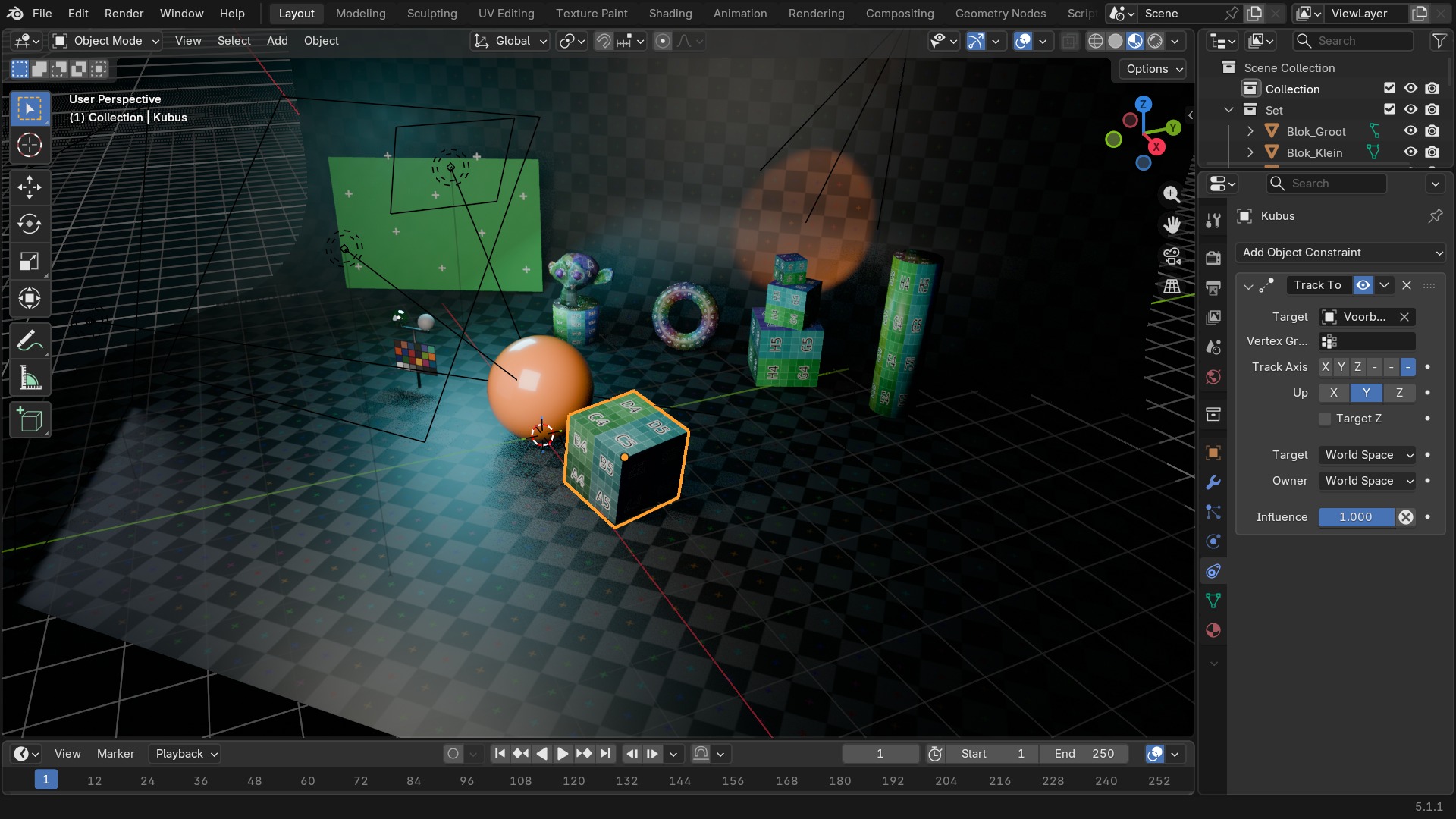
Track To, Damped Track en Locked Track: het verschil
Alle drie laten een object naar een ander object 'kijken', maar met een andere manier om de rest van de rotatie in te vullen. Track To is de klassieke, met een expliciete Up-as die kan flippen bij bepaalde hoeken (gimbal-achtig probleem). Damped Track roteert zo min mogelijk om het doel te volgen, zonder een aparte Up-as — meestal de stabielste keuze voor een camera of geschutskoepel die vloeiend moet meedraaien. Locked Track houdt één as helemaal vast (bv. de object blijft rechtop) terwijl een andere as naar het doel wijst.
 RECBLENDER 5.1 · CONSTRAINT-TRACKING00:00:00:001920×1080
Tracking (vervolg) en Transform, deel 1
| Instelling | Type | Standaard | Bereik | Wat hij doet (tooltip uit Blender) |
|---|---|---|---|---|
| Name | STRING | – | – | Constraint name |
| Type | ENUM | CAMERA_SOLVER | Camera Solver, Follow Track, Object Solver, Copy Location, Copy Rotation, Copy Scale, Copy Transforms, Limit Distance, Limit Location, Limit Rotation, Limit Scale, Maintain Volume, Transformation, Transform Cache, Clamp To, Damped Track, Inverse Kinematics, Locked Track, Spline IK, Stretch To, Track To, Action, Armature, Child Of, Floor, Follow Path, Geometry Attribute, Pivot, Shrinkwrap | |
| Override Constraint | BOOLEAN | aan | – | In a local override object, whether this constraint comes from the linked reference object, or is local to the override |
| Owner Space | ENUM | WORLD | World Space, Custom Space, Pose Space, Local With Parent, Local Space | Space that owner is evaluated in |
| Target Space | ENUM | WORLD | World Space, Custom Space, Pose Space, Local With Parent, Local Space, Local Space (Owner Orientation) | Space that target is evaluated in |
| Object | POINTER | – | – | Object for Custom Space |
| Sub-Target | STRING | – | – | Armature bone, mesh or lattice vertex group, ... |
| Disable | BOOLEAN | uit | – | Enable/Disable Constraint |
| Enabled | BOOLEAN | aan | – | Use the results of this constraint |
| Expanded | BOOLEAN | uit | – | Constraint's panel is expanded in UI |
| Valid | BOOLEAN | aan | – | Constraint has valid settings and can be evaluated |
| Active | BOOLEAN | uit | – | Constraint is the one being edited |
| Influence | FLOAT | 0 | 0 – 1 | Amount of influence constraint will have on the final solution |
| Lin error | FLOAT | 0 | -10000 – 10000 | Amount of residual error in Blender space unit for constraints that work on position |
| Rotation error | FLOAT | 0 | -10000 – 10000 | Amount of residual error in radians for constraints that work on orientation |
| Target | POINTER | – | – | Curve that controls this relationship |
| Chain Length | INT | 0 | 1 – 255 | How many bones are included in the chain |
| Joint Bindings | FLOAT | 0 | 0 – 1 | (EXPERIENCED USERS ONLY) The relative positions of the joints along the chain, as percentages |
| Chain Offset | BOOLEAN | uit | – | Offset the entire chain relative to the root joint |
| Even Divisions | BOOLEAN | uit | – | Ignore the relative lengths of the bones when fitting to the curve |
| Use Curve Radius | BOOLEAN | aan | – | Average radius of the endpoints is used to tweak the X and Z Scaling of the bones, on top of XZ Scale mode |
| XZ Scale Mode | ENUM | NONE | None, Bone Original, Inverse Scale, Volume Preservation | Method used for determining the scaling of the X and Z axes of the bones |
| Y Scale Mode | ENUM | NONE | None, Fit Curve, Bone Original | Method used for determining the scaling of the Y axis of the bones, on top of the shape and scaling of the curve itself |
| Use Original Scale | BOOLEAN | uit | – | Apply volume preservation over the original scaling |
| Volume Variation | FLOAT | 0 | 0 – 100 | Factor between volume variation and stretching |
| Use Volume Variation Minimum | BOOLEAN | uit | – | Use lower limit for volume variation |
| Use Volume Variation Maximum | BOOLEAN | uit | – | Use upper limit for volume variation |
| Volume Variation Minimum | FLOAT | 0 | 0 – 1 | Minimum volume stretching factor |
| Volume Variation Maximum | FLOAT | 0 | 1 – 100 | Maximum volume stretching factor |
| Volume Variation Smoothness | FLOAT | 0 | 0 – 1 | Strength of volume stretching clamping |
| Instelling | Type | Standaard | Bereik | Wat hij doet (tooltip uit Blender) |
|---|---|---|---|---|
| Name | STRING | – | – | Constraint name |
| Type | ENUM | CAMERA_SOLVER | Camera Solver, Follow Track, Object Solver, Copy Location, Copy Rotation, Copy Scale, Copy Transforms, Limit Distance, Limit Location, Limit Rotation, Limit Scale, Maintain Volume, Transformation, Transform Cache, Clamp To, Damped Track, Inverse Kinematics, Locked Track, Spline IK, Stretch To, Track To, Action, Armature, Child Of, Floor, Follow Path, Geometry Attribute, Pivot, Shrinkwrap | |
| Override Constraint | BOOLEAN | aan | – | In a local override object, whether this constraint comes from the linked reference object, or is local to the override |
| Owner Space | ENUM | WORLD | World Space, Custom Space, Pose Space, Local With Parent, Local Space | Space that owner is evaluated in |
| Target Space | ENUM | WORLD | World Space, Custom Space, Pose Space, Local With Parent, Local Space, Local Space (Owner Orientation) | Space that target is evaluated in |
| Object | POINTER | – | – | Object for Custom Space |
| Sub-Target | STRING | – | – | Armature bone, mesh or lattice vertex group, ... |
| Disable | BOOLEAN | uit | – | Enable/Disable Constraint |
| Enabled | BOOLEAN | aan | – | Use the results of this constraint |
| Expanded | BOOLEAN | uit | – | Constraint's panel is expanded in UI |
| Valid | BOOLEAN | aan | – | Constraint has valid settings and can be evaluated |
| Active | BOOLEAN | uit | – | Constraint is the one being edited |
| Influence | FLOAT | 0 | 0 – 1 | Amount of influence constraint will have on the final solution |
| Lin error | FLOAT | 0 | -10000 – 10000 | Amount of residual error in Blender space unit for constraints that work on position |
| Rotation error | FLOAT | 0 | -10000 – 10000 | Amount of residual error in radians for constraints that work on orientation |
| Head/Tail | FLOAT | 0 | 0 – 1 | Target along length of bone: Head is 0, Tail is 1 |
| Follow B-Bone | BOOLEAN | uit | – | Follow shape of B-Bone segments when calculating Head/Tail position |
| Target | POINTER | – | – | Target object |
| Sub-Target | STRING | – | – | Armature bone, mesh or lattice vertex group, ... |
| Maintain Volume | ENUM | VOLUME_XZX | XZ, X, Z, None | Maintain the object's volume as it stretches |
| Keep Axis | ENUM | PLANE_X | XZ, ZX, Swing | The rotation type and axis order to use |
| Original Length | FLOAT | 0 | 0 – 100 | Length at rest position |
| Volume Variation | FLOAT | 0 | 0 – 100 | Factor between volume variation and stretching |
| Use Volume Variation Minimum | BOOLEAN | uit | – | Use lower limit for volume variation |
| Use Volume Variation Maximum | BOOLEAN | uit | – | Use upper limit for volume variation |
| Volume Variation Minimum | FLOAT | 0 | 0 – 1 | Minimum volume stretching factor |
| Volume Variation Maximum | FLOAT | 0 | 1 – 100 | Maximum volume stretching factor |
| Volume Variation Smoothness | FLOAT | 0 | 0 – 1 | Strength of volume stretching clamping |
| Instelling | Type | Standaard | Bereik | Wat hij doet (tooltip uit Blender) |
|---|---|---|---|---|
| Name | STRING | – | – | Constraint name |
| Type | ENUM | CAMERA_SOLVER | Camera Solver, Follow Track, Object Solver, Copy Location, Copy Rotation, Copy Scale, Copy Transforms, Limit Distance, Limit Location, Limit Rotation, Limit Scale, Maintain Volume, Transformation, Transform Cache, Clamp To, Damped Track, Inverse Kinematics, Locked Track, Spline IK, Stretch To, Track To, Action, Armature, Child Of, Floor, Follow Path, Geometry Attribute, Pivot, Shrinkwrap | |
| Override Constraint | BOOLEAN | aan | – | In a local override object, whether this constraint comes from the linked reference object, or is local to the override |
| Owner Space | ENUM | WORLD | World Space, Custom Space, Pose Space, Local With Parent, Local Space | Space that owner is evaluated in |
| Target Space | ENUM | WORLD | World Space, Custom Space, Pose Space, Local With Parent, Local Space, Local Space (Owner Orientation) | Space that target is evaluated in |
| Object | POINTER | – | – | Object for Custom Space |
| Sub-Target | STRING | – | – | Armature bone, mesh or lattice vertex group, ... |
| Disable | BOOLEAN | uit | – | Enable/Disable Constraint |
| Enabled | BOOLEAN | aan | – | Use the results of this constraint |
| Expanded | BOOLEAN | uit | – | Constraint's panel is expanded in UI |
| Valid | BOOLEAN | aan | – | Constraint has valid settings and can be evaluated |
| Active | BOOLEAN | uit | – | Constraint is the one being edited |
| Influence | FLOAT | 0 | 0 – 1 | Amount of influence constraint will have on the final solution |
| Lin error | FLOAT | 0 | -10000 – 10000 | Amount of residual error in Blender space unit for constraints that work on position |
| Rotation error | FLOAT | 0 | -10000 – 10000 | Amount of residual error in radians for constraints that work on orientation |
| Head/Tail | FLOAT | 0 | 0 – 1 | Target along length of bone: Head is 0, Tail is 1 |
| Follow B-Bone | BOOLEAN | uit | – | Follow shape of B-Bone segments when calculating Head/Tail position |
| Target | POINTER | – | – | Target object |
| Sub-Target | STRING | – | – | Armature bone, mesh or lattice vertex group, ... |
| Track Axis | ENUM | TRACK_X | X, Y, Z, -X, -Y, -Z | Axis that points to the target object |
| Up Axis | ENUM | UP_X | X, Y, Z | Axis that points upward |
| Target Z | BOOLEAN | uit | – | Target's Z axis, not World Z axis, will constrain the Up direction |
| Instelling | Type | Standaard | Bereik | Wat hij doet (tooltip uit Blender) |
|---|---|---|---|---|
| Name | STRING | – | – | Constraint name |
| Type | ENUM | CAMERA_SOLVER | Camera Solver, Follow Track, Object Solver, Copy Location, Copy Rotation, Copy Scale, Copy Transforms, Limit Distance, Limit Location, Limit Rotation, Limit Scale, Maintain Volume, Transformation, Transform Cache, Clamp To, Damped Track, Inverse Kinematics, Locked Track, Spline IK, Stretch To, Track To, Action, Armature, Child Of, Floor, Follow Path, Geometry Attribute, Pivot, Shrinkwrap | |
| Override Constraint | BOOLEAN | aan | – | In a local override object, whether this constraint comes from the linked reference object, or is local to the override |
| Owner Space | ENUM | WORLD | World Space, Custom Space, Pose Space, Local With Parent, Local Space | Space that owner is evaluated in |
| Target Space | ENUM | WORLD | World Space, Custom Space, Pose Space, Local With Parent, Local Space, Local Space (Owner Orientation) | Space that target is evaluated in |
| Object | POINTER | – | – | Object for Custom Space |
| Sub-Target | STRING | – | – | Armature bone, mesh or lattice vertex group, ... |
| Disable | BOOLEAN | uit | – | Enable/Disable Constraint |
| Enabled | BOOLEAN | aan | – | Use the results of this constraint |
| Expanded | BOOLEAN | uit | – | Constraint's panel is expanded in UI |
| Valid | BOOLEAN | aan | – | Constraint has valid settings and can be evaluated |
| Active | BOOLEAN | uit | – | Constraint is the one being edited |
| Influence | FLOAT | 0 | 0 – 1 | Amount of influence constraint will have on the final solution |
| Lin error | FLOAT | 0 | -10000 – 10000 | Amount of residual error in Blender space unit for constraints that work on position |
| Rotation error | FLOAT | 0 | -10000 – 10000 | Amount of residual error in radians for constraints that work on orientation |
| Head/Tail | FLOAT | 0 | 0 – 1 | Target along length of bone: Head is 0, Tail is 1 |
| Follow B-Bone | BOOLEAN | uit | – | Follow shape of B-Bone segments when calculating Head/Tail position |
| Target | POINTER | – | – | Target object |
| Sub-Target | STRING | – | – | Armature bone, mesh or lattice vertex group, ... |
| Copy X | BOOLEAN | uit | – | Copy the target's X location |
| Copy Y | BOOLEAN | uit | – | Copy the target's Y location |
| Copy Z | BOOLEAN | uit | – | Copy the target's Z location |
| Invert X | BOOLEAN | uit | – | Invert the X location |
| Invert Y | BOOLEAN | uit | – | Invert the Y location |
| Invert Z | BOOLEAN | uit | – | Invert the Z location |
| Offset | BOOLEAN | uit | – | Add original location into copied location |
| Instelling | Type | Standaard | Bereik | Wat hij doet (tooltip uit Blender) |
|---|---|---|---|---|
| Name | STRING | – | – | Constraint name |
| Type | ENUM | CAMERA_SOLVER | Camera Solver, Follow Track, Object Solver, Copy Location, Copy Rotation, Copy Scale, Copy Transforms, Limit Distance, Limit Location, Limit Rotation, Limit Scale, Maintain Volume, Transformation, Transform Cache, Clamp To, Damped Track, Inverse Kinematics, Locked Track, Spline IK, Stretch To, Track To, Action, Armature, Child Of, Floor, Follow Path, Geometry Attribute, Pivot, Shrinkwrap | |
| Override Constraint | BOOLEAN | aan | – | In a local override object, whether this constraint comes from the linked reference object, or is local to the override |
| Owner Space | ENUM | WORLD | World Space, Custom Space, Pose Space, Local With Parent, Local Space | Space that owner is evaluated in |
| Target Space | ENUM | WORLD | World Space, Custom Space, Pose Space, Local With Parent, Local Space, Local Space (Owner Orientation) | Space that target is evaluated in |
| Object | POINTER | – | – | Object for Custom Space |
| Sub-Target | STRING | – | – | Armature bone, mesh or lattice vertex group, ... |
| Disable | BOOLEAN | uit | – | Enable/Disable Constraint |
| Enabled | BOOLEAN | aan | – | Use the results of this constraint |
| Expanded | BOOLEAN | uit | – | Constraint's panel is expanded in UI |
| Valid | BOOLEAN | aan | – | Constraint has valid settings and can be evaluated |
| Active | BOOLEAN | uit | – | Constraint is the one being edited |
| Influence | FLOAT | 0 | 0 – 1 | Amount of influence constraint will have on the final solution |
| Lin error | FLOAT | 0 | -10000 – 10000 | Amount of residual error in Blender space unit for constraints that work on position |
| Rotation error | FLOAT | 0 | -10000 – 10000 | Amount of residual error in radians for constraints that work on orientation |
| Target | POINTER | – | – | Target object |
| Sub-Target | STRING | – | – | Armature bone, mesh or lattice vertex group, ... |
| Copy X | BOOLEAN | uit | – | Copy the target's X rotation |
| Copy Y | BOOLEAN | uit | – | Copy the target's Y rotation |
| Copy Z | BOOLEAN | uit | – | Copy the target's Z rotation |
| Invert X | BOOLEAN | uit | – | Invert the X rotation |
| Invert Y | BOOLEAN | uit | – | Invert the Y rotation |
| Invert Z | BOOLEAN | uit | – | Invert the Z rotation |
| Euler Order | ENUM | AUTO | Default, XYZ Euler, XZY Euler, YXZ Euler, YZX Euler, ZXY Euler, ZYX Euler | Explicitly specify the euler rotation order |
| Mix Mode | ENUM | REPLACE | Replace, Add, Before Original, After Original, Offset (Legacy) | Specify how the copied and existing rotations are combined |
| Offset | BOOLEAN | uit | – | DEPRECATED: Add original rotation into copied rotation |
| Instelling | Type | Standaard | Bereik | Wat hij doet (tooltip uit Blender) |
|---|---|---|---|---|
| Name | STRING | – | – | Constraint name |
| Type | ENUM | CAMERA_SOLVER | Camera Solver, Follow Track, Object Solver, Copy Location, Copy Rotation, Copy Scale, Copy Transforms, Limit Distance, Limit Location, Limit Rotation, Limit Scale, Maintain Volume, Transformation, Transform Cache, Clamp To, Damped Track, Inverse Kinematics, Locked Track, Spline IK, Stretch To, Track To, Action, Armature, Child Of, Floor, Follow Path, Geometry Attribute, Pivot, Shrinkwrap | |
| Override Constraint | BOOLEAN | aan | – | In a local override object, whether this constraint comes from the linked reference object, or is local to the override |
| Owner Space | ENUM | WORLD | World Space, Custom Space, Pose Space, Local With Parent, Local Space | Space that owner is evaluated in |
| Target Space | ENUM | WORLD | World Space, Custom Space, Pose Space, Local With Parent, Local Space, Local Space (Owner Orientation) | Space that target is evaluated in |
| Object | POINTER | – | – | Object for Custom Space |
| Sub-Target | STRING | – | – | Armature bone, mesh or lattice vertex group, ... |
| Disable | BOOLEAN | uit | – | Enable/Disable Constraint |
| Enabled | BOOLEAN | aan | – | Use the results of this constraint |
| Expanded | BOOLEAN | uit | – | Constraint's panel is expanded in UI |
| Valid | BOOLEAN | aan | – | Constraint has valid settings and can be evaluated |
| Active | BOOLEAN | uit | – | Constraint is the one being edited |
| Influence | FLOAT | 0 | 0 – 1 | Amount of influence constraint will have on the final solution |
| Lin error | FLOAT | 0 | -10000 – 10000 | Amount of residual error in Blender space unit for constraints that work on position |
| Rotation error | FLOAT | 0 | -10000 – 10000 | Amount of residual error in radians for constraints that work on orientation |
| Target | POINTER | – | – | Target object |
| Sub-Target | STRING | – | – | Armature bone, mesh or lattice vertex group, ... |
| Copy X | BOOLEAN | uit | – | Copy the target's X scale |
| Copy Y | BOOLEAN | uit | – | Copy the target's Y scale |
| Copy Z | BOOLEAN | uit | – | Copy the target's Z scale |
| Power | FLOAT | 1 | – | Raise the target's scale to the specified power |
| Make Uniform | BOOLEAN | uit | – | Redistribute the copied change in volume equally between the three axes of the owner |
| Offset | BOOLEAN | uit | – | Combine original scale with copied scale |
| Additive | BOOLEAN | aan | – | Use addition instead of multiplication to combine scale (2.7 compatibility) |
| Instelling | Type | Standaard | Bereik | Wat hij doet (tooltip uit Blender) |
|---|---|---|---|---|
| Name | STRING | – | – | Constraint name |
| Type | ENUM | CAMERA_SOLVER | Camera Solver, Follow Track, Object Solver, Copy Location, Copy Rotation, Copy Scale, Copy Transforms, Limit Distance, Limit Location, Limit Rotation, Limit Scale, Maintain Volume, Transformation, Transform Cache, Clamp To, Damped Track, Inverse Kinematics, Locked Track, Spline IK, Stretch To, Track To, Action, Armature, Child Of, Floor, Follow Path, Geometry Attribute, Pivot, Shrinkwrap | |
| Override Constraint | BOOLEAN | aan | – | In a local override object, whether this constraint comes from the linked reference object, or is local to the override |
| Owner Space | ENUM | WORLD | World Space, Custom Space, Pose Space, Local With Parent, Local Space | Space that owner is evaluated in |
| Target Space | ENUM | WORLD | World Space, Custom Space, Pose Space, Local With Parent, Local Space, Local Space (Owner Orientation) | Space that target is evaluated in |
| Object | POINTER | – | – | Object for Custom Space |
| Sub-Target | STRING | – | – | Armature bone, mesh or lattice vertex group, ... |
| Disable | BOOLEAN | uit | – | Enable/Disable Constraint |
| Enabled | BOOLEAN | aan | – | Use the results of this constraint |
| Expanded | BOOLEAN | uit | – | Constraint's panel is expanded in UI |
| Valid | BOOLEAN | aan | – | Constraint has valid settings and can be evaluated |
| Active | BOOLEAN | uit | – | Constraint is the one being edited |
| Influence | FLOAT | 0 | 0 – 1 | Amount of influence constraint will have on the final solution |
| Lin error | FLOAT | 0 | -10000 – 10000 | Amount of residual error in Blender space unit for constraints that work on position |
| Rotation error | FLOAT | 0 | -10000 – 10000 | Amount of residual error in radians for constraints that work on orientation |
| Head/Tail | FLOAT | 0 | 0 – 1 | Target along length of bone: Head is 0, Tail is 1 |
| Follow B-Bone | BOOLEAN | uit | – | Follow shape of B-Bone segments when calculating Head/Tail position |
| Target | POINTER | – | – | Target object |
| Sub-Target | STRING | – | – | Armature bone, mesh or lattice vertex group, ... |
| Remove Target Shear | BOOLEAN | uit | – | Remove shear from the target transformation before combining |
| Mix Mode | ENUM | REPLACE | Replace, Before Original (Full), Before Original (Aligned), Before Original (Split Channels), After Original (Full), After Original (Aligned), After Original (Split Channels) | Specify how the copied and existing transformations are combined |
Transform, deel 2 — limieten en volume
De Limit-constraints knijpen een transform binnen een bereik in plaats van 'm van een ander object over te nemen.
| Instelling | Type | Standaard | Bereik | Wat hij doet (tooltip uit Blender) |
|---|---|---|---|---|
| Name | STRING | – | – | Constraint name |
| Type | ENUM | CAMERA_SOLVER | Camera Solver, Follow Track, Object Solver, Copy Location, Copy Rotation, Copy Scale, Copy Transforms, Limit Distance, Limit Location, Limit Rotation, Limit Scale, Maintain Volume, Transformation, Transform Cache, Clamp To, Damped Track, Inverse Kinematics, Locked Track, Spline IK, Stretch To, Track To, Action, Armature, Child Of, Floor, Follow Path, Geometry Attribute, Pivot, Shrinkwrap | |
| Override Constraint | BOOLEAN | aan | – | In a local override object, whether this constraint comes from the linked reference object, or is local to the override |
| Owner Space | ENUM | WORLD | World Space, Custom Space, Pose Space, Local With Parent, Local Space | Space that owner is evaluated in |
| Target Space | ENUM | WORLD | World Space, Custom Space, Pose Space, Local With Parent, Local Space, Local Space (Owner Orientation) | Space that target is evaluated in |
| Object | POINTER | – | – | Object for Custom Space |
| Sub-Target | STRING | – | – | Armature bone, mesh or lattice vertex group, ... |
| Disable | BOOLEAN | uit | – | Enable/Disable Constraint |
| Enabled | BOOLEAN | aan | – | Use the results of this constraint |
| Expanded | BOOLEAN | uit | – | Constraint's panel is expanded in UI |
| Valid | BOOLEAN | aan | – | Constraint has valid settings and can be evaluated |
| Active | BOOLEAN | uit | – | Constraint is the one being edited |
| Influence | FLOAT | 0 | 0 – 1 | Amount of influence constraint will have on the final solution |
| Lin error | FLOAT | 0 | -10000 – 10000 | Amount of residual error in Blender space unit for constraints that work on position |
| Rotation error | FLOAT | 0 | -10000 – 10000 | Amount of residual error in radians for constraints that work on orientation |
| Head/Tail | FLOAT | 0 | 0 – 1 | Target along length of bone: Head is 0, Tail is 1 |
| Follow B-Bone | BOOLEAN | uit | – | Follow shape of B-Bone segments when calculating Head/Tail position |
| Target | POINTER | – | – | Target object |
| Sub-Target | STRING | – | – | Armature bone, mesh or lattice vertex group, ... |
| Distance | FLOAT | 0 | 0 – 100 | Radius of limiting sphere |
| Limit Mode | ENUM | LIMITDIST_INSIDE | Inside, Outside, On Surface | Distances in relation to sphere of influence to allow |
| Affect Transform | BOOLEAN | uit | – | Transforms are affected by this constraint as well |
| Instelling | Type | Standaard | Bereik | Wat hij doet (tooltip uit Blender) |
|---|---|---|---|---|
| Name | STRING | – | – | Constraint name |
| Type | ENUM | CAMERA_SOLVER | Camera Solver, Follow Track, Object Solver, Copy Location, Copy Rotation, Copy Scale, Copy Transforms, Limit Distance, Limit Location, Limit Rotation, Limit Scale, Maintain Volume, Transformation, Transform Cache, Clamp To, Damped Track, Inverse Kinematics, Locked Track, Spline IK, Stretch To, Track To, Action, Armature, Child Of, Floor, Follow Path, Geometry Attribute, Pivot, Shrinkwrap | |
| Override Constraint | BOOLEAN | aan | – | In a local override object, whether this constraint comes from the linked reference object, or is local to the override |
| Owner Space | ENUM | WORLD | World Space, Custom Space, Pose Space, Local With Parent, Local Space | Space that owner is evaluated in |
| Target Space | ENUM | WORLD | World Space, Custom Space, Pose Space, Local With Parent, Local Space, Local Space (Owner Orientation) | Space that target is evaluated in |
| Object | POINTER | – | – | Object for Custom Space |
| Sub-Target | STRING | – | – | Armature bone, mesh or lattice vertex group, ... |
| Disable | BOOLEAN | uit | – | Enable/Disable Constraint |
| Enabled | BOOLEAN | aan | – | Use the results of this constraint |
| Expanded | BOOLEAN | uit | – | Constraint's panel is expanded in UI |
| Valid | BOOLEAN | aan | – | Constraint has valid settings and can be evaluated |
| Active | BOOLEAN | uit | – | Constraint is the one being edited |
| Influence | FLOAT | 0 | 0 – 1 | Amount of influence constraint will have on the final solution |
| Lin error | FLOAT | 0 | -10000 – 10000 | Amount of residual error in Blender space unit for constraints that work on position |
| Rotation error | FLOAT | 0 | -10000 – 10000 | Amount of residual error in radians for constraints that work on orientation |
| Minimum X | BOOLEAN | uit | – | Use the minimum X value |
| Minimum Y | BOOLEAN | uit | – | Use the minimum Y value |
| Minimum Z | BOOLEAN | uit | – | Use the minimum Z value |
| Maximum X | BOOLEAN | uit | – | Use the maximum X value |
| Maximum Y | BOOLEAN | uit | – | Use the maximum Y value |
| Maximum Z | BOOLEAN | uit | – | Use the maximum Z value |
| Minimum X | FLOAT | 0 | -1000 – 1000 | Lowest X value to allow |
| Minimum Y | FLOAT | 0 | -1000 – 1000 | Lowest Y value to allow |
| Minimum Z | FLOAT | 0 | -1000 – 1000 | Lowest Z value to allow |
| Maximum X | FLOAT | 0 | -1000 – 1000 | Highest X value to allow |
| Maximum Y | FLOAT | 0 | -1000 – 1000 | Highest Y value to allow |
| Maximum Z | FLOAT | 0 | -1000 – 1000 | Highest Z value to allow |
| Affect Transform | BOOLEAN | uit | – | Transform tools are affected by this constraint as well |
| Instelling | Type | Standaard | Bereik | Wat hij doet (tooltip uit Blender) |
|---|---|---|---|---|
| Name | STRING | – | – | Constraint name |
| Type | ENUM | CAMERA_SOLVER | Camera Solver, Follow Track, Object Solver, Copy Location, Copy Rotation, Copy Scale, Copy Transforms, Limit Distance, Limit Location, Limit Rotation, Limit Scale, Maintain Volume, Transformation, Transform Cache, Clamp To, Damped Track, Inverse Kinematics, Locked Track, Spline IK, Stretch To, Track To, Action, Armature, Child Of, Floor, Follow Path, Geometry Attribute, Pivot, Shrinkwrap | |
| Override Constraint | BOOLEAN | aan | – | In a local override object, whether this constraint comes from the linked reference object, or is local to the override |
| Owner Space | ENUM | WORLD | World Space, Custom Space, Pose Space, Local With Parent, Local Space | Space that owner is evaluated in |
| Target Space | ENUM | WORLD | World Space, Custom Space, Pose Space, Local With Parent, Local Space, Local Space (Owner Orientation) | Space that target is evaluated in |
| Object | POINTER | – | – | Object for Custom Space |
| Sub-Target | STRING | – | – | Armature bone, mesh or lattice vertex group, ... |
| Disable | BOOLEAN | uit | – | Enable/Disable Constraint |
| Enabled | BOOLEAN | aan | – | Use the results of this constraint |
| Expanded | BOOLEAN | uit | – | Constraint's panel is expanded in UI |
| Valid | BOOLEAN | aan | – | Constraint has valid settings and can be evaluated |
| Active | BOOLEAN | uit | – | Constraint is the one being edited |
| Influence | FLOAT | 0 | 0 – 1 | Amount of influence constraint will have on the final solution |
| Lin error | FLOAT | 0 | -10000 – 10000 | Amount of residual error in Blender space unit for constraints that work on position |
| Rotation error | FLOAT | 0 | -10000 – 10000 | Amount of residual error in radians for constraints that work on orientation |
| Limit X | BOOLEAN | uit | – | Use the minimum X value |
| Limit Y | BOOLEAN | uit | – | Use the minimum Y value |
| Limit Z | BOOLEAN | uit | – | Use the minimum Z value |
| Minimum X | FLOAT | 0 | -6.2832 – 6.2832 | Lower X angle bound |
| Minimum Y | FLOAT | 0 | -6.2832 – 6.2832 | Lower Y angle bound |
| Minimum Z | FLOAT | 0 | -6.2832 – 6.2832 | Lower Z angle bound |
| Maximum X | FLOAT | 0 | -6.2832 – 6.2832 | Upper X angle bound |
| Maximum Y | FLOAT | 0 | -6.2832 – 6.2832 | Upper Y angle bound |
| Maximum Z | FLOAT | 0 | -6.2832 – 6.2832 | Upper Z angle bound |
| Euler Order | ENUM | AUTO | Default, XYZ Euler, XZY Euler, YXZ Euler, YZX Euler, ZXY Euler, ZYX Euler | Explicitly specify the euler rotation order |
| Affect Transform | BOOLEAN | uit | – | Transform tools are affected by this constraint as well |
| Legacy Behavior | BOOLEAN | uit | – | Use the old semi-broken behavior that does not understand that rotations loop around |
| Instelling | Type | Standaard | Bereik | Wat hij doet (tooltip uit Blender) |
|---|---|---|---|---|
| Name | STRING | – | – | Constraint name |
| Type | ENUM | CAMERA_SOLVER | Camera Solver, Follow Track, Object Solver, Copy Location, Copy Rotation, Copy Scale, Copy Transforms, Limit Distance, Limit Location, Limit Rotation, Limit Scale, Maintain Volume, Transformation, Transform Cache, Clamp To, Damped Track, Inverse Kinematics, Locked Track, Spline IK, Stretch To, Track To, Action, Armature, Child Of, Floor, Follow Path, Geometry Attribute, Pivot, Shrinkwrap | |
| Override Constraint | BOOLEAN | aan | – | In a local override object, whether this constraint comes from the linked reference object, or is local to the override |
| Owner Space | ENUM | WORLD | World Space, Custom Space, Pose Space, Local With Parent, Local Space | Space that owner is evaluated in |
| Target Space | ENUM | WORLD | World Space, Custom Space, Pose Space, Local With Parent, Local Space, Local Space (Owner Orientation) | Space that target is evaluated in |
| Object | POINTER | – | – | Object for Custom Space |
| Sub-Target | STRING | – | – | Armature bone, mesh or lattice vertex group, ... |
| Disable | BOOLEAN | uit | – | Enable/Disable Constraint |
| Enabled | BOOLEAN | aan | – | Use the results of this constraint |
| Expanded | BOOLEAN | uit | – | Constraint's panel is expanded in UI |
| Valid | BOOLEAN | aan | – | Constraint has valid settings and can be evaluated |
| Active | BOOLEAN | uit | – | Constraint is the one being edited |
| Influence | FLOAT | 0 | 0 – 1 | Amount of influence constraint will have on the final solution |
| Lin error | FLOAT | 0 | -10000 – 10000 | Amount of residual error in Blender space unit for constraints that work on position |
| Rotation error | FLOAT | 0 | -10000 – 10000 | Amount of residual error in radians for constraints that work on orientation |
| Minimum X | BOOLEAN | uit | – | Use the minimum X value |
| Minimum Y | BOOLEAN | uit | – | Use the minimum Y value |
| Minimum Z | BOOLEAN | uit | – | Use the minimum Z value |
| Maximum X | BOOLEAN | uit | – | Use the maximum X value |
| Maximum Y | BOOLEAN | uit | – | Use the maximum Y value |
| Maximum Z | BOOLEAN | uit | – | Use the maximum Z value |
| Minimum X | FLOAT | 0 | -1000 – 1000 | Lowest X value to allow |
| Minimum Y | FLOAT | 0 | -1000 – 1000 | Lowest Y value to allow |
| Minimum Z | FLOAT | 0 | -1000 – 1000 | Lowest Z value to allow |
| Maximum X | FLOAT | 0 | -1000 – 1000 | Highest X value to allow |
| Maximum Y | FLOAT | 0 | -1000 – 1000 | Highest Y value to allow |
| Maximum Z | FLOAT | 0 | -1000 – 1000 | Highest Z value to allow |
| Affect Transform | BOOLEAN | uit | – | Transform tools are affected by this constraint as well |
| Instelling | Type | Standaard | Bereik | Wat hij doet (tooltip uit Blender) |
|---|---|---|---|---|
| Name | STRING | – | – | Constraint name |
| Type | ENUM | CAMERA_SOLVER | Camera Solver, Follow Track, Object Solver, Copy Location, Copy Rotation, Copy Scale, Copy Transforms, Limit Distance, Limit Location, Limit Rotation, Limit Scale, Maintain Volume, Transformation, Transform Cache, Clamp To, Damped Track, Inverse Kinematics, Locked Track, Spline IK, Stretch To, Track To, Action, Armature, Child Of, Floor, Follow Path, Geometry Attribute, Pivot, Shrinkwrap | |
| Override Constraint | BOOLEAN | aan | – | In a local override object, whether this constraint comes from the linked reference object, or is local to the override |
| Owner Space | ENUM | WORLD | World Space, Custom Space, Pose Space, Local With Parent, Local Space | Space that owner is evaluated in |
| Target Space | ENUM | WORLD | World Space, Custom Space, Pose Space, Local With Parent, Local Space, Local Space (Owner Orientation) | Space that target is evaluated in |
| Object | POINTER | – | – | Object for Custom Space |
| Sub-Target | STRING | – | – | Armature bone, mesh or lattice vertex group, ... |
| Disable | BOOLEAN | uit | – | Enable/Disable Constraint |
| Enabled | BOOLEAN | aan | – | Use the results of this constraint |
| Expanded | BOOLEAN | uit | – | Constraint's panel is expanded in UI |
| Valid | BOOLEAN | aan | – | Constraint has valid settings and can be evaluated |
| Active | BOOLEAN | uit | – | Constraint is the one being edited |
| Influence | FLOAT | 0 | 0 – 1 | Amount of influence constraint will have on the final solution |
| Lin error | FLOAT | 0 | -10000 – 10000 | Amount of residual error in Blender space unit for constraints that work on position |
| Rotation error | FLOAT | 0 | -10000 – 10000 | Amount of residual error in radians for constraints that work on orientation |
| Free Axis | ENUM | SAMEVOL_X | X, Y, Z | The free scaling axis of the object |
| Mode | ENUM | STRICT | Strict, Uniform, Single Axis | The way the constraint treats original non-free axis scaling |
| Volume | FLOAT | 0 | 0.001 – 100 | Volume of the bone at rest |
| Instelling | Type | Standaard | Bereik | Wat hij doet (tooltip uit Blender) |
|---|
| Instelling | Type | Standaard | Bereik | Wat hij doet (tooltip uit Blender) |
|---|---|---|---|---|
| Name | STRING | – | – | Constraint name |
| Type | ENUM | CAMERA_SOLVER | Camera Solver, Follow Track, Object Solver, Copy Location, Copy Rotation, Copy Scale, Copy Transforms, Limit Distance, Limit Location, Limit Rotation, Limit Scale, Maintain Volume, Transformation, Transform Cache, Clamp To, Damped Track, Inverse Kinematics, Locked Track, Spline IK, Stretch To, Track To, Action, Armature, Child Of, Floor, Follow Path, Geometry Attribute, Pivot, Shrinkwrap | |
| Override Constraint | BOOLEAN | aan | – | In a local override object, whether this constraint comes from the linked reference object, or is local to the override |
| Owner Space | ENUM | WORLD | World Space, Custom Space, Pose Space, Local With Parent, Local Space | Space that owner is evaluated in |
| Target Space | ENUM | WORLD | World Space, Custom Space, Pose Space, Local With Parent, Local Space, Local Space (Owner Orientation) | Space that target is evaluated in |
| Object | POINTER | – | – | Object for Custom Space |
| Sub-Target | STRING | – | – | Armature bone, mesh or lattice vertex group, ... |
| Disable | BOOLEAN | uit | – | Enable/Disable Constraint |
| Enabled | BOOLEAN | aan | – | Use the results of this constraint |
| Expanded | BOOLEAN | uit | – | Constraint's panel is expanded in UI |
| Valid | BOOLEAN | aan | – | Constraint has valid settings and can be evaluated |
| Active | BOOLEAN | uit | – | Constraint is the one being edited |
| Influence | FLOAT | 0 | 0 – 1 | Amount of influence constraint will have on the final solution |
| Lin error | FLOAT | 0 | -10000 – 10000 | Amount of residual error in Blender space unit for constraints that work on position |
| Rotation error | FLOAT | 0 | -10000 – 10000 | Amount of residual error in radians for constraints that work on orientation |
| Cache File | POINTER | – | – | |
| Object Path | STRING | – | – | Path to the object in the Alembic archive used to lookup the transform matrix |
Copy-constraints tegenover Limit-constraints
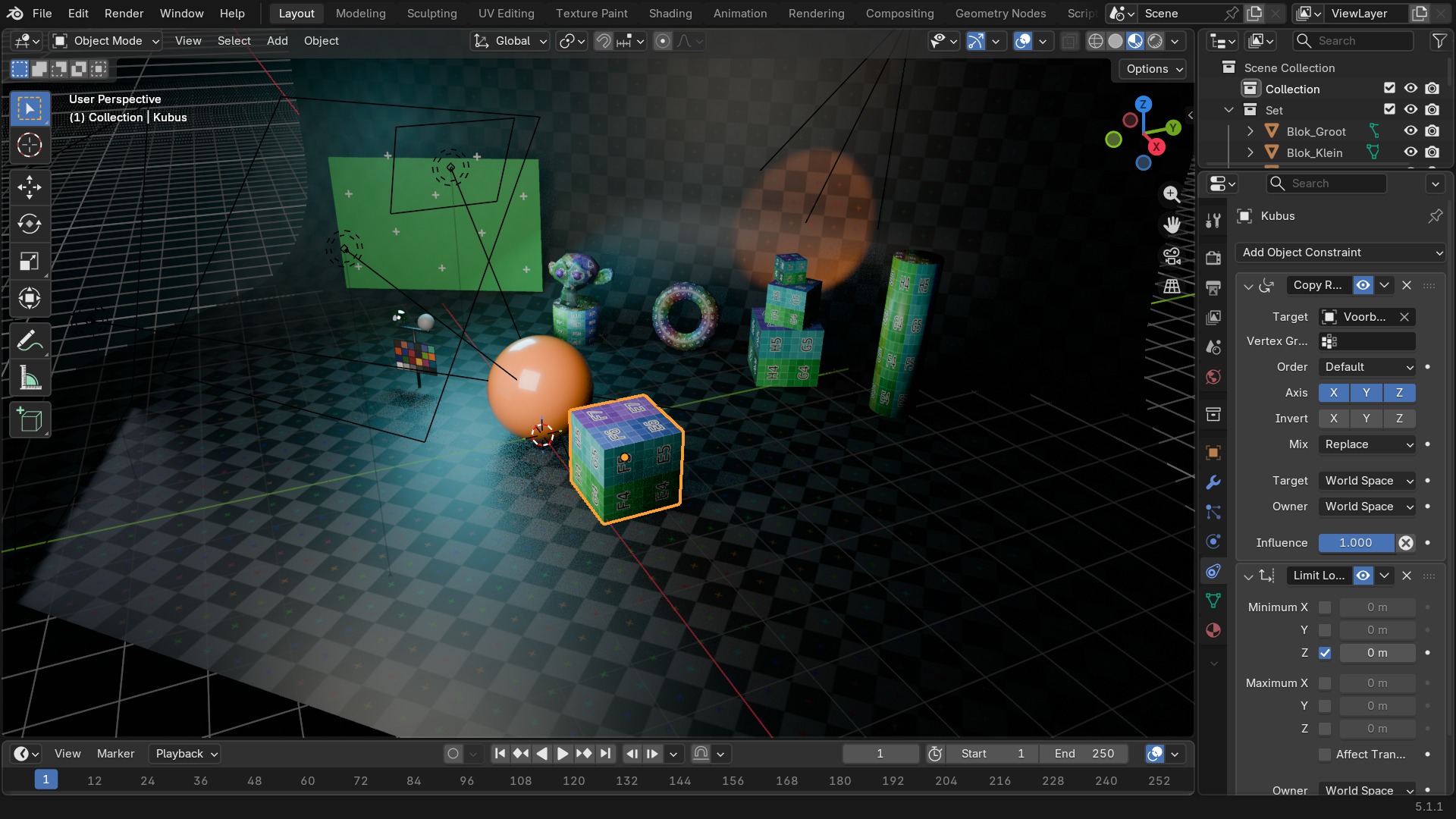
De Copy *-constraints (Location, Rotation, Scale, Transforms) halen hun waarde van een ander object — verplaats het doel, en het beperkte object volgt mee. De Limit *-constraints doen het tegenovergestelde: ze knijpen de eigen transform van het object binnen een minimum en maximum, zonder doel-object nodig te hebben. Beide types combineer je vaak: een rig-controller die de rotatie van een bot kopieert, maar met een Limit Rotation die voorkomt dat een elleboog de verkeerde kant op buigt.
Maintain Volume is een specialist: bij het uitrekken van een object langs één as, drukt deze constraint de andere twee assen automatisch samen zodat het volume ongeveer gelijk blijft — bruikbaar voor cartoony squash-and-stretch.
 RECBLENDER 5.1 · CONSTRAINT-COPYVSLIMIT00:00:00:001920×1080
Relationship — de constraints met een bijzondere band
Deze groep koppelt aan iets anders dan alleen transform-waarden: een actie, een armature, een pad, de vloer, of geometrie zelf.
| Instelling | Type | Standaard | Bereik | Wat hij doet (tooltip uit Blender) |
|---|---|---|---|---|
| Name | STRING | – | – | Constraint name |
| Type | ENUM | CAMERA_SOLVER | Camera Solver, Follow Track, Object Solver, Copy Location, Copy Rotation, Copy Scale, Copy Transforms, Limit Distance, Limit Location, Limit Rotation, Limit Scale, Maintain Volume, Transformation, Transform Cache, Clamp To, Damped Track, Inverse Kinematics, Locked Track, Spline IK, Stretch To, Track To, Action, Armature, Child Of, Floor, Follow Path, Geometry Attribute, Pivot, Shrinkwrap | |
| Override Constraint | BOOLEAN | aan | – | In a local override object, whether this constraint comes from the linked reference object, or is local to the override |
| Owner Space | ENUM | WORLD | World Space, Custom Space, Pose Space, Local With Parent, Local Space | Space that owner is evaluated in |
| Target Space | ENUM | WORLD | World Space, Custom Space, Pose Space, Local With Parent, Local Space, Local Space (Owner Orientation) | Space that target is evaluated in |
| Object | POINTER | – | – | Object for Custom Space |
| Sub-Target | STRING | – | – | Armature bone, mesh or lattice vertex group, ... |
| Disable | BOOLEAN | uit | – | Enable/Disable Constraint |
| Enabled | BOOLEAN | aan | – | Use the results of this constraint |
| Expanded | BOOLEAN | uit | – | Constraint's panel is expanded in UI |
| Valid | BOOLEAN | aan | – | Constraint has valid settings and can be evaluated |
| Active | BOOLEAN | uit | – | Constraint is the one being edited |
| Influence | FLOAT | 0 | 0 – 1 | Amount of influence constraint will have on the final solution |
| Lin error | FLOAT | 0 | -10000 – 10000 | Amount of residual error in Blender space unit for constraints that work on position |
| Rotation error | FLOAT | 0 | -10000 – 10000 | Amount of residual error in radians for constraints that work on orientation |
| Target | POINTER | – | – | Target object |
| Sub-Target | STRING | – | – | Armature bone, mesh or lattice vertex group, ... |
| Mix Mode | ENUM | AFTER_FULL | Replace, Before Original (Full), Before Original (Aligned), Before Original (Split Channels), After Original (Full), After Original (Aligned), After Original (Split Channels) | Specify how existing transformations and the action channels are combined |
| Transform Channel | ENUM | ROTATION_X | X Location, Y Location, Z Location, X Rotation, Y Rotation, Z Rotation, X Scale, Y Scale, Z Scale | Transformation channel from the target that is used to key the Action |
| Action | POINTER | – | – | The constraining action |
| Action Slot Handle | INT | 0 | -10000 – 10000 | A number that identifies which sub-set of the Action is considered to be for this Action Constraint |
| Last Action Slot Identifier | STRING | – | – | The identifier of the most recently assigned action slot. The slot identifies which sub-set of the Action is considered to be for this constraint, and its identifier is used to find the right slot when assigning an Action. |
| Action Slot | POINTER | – | – | The slot identifies which sub-set of the Action is considered to be for this strip, and its name is used to find the right slot when assigning another Action |
| Action Slots | COLLECTION | – | – | The list of action slots suitable for this NLA strip |
| Object Action | BOOLEAN | uit | – | Bones only: apply the object's transformation channels of the action to the constrained bone, instead of bone's channels |
| Start Frame | INT | 0 | -1048574 – 1048574 | First frame of the Action to use |
| End Frame | INT | 0 | -1048574 – 1048574 | Last frame of the Action to use |
| Maximum | FLOAT | 0 | -1000 – 1000 | Maximum value for target channel range |
| Minimum | FLOAT | 0 | -1000 – 1000 | Minimum value for target channel range |
| Evaluation Time | FLOAT | 0 | 0 – 1 | Interpolates between Action Start and End frames |
| Use Evaluation Time | BOOLEAN | uit | – | Interpolate between Action Start and End frames, with the Evaluation Time slider instead of the Target object/bone |
| Instelling | Type | Standaard | Bereik | Wat hij doet (tooltip uit Blender) |
|---|---|---|---|---|
| Name | STRING | – | – | Constraint name |
| Type | ENUM | CAMERA_SOLVER | Camera Solver, Follow Track, Object Solver, Copy Location, Copy Rotation, Copy Scale, Copy Transforms, Limit Distance, Limit Location, Limit Rotation, Limit Scale, Maintain Volume, Transformation, Transform Cache, Clamp To, Damped Track, Inverse Kinematics, Locked Track, Spline IK, Stretch To, Track To, Action, Armature, Child Of, Floor, Follow Path, Geometry Attribute, Pivot, Shrinkwrap | |
| Override Constraint | BOOLEAN | aan | – | In a local override object, whether this constraint comes from the linked reference object, or is local to the override |
| Owner Space | ENUM | WORLD | World Space, Custom Space, Pose Space, Local With Parent, Local Space | Space that owner is evaluated in |
| Target Space | ENUM | WORLD | World Space, Custom Space, Pose Space, Local With Parent, Local Space, Local Space (Owner Orientation) | Space that target is evaluated in |
| Object | POINTER | – | – | Object for Custom Space |
| Sub-Target | STRING | – | – | Armature bone, mesh or lattice vertex group, ... |
| Disable | BOOLEAN | uit | – | Enable/Disable Constraint |
| Enabled | BOOLEAN | aan | – | Use the results of this constraint |
| Expanded | BOOLEAN | uit | – | Constraint's panel is expanded in UI |
| Valid | BOOLEAN | aan | – | Constraint has valid settings and can be evaluated |
| Active | BOOLEAN | uit | – | Constraint is the one being edited |
| Influence | FLOAT | 0 | 0 – 1 | Amount of influence constraint will have on the final solution |
| Lin error | FLOAT | 0 | -10000 – 10000 | Amount of residual error in Blender space unit for constraints that work on position |
| Rotation error | FLOAT | 0 | -10000 – 10000 | Amount of residual error in radians for constraints that work on orientation |
| Targets | COLLECTION | – | – | Target Bones |
| Preserve Volume | BOOLEAN | uit | – | Deform rotation interpolation with quaternions |
| Use Envelopes | BOOLEAN | uit | – | Multiply weights by envelope for all bones, instead of acting like Vertex Group based blending. The specified weights are still used, and only the listed bones are considered. |
| Use Current Location | BOOLEAN | uit | – | Use the current bone location for envelopes and choosing B-Bone segments instead of rest position |
| Instelling | Type | Standaard | Bereik | Wat hij doet (tooltip uit Blender) |
|---|---|---|---|---|
| Name | STRING | – | – | Constraint name |
| Type | ENUM | CAMERA_SOLVER | Camera Solver, Follow Track, Object Solver, Copy Location, Copy Rotation, Copy Scale, Copy Transforms, Limit Distance, Limit Location, Limit Rotation, Limit Scale, Maintain Volume, Transformation, Transform Cache, Clamp To, Damped Track, Inverse Kinematics, Locked Track, Spline IK, Stretch To, Track To, Action, Armature, Child Of, Floor, Follow Path, Geometry Attribute, Pivot, Shrinkwrap | |
| Override Constraint | BOOLEAN | aan | – | In a local override object, whether this constraint comes from the linked reference object, or is local to the override |
| Owner Space | ENUM | WORLD | World Space, Custom Space, Pose Space, Local With Parent, Local Space | Space that owner is evaluated in |
| Target Space | ENUM | WORLD | World Space, Custom Space, Pose Space, Local With Parent, Local Space, Local Space (Owner Orientation) | Space that target is evaluated in |
| Object | POINTER | – | – | Object for Custom Space |
| Sub-Target | STRING | – | – | Armature bone, mesh or lattice vertex group, ... |
| Disable | BOOLEAN | uit | – | Enable/Disable Constraint |
| Enabled | BOOLEAN | aan | – | Use the results of this constraint |
| Expanded | BOOLEAN | uit | – | Constraint's panel is expanded in UI |
| Valid | BOOLEAN | aan | – | Constraint has valid settings and can be evaluated |
| Active | BOOLEAN | uit | – | Constraint is the one being edited |
| Influence | FLOAT | 0 | 0 – 1 | Amount of influence constraint will have on the final solution |
| Lin error | FLOAT | 0 | -10000 – 10000 | Amount of residual error in Blender space unit for constraints that work on position |
| Rotation error | FLOAT | 0 | -10000 – 10000 | Amount of residual error in radians for constraints that work on orientation |
| Target | POINTER | – | – | Target object |
| Sub-Target | STRING | – | – | Armature bone, mesh or lattice vertex group, ... |
| Location X | BOOLEAN | uit | – | Use X Location of Parent |
| Location Y | BOOLEAN | uit | – | Use Y Location of Parent |
| Location Z | BOOLEAN | uit | – | Use Z Location of Parent |
| Rotation X | BOOLEAN | uit | – | Use X Rotation of Parent |
| Rotation Y | BOOLEAN | uit | – | Use Y Rotation of Parent |
| Rotation Z | BOOLEAN | uit | – | Use Z Rotation of Parent |
| Scale X | BOOLEAN | uit | – | Use X Scale of Parent |
| Scale Y | BOOLEAN | uit | – | Use Y Scale of Parent |
| Scale Z | BOOLEAN | uit | – | Use Z Scale of Parent |
| Set Inverse Pending | BOOLEAN | uit | – | Set to true to request recalculation of the inverse matrix |
| Inverse Matrix | FLOAT | 0 | -10000 – 10000 | Transformation matrix to apply before |
| Instelling | Type | Standaard | Bereik | Wat hij doet (tooltip uit Blender) |
|---|---|---|---|---|
| Name | STRING | – | – | Constraint name |
| Type | ENUM | CAMERA_SOLVER | Camera Solver, Follow Track, Object Solver, Copy Location, Copy Rotation, Copy Scale, Copy Transforms, Limit Distance, Limit Location, Limit Rotation, Limit Scale, Maintain Volume, Transformation, Transform Cache, Clamp To, Damped Track, Inverse Kinematics, Locked Track, Spline IK, Stretch To, Track To, Action, Armature, Child Of, Floor, Follow Path, Geometry Attribute, Pivot, Shrinkwrap | |
| Override Constraint | BOOLEAN | aan | – | In a local override object, whether this constraint comes from the linked reference object, or is local to the override |
| Owner Space | ENUM | WORLD | World Space, Custom Space, Pose Space, Local With Parent, Local Space | Space that owner is evaluated in |
| Target Space | ENUM | WORLD | World Space, Custom Space, Pose Space, Local With Parent, Local Space, Local Space (Owner Orientation) | Space that target is evaluated in |
| Object | POINTER | – | – | Object for Custom Space |
| Sub-Target | STRING | – | – | Armature bone, mesh or lattice vertex group, ... |
| Disable | BOOLEAN | uit | – | Enable/Disable Constraint |
| Enabled | BOOLEAN | aan | – | Use the results of this constraint |
| Expanded | BOOLEAN | uit | – | Constraint's panel is expanded in UI |
| Valid | BOOLEAN | aan | – | Constraint has valid settings and can be evaluated |
| Active | BOOLEAN | uit | – | Constraint is the one being edited |
| Influence | FLOAT | 0 | 0 – 1 | Amount of influence constraint will have on the final solution |
| Lin error | FLOAT | 0 | -10000 – 10000 | Amount of residual error in Blender space unit for constraints that work on position |
| Rotation error | FLOAT | 0 | -10000 – 10000 | Amount of residual error in radians for constraints that work on orientation |
| Target | POINTER | – | – | Target object |
| Sub-Target | STRING | – | – | Armature bone, mesh or lattice vertex group, ... |
| Floor Location | ENUM | FLOOR_X | X, Y, Z, -X, -Y, -Z | Location of target that object will not pass through |
| Use Rotation | BOOLEAN | uit | – | Use the target's rotation to determine floor |
| Offset | FLOAT | 0 | -100 – 100 | Offset of floor from object origin |
| Instelling | Type | Standaard | Bereik | Wat hij doet (tooltip uit Blender) |
|---|---|---|---|---|
| Name | STRING | – | – | Constraint name |
| Type | ENUM | CAMERA_SOLVER | Camera Solver, Follow Track, Object Solver, Copy Location, Copy Rotation, Copy Scale, Copy Transforms, Limit Distance, Limit Location, Limit Rotation, Limit Scale, Maintain Volume, Transformation, Transform Cache, Clamp To, Damped Track, Inverse Kinematics, Locked Track, Spline IK, Stretch To, Track To, Action, Armature, Child Of, Floor, Follow Path, Geometry Attribute, Pivot, Shrinkwrap | |
| Override Constraint | BOOLEAN | aan | – | In a local override object, whether this constraint comes from the linked reference object, or is local to the override |
| Owner Space | ENUM | WORLD | World Space, Custom Space, Pose Space, Local With Parent, Local Space | Space that owner is evaluated in |
| Target Space | ENUM | WORLD | World Space, Custom Space, Pose Space, Local With Parent, Local Space, Local Space (Owner Orientation) | Space that target is evaluated in |
| Object | POINTER | – | – | Object for Custom Space |
| Sub-Target | STRING | – | – | Armature bone, mesh or lattice vertex group, ... |
| Disable | BOOLEAN | uit | – | Enable/Disable Constraint |
| Enabled | BOOLEAN | aan | – | Use the results of this constraint |
| Expanded | BOOLEAN | uit | – | Constraint's panel is expanded in UI |
| Valid | BOOLEAN | aan | – | Constraint has valid settings and can be evaluated |
| Active | BOOLEAN | uit | – | Constraint is the one being edited |
| Influence | FLOAT | 0 | 0 – 1 | Amount of influence constraint will have on the final solution |
| Lin error | FLOAT | 0 | -10000 – 10000 | Amount of residual error in Blender space unit for constraints that work on position |
| Rotation error | FLOAT | 0 | -10000 – 10000 | Amount of residual error in radians for constraints that work on orientation |
| Target | POINTER | – | – | Target Curve object |
| Offset | FLOAT | 0 | -1048574 – 1048574 | Offset from the position corresponding to the time frame |
| Offset Factor | FLOAT | 0 | 0 – 1 | Percentage value defining target position along length of curve |
| Forward Axis | ENUM | FORWARD_X | X, Y, Z, -X, -Y, -Z | Axis that points forward along the path |
| Up Axis | ENUM | UP_X | X, Y, Z | Axis that points upward |
| Follow Curve | BOOLEAN | uit | – | Object will follow the heading and banking of the curve |
| Fixed Position | BOOLEAN | uit | – | Object will stay locked to a single point somewhere along the length of the curve regardless of time |
| Curve Radius | BOOLEAN | uit | – | Object is scaled by the curve radius |
| Instelling | Type | Standaard | Bereik | Wat hij doet (tooltip uit Blender) |
|---|---|---|---|---|
| Name | STRING | – | – | Constraint name |
| Type | ENUM | CAMERA_SOLVER | Camera Solver, Follow Track, Object Solver, Copy Location, Copy Rotation, Copy Scale, Copy Transforms, Limit Distance, Limit Location, Limit Rotation, Limit Scale, Maintain Volume, Transformation, Transform Cache, Clamp To, Damped Track, Inverse Kinematics, Locked Track, Spline IK, Stretch To, Track To, Action, Armature, Child Of, Floor, Follow Path, Geometry Attribute, Pivot, Shrinkwrap | |
| Override Constraint | BOOLEAN | aan | – | In a local override object, whether this constraint comes from the linked reference object, or is local to the override |
| Owner Space | ENUM | WORLD | World Space, Custom Space, Pose Space, Local With Parent, Local Space | Space that owner is evaluated in |
| Target Space | ENUM | WORLD | World Space, Custom Space, Pose Space, Local With Parent, Local Space, Local Space (Owner Orientation) | Space that target is evaluated in |
| Object | POINTER | – | – | Object for Custom Space |
| Sub-Target | STRING | – | – | Armature bone, mesh or lattice vertex group, ... |
| Disable | BOOLEAN | uit | – | Enable/Disable Constraint |
| Enabled | BOOLEAN | aan | – | Use the results of this constraint |
| Expanded | BOOLEAN | uit | – | Constraint's panel is expanded in UI |
| Valid | BOOLEAN | aan | – | Constraint has valid settings and can be evaluated |
| Active | BOOLEAN | uit | – | Constraint is the one being edited |
| Influence | FLOAT | 0 | 0 – 1 | Amount of influence constraint will have on the final solution |
| Lin error | FLOAT | 0 | -10000 – 10000 | Amount of residual error in Blender space unit for constraints that work on position |
| Rotation error | FLOAT | 0 | -10000 – 10000 | Amount of residual error in radians for constraints that work on orientation |
| Target | POINTER | – | – | Target geometry object |
| Attribute Name | STRING | – | – | Name of the attribute to retrieve the transform from |
| Domain Type | ENUM | POINT | Point, Edge, Face, Face Corner, Spline, Instance | Attribute domain |
| Target Transform | BOOLEAN | uit | – | Apply the target object's world transform on top of the attribute's transform |
| Data Type | ENUM | VECTOR | Vector, Quaternion, 4x4 Matrix | Select data type of attribute |
| Sample Index | INT | 0 | 0 – onbegrensd | Sample Index |
| Mix Location | BOOLEAN | uit | – | Mix Location |
| Mix Rotation | BOOLEAN | uit | – | Mix Rotation |
| Mix Scale | BOOLEAN | uit | – | Mix Scale |
| Mix Mode | ENUM | REPLACE | Replace, Before Original (Full), Before Original (Split Channels), After Original (Full), After Original (Split Channels) | Specify how the copied and existing transformations are combined |
| Instelling | Type | Standaard | Bereik | Wat hij doet (tooltip uit Blender) |
|---|
| Instelling | Type | Standaard | Bereik | Wat hij doet (tooltip uit Blender) |
|---|---|---|---|---|
| Name | STRING | – | – | Constraint name |
| Type | ENUM | CAMERA_SOLVER | Camera Solver, Follow Track, Object Solver, Copy Location, Copy Rotation, Copy Scale, Copy Transforms, Limit Distance, Limit Location, Limit Rotation, Limit Scale, Maintain Volume, Transformation, Transform Cache, Clamp To, Damped Track, Inverse Kinematics, Locked Track, Spline IK, Stretch To, Track To, Action, Armature, Child Of, Floor, Follow Path, Geometry Attribute, Pivot, Shrinkwrap | |
| Override Constraint | BOOLEAN | aan | – | In a local override object, whether this constraint comes from the linked reference object, or is local to the override |
| Owner Space | ENUM | WORLD | World Space, Custom Space, Pose Space, Local With Parent, Local Space | Space that owner is evaluated in |
| Target Space | ENUM | WORLD | World Space, Custom Space, Pose Space, Local With Parent, Local Space, Local Space (Owner Orientation) | Space that target is evaluated in |
| Object | POINTER | – | – | Object for Custom Space |
| Sub-Target | STRING | – | – | Armature bone, mesh or lattice vertex group, ... |
| Disable | BOOLEAN | uit | – | Enable/Disable Constraint |
| Enabled | BOOLEAN | aan | – | Use the results of this constraint |
| Expanded | BOOLEAN | uit | – | Constraint's panel is expanded in UI |
| Valid | BOOLEAN | aan | – | Constraint has valid settings and can be evaluated |
| Active | BOOLEAN | uit | – | Constraint is the one being edited |
| Influence | FLOAT | 0 | 0 – 1 | Amount of influence constraint will have on the final solution |
| Lin error | FLOAT | 0 | -10000 – 10000 | Amount of residual error in Blender space unit for constraints that work on position |
| Rotation error | FLOAT | 0 | -10000 – 10000 | Amount of residual error in radians for constraints that work on orientation |
| Head/Tail | FLOAT | 0 | 0 – 1 | Target along length of bone: Head is 0, Tail is 1 |
| Follow B-Bone | BOOLEAN | uit | – | Follow shape of B-Bone segments when calculating Head/Tail position |
| Target | POINTER | – | – | Target Object, defining the position of the pivot when defined |
| Sub-Target | STRING | – | – | |
| Use Relative Offset | BOOLEAN | aan | – | Offset will be an absolute point in space instead of relative to the target |
| Offset | FLOAT | 0 | -10000 – 10000 | Offset of pivot from target (when set), or from owner's location (when Fixed Position is off), or the absolute pivot point |
| Enabled Rotation Range | ENUM | NX | Always, -X Rotation, -Y Rotation, -Z Rotation, X Rotation, Y Rotation, Z Rotation | Rotation range on which pivoting should occur |
| Instelling | Type | Standaard | Bereik | Wat hij doet (tooltip uit Blender) |
|---|---|---|---|---|
| Name | STRING | – | – | Constraint name |
| Type | ENUM | CAMERA_SOLVER | Camera Solver, Follow Track, Object Solver, Copy Location, Copy Rotation, Copy Scale, Copy Transforms, Limit Distance, Limit Location, Limit Rotation, Limit Scale, Maintain Volume, Transformation, Transform Cache, Clamp To, Damped Track, Inverse Kinematics, Locked Track, Spline IK, Stretch To, Track To, Action, Armature, Child Of, Floor, Follow Path, Geometry Attribute, Pivot, Shrinkwrap | |
| Override Constraint | BOOLEAN | aan | – | In a local override object, whether this constraint comes from the linked reference object, or is local to the override |
| Owner Space | ENUM | WORLD | World Space, Custom Space, Pose Space, Local With Parent, Local Space | Space that owner is evaluated in |
| Target Space | ENUM | WORLD | World Space, Custom Space, Pose Space, Local With Parent, Local Space, Local Space (Owner Orientation) | Space that target is evaluated in |
| Object | POINTER | – | – | Object for Custom Space |
| Sub-Target | STRING | – | – | Armature bone, mesh or lattice vertex group, ... |
| Disable | BOOLEAN | uit | – | Enable/Disable Constraint |
| Enabled | BOOLEAN | aan | – | Use the results of this constraint |
| Expanded | BOOLEAN | uit | – | Constraint's panel is expanded in UI |
| Valid | BOOLEAN | aan | – | Constraint has valid settings and can be evaluated |
| Active | BOOLEAN | uit | – | Constraint is the one being edited |
| Influence | FLOAT | 0 | 0 – 1 | Amount of influence constraint will have on the final solution |
| Lin error | FLOAT | 0 | -10000 – 10000 | Amount of residual error in Blender space unit for constraints that work on position |
| Rotation error | FLOAT | 0 | -10000 – 10000 | Amount of residual error in radians for constraints that work on orientation |
| Target | POINTER | – | – | Target Mesh object |
| Shrinkwrap Type | ENUM | NEAREST_SURFACE | Nearest Surface Point, Project, Nearest Vertex, Target Normal Project | Select type of shrinkwrap algorithm for target position |
| Snap Mode | ENUM | ON_SURFACE | On Surface, Inside, Outside, Outside Surface, Above Surface | Select how to constrain the object to the target surface |
| Distance | FLOAT | 0 | 0 – 100 | Distance to Target |
| Project Axis | ENUM | POS_X | +X, +Y, +Z, -X, -Y, -Z | Axis constrain to |
| Axis Space | ENUM | WORLD | World Space, Custom Space, Pose Space, Local With Parent, Local Space | Space for the projection axis |
| Project Distance | FLOAT | 0 | 0 – 100 | Limit the distance used for projection (zero disables) |
| Project Opposite | BOOLEAN | uit | – | Project in both specified and opposite directions |
| Face Cull | ENUM | OFF | Off, Front, Back | Stop vertices from projecting to a face on the target when facing towards/away |
| Invert Cull | BOOLEAN | uit | – | When projecting in the opposite direction invert the face cull mode |
| Align Axis To Normal | BOOLEAN | uit | – | Align the specified axis to the surface normal |
| Track Axis | ENUM | TRACK_X | X, Y, Z, -X, -Y, -Z | Axis that is aligned to the normal |
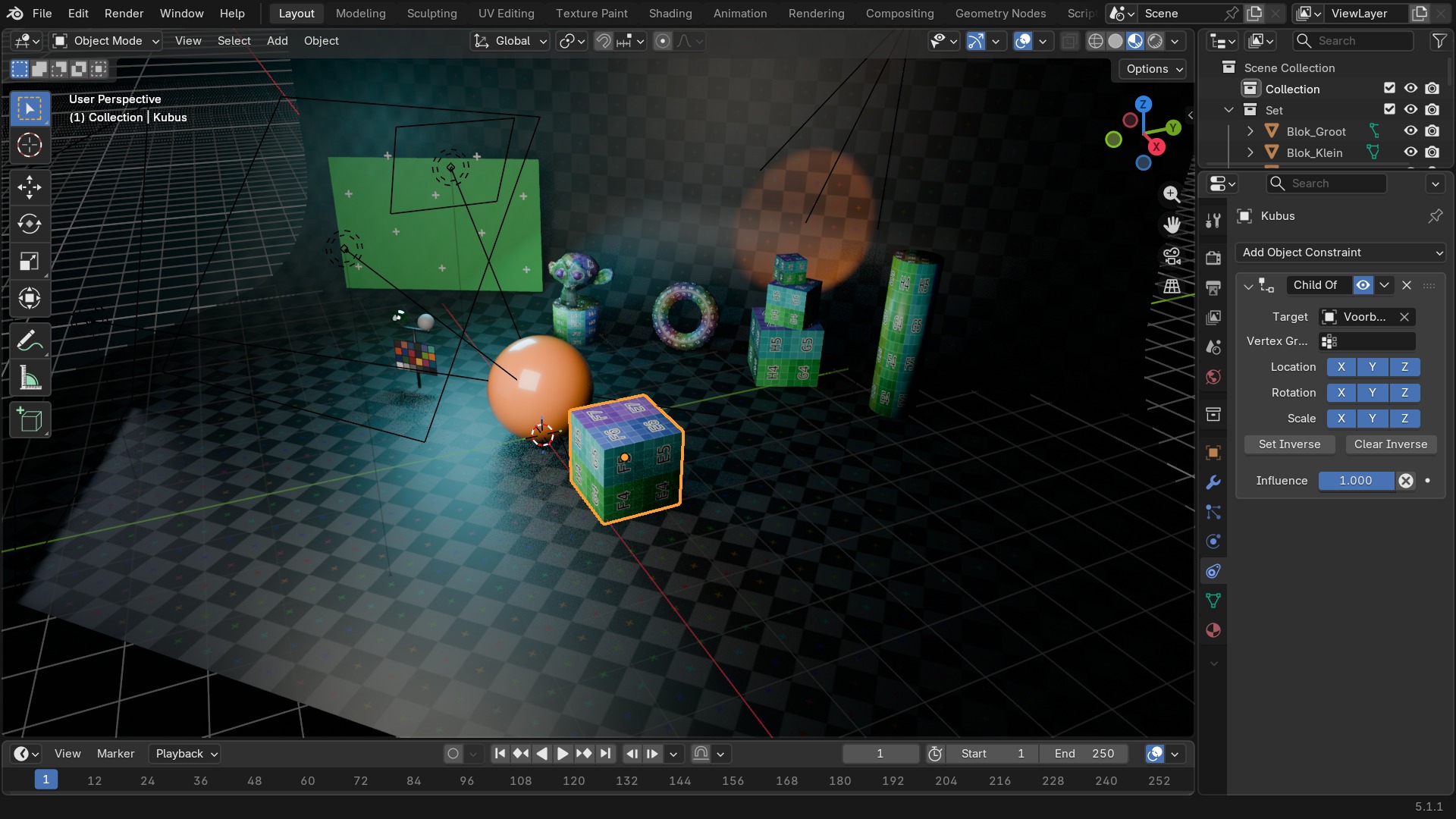
Child Of: de krachtigste, en de lastigste
Child Of doet ongeveer wat gewone parenting doet (Ctrl+P), maar dan als instelbare, uitschakelbare constraint: het object erft locatie, rotatie en schaal van het doel, met aparte aan/uit-schakelaars per as. Het venstelijke probleem is Set Inverse: zonder die knop springt het object naar de oorsprong van het doel op het moment dat je de constraint toevoegt. Set Inverse legt de huidige relatieve positie vast als nulpunt, zodat het object blijft staan waar het stond en pas beweegt zodra het doel beweegt.
Inverse Kinematics (IK) is de constraint achter elk IK-rig: in plaats van elk bot apart te roteren, sleep je een IK Target en berekent Blender terugwaarts hoe de hele keten (bepaald door Chain Length) moet buigen om dat doel te bereiken — onmisbaar voor benen en armen in character rigging (deel J).
 RECBLENDER 5.1 · CONSTRAINT-CHILDOF00:00:00:001920×1080
Zelf proberen: een oog dat een bal volgt
Laat een oogbol met Damped Track altijd naar een los, verplaatsbaar doel-object kijken.
- 1Open
blends/start_constraint_trackto.blend(een oogbol en een leeg Empty als doel). - 2Selecteer de oogbol, voeg een Damped Track-constraint toe.
- 3Zet Target op het Empty en Track Axis op de as die naar voren wijst (meestal -Z of Y, afhankelijk van hoe het oog gemodelleerd is).
- 4Verplaats het Empty door de scène en bevestig dat het oog blijft volgen.
- 5Zet Influence op 0.5 en zie hoe het oog nu maar half meedraait.