Hoofdstuk 92Alle object constraints
29 constraints in vier groepen, en wanneer je elk ervan pakt
Een Constraint (beperking) berekent, elk frame opnieuw, een aanpassing op de transform van een object of bot — bovenop wat keyframes of handmatige invoer al vastleggen. Blender telt er 29, exact dezelfde set voor objecten (Object Constraint Properties) en voor botten (Bone Constraint Properties, hoofdstuk 93), verdeeld over vier groepen: Motion Tracking, Transform, Tracking en Relationship. Dit hoofdstuk behandelt alle 29 met hun volledige instellingen uit Blender 5.1 (632 instellingen in totaal), gegroepeerd per soort, telkens met wanneer je die constraint pakt in plaats van een andere.
 RECCONCEPT00:00:00:00schoolium
Hoe de constraint-stapel werkt
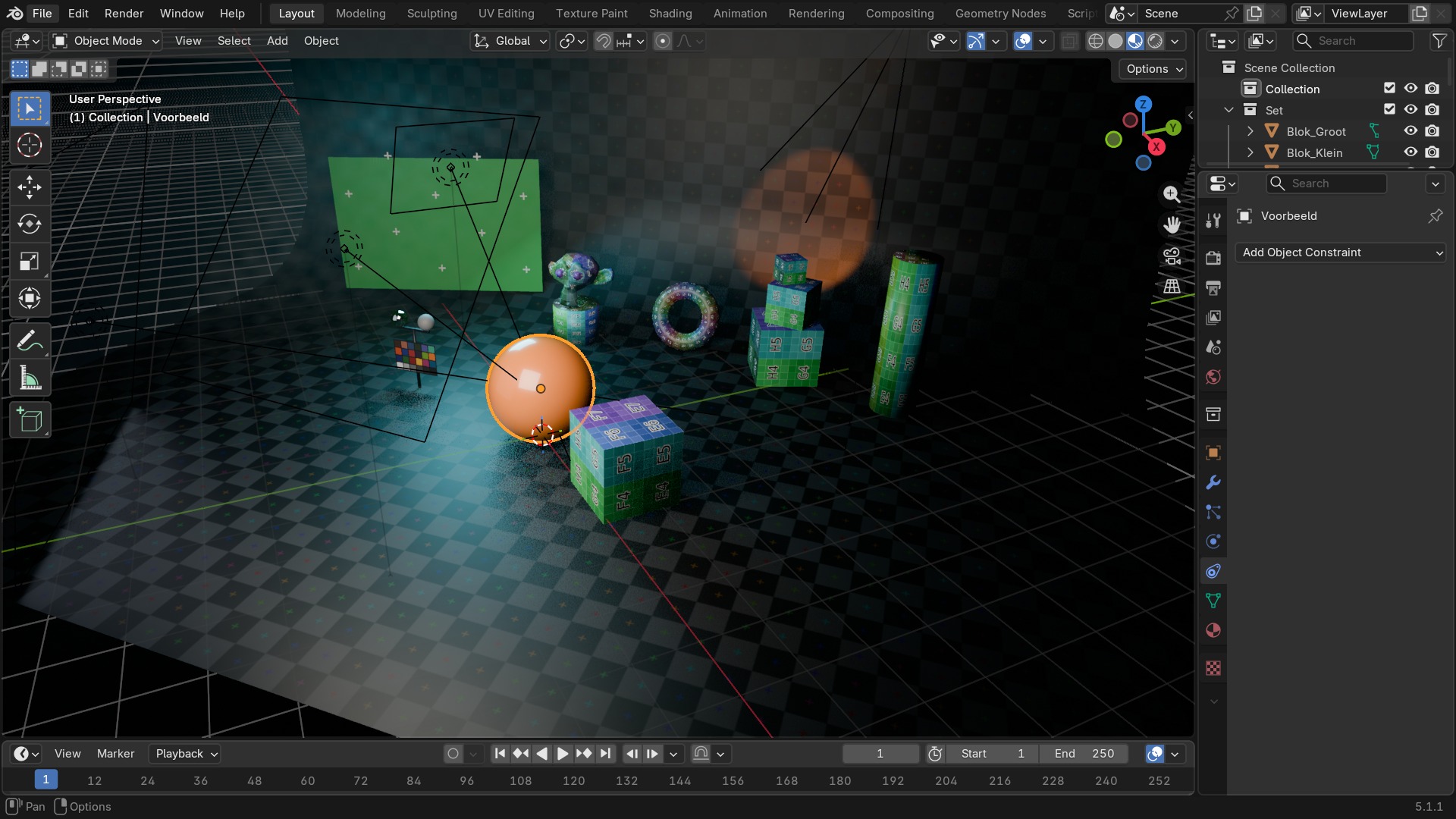
Constraints staan, net als modifiers, in een stapel die van boven naar beneden wordt doorgerekend: elke constraint werkt op het resultaat van de constraint erboven, niet op de oorspronkelijke transform. Influence (0 tot 1, zelf animeerbaar) regelt hoe sterk een constraint meetelt, en het oogje naast elke constraint zet 'm tijdelijk uit zonder 'm te verwijderen — handig om tijdens het posen te zien hoe een rig zich zonder een bepaalde beperking gedraagt.
Het verschil met parenting: een constraint kan losgekoppeld, herordend of qua sterkte gemengd worden zonder de objecthiërarchie te breken, en één object draagt vaak meerdere constraints die elkaar aanvullen — bv. een Copy Rotation gevolgd door een Limit Rotation die de uitkomst binnen een veilige hoek houdt.
 RECBLENDER 5.1 · PROP-CONSTRAINT00:00:00:001920×1080
Motion Tracking
Koppelen een object aan het resultaat van een cameratracking (deel K, hoofdstuk 106) — zonder een geslaagde tracking-solve hebben deze drie geen functie.
| Instelling | Type | Standaard | Bereik | Wat hij doet (tooltip uit Blender) |
|---|---|---|---|---|
| Name | STRING | – | – | Constraint name |
| Type | ENUM | CAMERA_SOLVER | Camera Solver, Follow Track, Object Solver, Copy Location, Copy Rotation, Copy Scale, Copy Transforms, Limit Distance, Limit Location, Limit Rotation, Limit Scale, Maintain Volume, Transformation, Transform Cache, Clamp To, Damped Track, Inverse Kinematics, Locked Track, Spline IK, Stretch To, Track To, Action, Armature, Child Of, Floor, Follow Path, Geometry Attribute, Pivot, Shrinkwrap | |
| Override Constraint | BOOLEAN | aan | – | In a local override object, whether this constraint comes from the linked reference object, or is local to the override |
| Owner Space | ENUM | WORLD | World Space, Custom Space, Pose Space, Local With Parent, Local Space | Space that owner is evaluated in |
| Target Space | ENUM | WORLD | World Space, Custom Space, Pose Space, Local With Parent, Local Space, Local Space (Owner Orientation) | Space that target is evaluated in |
| Object | POINTER | – | – | Object for Custom Space |
| Sub-Target | STRING | – | – | Armature bone, mesh or lattice vertex group, ... |
| Disable | BOOLEAN | uit | – | Enable/Disable Constraint |
| Enabled | BOOLEAN | aan | – | Use the results of this constraint |
| Expanded | BOOLEAN | uit | – | Constraint's panel is expanded in UI |
| Valid | BOOLEAN | aan | – | Constraint has valid settings and can be evaluated |
| Active | BOOLEAN | uit | – | Constraint is the one being edited |
| Influence | FLOAT | 0 | 0 – 1 | Amount of influence constraint will have on the final solution |
| Lin error | FLOAT | 0 | -10000 – 10000 | Amount of residual error in Blender space unit for constraints that work on position |
| Rotation error | FLOAT | 0 | -10000 – 10000 | Amount of residual error in radians for constraints that work on orientation |
| Movie Clip | POINTER | – | – | Movie Clip to get tracking data from |
| Active Clip | BOOLEAN | uit | – | Use active clip defined in scene |
| Instelling | Type | Standaard | Bereik | Wat hij doet (tooltip uit Blender) |
|---|---|---|---|---|
| Name | STRING | – | – | Constraint name |
| Type | ENUM | CAMERA_SOLVER | Camera Solver, Follow Track, Object Solver, Copy Location, Copy Rotation, Copy Scale, Copy Transforms, Limit Distance, Limit Location, Limit Rotation, Limit Scale, Maintain Volume, Transformation, Transform Cache, Clamp To, Damped Track, Inverse Kinematics, Locked Track, Spline IK, Stretch To, Track To, Action, Armature, Child Of, Floor, Follow Path, Geometry Attribute, Pivot, Shrinkwrap | |
| Override Constraint | BOOLEAN | aan | – | In a local override object, whether this constraint comes from the linked reference object, or is local to the override |
| Owner Space | ENUM | WORLD | World Space, Custom Space, Pose Space, Local With Parent, Local Space | Space that owner is evaluated in |
| Target Space | ENUM | WORLD | World Space, Custom Space, Pose Space, Local With Parent, Local Space, Local Space (Owner Orientation) | Space that target is evaluated in |
| Object | POINTER | – | – | Object for Custom Space |
| Sub-Target | STRING | – | – | Armature bone, mesh or lattice vertex group, ... |
| Disable | BOOLEAN | uit | – | Enable/Disable Constraint |
| Enabled | BOOLEAN | aan | – | Use the results of this constraint |
| Expanded | BOOLEAN | uit | – | Constraint's panel is expanded in UI |
| Valid | BOOLEAN | aan | – | Constraint has valid settings and can be evaluated |
| Active | BOOLEAN | uit | – | Constraint is the one being edited |
| Influence | FLOAT | 0 | 0 – 1 | Amount of influence constraint will have on the final solution |
| Lin error | FLOAT | 0 | -10000 – 10000 | Amount of residual error in Blender space unit for constraints that work on position |
| Rotation error | FLOAT | 0 | -10000 – 10000 | Amount of residual error in radians for constraints that work on orientation |
| Movie Clip | POINTER | – | – | Movie Clip to get tracking data from |
| Track | STRING | – | – | Movie tracking track to follow |
| Active Clip | BOOLEAN | uit | – | Use active clip defined in scene |
| 3D Position | BOOLEAN | uit | – | Use 3D position of track to parent to |
| Object | STRING | – | – | Movie tracking object to follow (if empty, camera object is used) |
| Camera | POINTER | – | – | Camera to which motion is parented (if empty active scene camera is used) |
| Depth Object | POINTER | – | – | Object used to define depth in camera space by projecting onto surface of this object |
| Frame Method | ENUM | STRETCH | Stretch, Fit, Crop | How the footage fits in the camera frame |
| Undistort | BOOLEAN | uit | – | Parent to undistorted position of 2D track |
| Instelling | Type | Standaard | Bereik | Wat hij doet (tooltip uit Blender) |
|---|---|---|---|---|
| Name | STRING | – | – | Constraint name |
| Type | ENUM | CAMERA_SOLVER | Camera Solver, Follow Track, Object Solver, Copy Location, Copy Rotation, Copy Scale, Copy Transforms, Limit Distance, Limit Location, Limit Rotation, Limit Scale, Maintain Volume, Transformation, Transform Cache, Clamp To, Damped Track, Inverse Kinematics, Locked Track, Spline IK, Stretch To, Track To, Action, Armature, Child Of, Floor, Follow Path, Geometry Attribute, Pivot, Shrinkwrap | |
| Override Constraint | BOOLEAN | aan | – | In a local override object, whether this constraint comes from the linked reference object, or is local to the override |
| Owner Space | ENUM | WORLD | World Space, Custom Space, Pose Space, Local With Parent, Local Space | Space that owner is evaluated in |
| Target Space | ENUM | WORLD | World Space, Custom Space, Pose Space, Local With Parent, Local Space, Local Space (Owner Orientation) | Space that target is evaluated in |
| Object | POINTER | – | – | Object for Custom Space |
| Sub-Target | STRING | – | – | Armature bone, mesh or lattice vertex group, ... |
| Disable | BOOLEAN | uit | – | Enable/Disable Constraint |
| Enabled | BOOLEAN | aan | – | Use the results of this constraint |
| Expanded | BOOLEAN | uit | – | Constraint's panel is expanded in UI |
| Valid | BOOLEAN | aan | – | Constraint has valid settings and can be evaluated |
| Active | BOOLEAN | uit | – | Constraint is the one being edited |
| Influence | FLOAT | 0 | 0 – 1 | Amount of influence constraint will have on the final solution |
| Lin error | FLOAT | 0 | -10000 – 10000 | Amount of residual error in Blender space unit for constraints that work on position |
| Rotation error | FLOAT | 0 | -10000 – 10000 | Amount of residual error in radians for constraints that work on orientation |
| Movie Clip | POINTER | – | – | Movie Clip to get tracking data from |
| Active Clip | BOOLEAN | uit | – | Use active clip defined in scene |
| Set Inverse Pending | BOOLEAN | uit | – | Set to true to request recalculation of the inverse matrix |
| Object | STRING | – | – | Movie tracking object to follow |
| Camera | POINTER | – | – | Camera to which motion is parented (if empty active scene camera is used) |
De drie Motion Tracking-constraints onderling
Camera Solver past de hele scene-camera aan op de opgeloste cameratracking — je zet 'm precies één keer, op het camera-object. Object Solver doet hetzelfde voor een los object dat een getrackt punt in de scène moet volgen (bv. een 3D-object dat op een tafel in beeldmateriaal lijkt te staan). Follow Track volgt één specifiek 2D-trackpunt, geprojecteerd in de 3D-scène vanaf de camera — de juiste keuze om bv. een logo op een bewegend vlak te plakken.
 RECBLENDER 5.1 · CONSTRAINT-TRACKING00:00:00:001920×1080
Tracking — een object naar een ander laten wijzen
Alle drie laten een object naar een doel 'kijken', met een andere manier om de rest van de rotatie in te vullen.
| Instelling | Type | Standaard | Bereik | Wat hij doet (tooltip uit Blender) |
|---|---|---|---|---|
| Name | STRING | – | – | Constraint name |
| Type | ENUM | CAMERA_SOLVER | Camera Solver, Follow Track, Object Solver, Copy Location, Copy Rotation, Copy Scale, Copy Transforms, Limit Distance, Limit Location, Limit Rotation, Limit Scale, Maintain Volume, Transformation, Transform Cache, Clamp To, Damped Track, Inverse Kinematics, Locked Track, Spline IK, Stretch To, Track To, Action, Armature, Child Of, Floor, Follow Path, Geometry Attribute, Pivot, Shrinkwrap | |
| Override Constraint | BOOLEAN | aan | – | In a local override object, whether this constraint comes from the linked reference object, or is local to the override |
| Owner Space | ENUM | WORLD | World Space, Custom Space, Pose Space, Local With Parent, Local Space | Space that owner is evaluated in |
| Target Space | ENUM | WORLD | World Space, Custom Space, Pose Space, Local With Parent, Local Space, Local Space (Owner Orientation) | Space that target is evaluated in |
| Object | POINTER | – | – | Object for Custom Space |
| Sub-Target | STRING | – | – | Armature bone, mesh or lattice vertex group, ... |
| Disable | BOOLEAN | uit | – | Enable/Disable Constraint |
| Enabled | BOOLEAN | aan | – | Use the results of this constraint |
| Expanded | BOOLEAN | uit | – | Constraint's panel is expanded in UI |
| Valid | BOOLEAN | aan | – | Constraint has valid settings and can be evaluated |
| Active | BOOLEAN | uit | – | Constraint is the one being edited |
| Influence | FLOAT | 0 | 0 – 1 | Amount of influence constraint will have on the final solution |
| Lin error | FLOAT | 0 | -10000 – 10000 | Amount of residual error in Blender space unit for constraints that work on position |
| Rotation error | FLOAT | 0 | -10000 – 10000 | Amount of residual error in radians for constraints that work on orientation |
| Target | POINTER | – | – | Target Object (Curves only) |
| Main Axis | ENUM | CLAMPTO_AUTO | Auto, X, Y, Z | Main axis of movement |
| Cyclic | BOOLEAN | uit | – | Treat curve as cyclic curve (no clamping to curve bounding box) |
| Instelling | Type | Standaard | Bereik | Wat hij doet (tooltip uit Blender) |
|---|---|---|---|---|
| Name | STRING | – | – | Constraint name |
| Type | ENUM | CAMERA_SOLVER | Camera Solver, Follow Track, Object Solver, Copy Location, Copy Rotation, Copy Scale, Copy Transforms, Limit Distance, Limit Location, Limit Rotation, Limit Scale, Maintain Volume, Transformation, Transform Cache, Clamp To, Damped Track, Inverse Kinematics, Locked Track, Spline IK, Stretch To, Track To, Action, Armature, Child Of, Floor, Follow Path, Geometry Attribute, Pivot, Shrinkwrap | |
| Override Constraint | BOOLEAN | aan | – | In a local override object, whether this constraint comes from the linked reference object, or is local to the override |
| Owner Space | ENUM | WORLD | World Space, Custom Space, Pose Space, Local With Parent, Local Space | Space that owner is evaluated in |
| Target Space | ENUM | WORLD | World Space, Custom Space, Pose Space, Local With Parent, Local Space, Local Space (Owner Orientation) | Space that target is evaluated in |
| Object | POINTER | – | – | Object for Custom Space |
| Sub-Target | STRING | – | – | Armature bone, mesh or lattice vertex group, ... |
| Disable | BOOLEAN | uit | – | Enable/Disable Constraint |
| Enabled | BOOLEAN | aan | – | Use the results of this constraint |
| Expanded | BOOLEAN | uit | – | Constraint's panel is expanded in UI |
| Valid | BOOLEAN | aan | – | Constraint has valid settings and can be evaluated |
| Active | BOOLEAN | uit | – | Constraint is the one being edited |
| Influence | FLOAT | 0 | 0 – 1 | Amount of influence constraint will have on the final solution |
| Lin error | FLOAT | 0 | -10000 – 10000 | Amount of residual error in Blender space unit for constraints that work on position |
| Rotation error | FLOAT | 0 | -10000 – 10000 | Amount of residual error in radians for constraints that work on orientation |
| Head/Tail | FLOAT | 0 | 0 – 1 | Target along length of bone: Head is 0, Tail is 1 |
| Follow B-Bone | BOOLEAN | uit | – | Follow shape of B-Bone segments when calculating Head/Tail position |
| Target | POINTER | – | – | Target object |
| Sub-Target | STRING | – | – | Armature bone, mesh or lattice vertex group, ... |
| Track Axis | ENUM | TRACK_X | X, Y, Z, -X, -Y, -Z | Axis that points to the target object |
| Instelling | Type | Standaard | Bereik | Wat hij doet (tooltip uit Blender) |
|---|---|---|---|---|
| Name | STRING | – | – | Constraint name |
| Type | ENUM | CAMERA_SOLVER | Camera Solver, Follow Track, Object Solver, Copy Location, Copy Rotation, Copy Scale, Copy Transforms, Limit Distance, Limit Location, Limit Rotation, Limit Scale, Maintain Volume, Transformation, Transform Cache, Clamp To, Damped Track, Inverse Kinematics, Locked Track, Spline IK, Stretch To, Track To, Action, Armature, Child Of, Floor, Follow Path, Geometry Attribute, Pivot, Shrinkwrap | |
| Override Constraint | BOOLEAN | aan | – | In a local override object, whether this constraint comes from the linked reference object, or is local to the override |
| Owner Space | ENUM | WORLD | World Space, Custom Space, Pose Space, Local With Parent, Local Space | Space that owner is evaluated in |
| Target Space | ENUM | WORLD | World Space, Custom Space, Pose Space, Local With Parent, Local Space, Local Space (Owner Orientation) | Space that target is evaluated in |
| Object | POINTER | – | – | Object for Custom Space |
| Sub-Target | STRING | – | – | Armature bone, mesh or lattice vertex group, ... |
| Disable | BOOLEAN | uit | – | Enable/Disable Constraint |
| Enabled | BOOLEAN | aan | – | Use the results of this constraint |
| Expanded | BOOLEAN | uit | – | Constraint's panel is expanded in UI |
| Valid | BOOLEAN | aan | – | Constraint has valid settings and can be evaluated |
| Active | BOOLEAN | uit | – | Constraint is the one being edited |
| Influence | FLOAT | 0 | 0 – 1 | Amount of influence constraint will have on the final solution |
| Lin error | FLOAT | 0 | -10000 – 10000 | Amount of residual error in Blender space unit for constraints that work on position |
| Rotation error | FLOAT | 0 | -10000 – 10000 | Amount of residual error in radians for constraints that work on orientation |
| Head/Tail | FLOAT | 0 | 0 – 1 | Target along length of bone: Head is 0, Tail is 1 |
| Follow B-Bone | BOOLEAN | uit | – | Follow shape of B-Bone segments when calculating Head/Tail position |
| Target | POINTER | – | – | Target object |
| Sub-Target | STRING | – | – | Armature bone, mesh or lattice vertex group, ... |
| Track Axis | ENUM | TRACK_X | X, Y, Z, -X, -Y, -Z | Axis that points to the target object |
| Locked Axis | ENUM | LOCK_X | X, Y, Z | Axis that points upward |
Track To, Damped Track, Locked Track en Clamp To
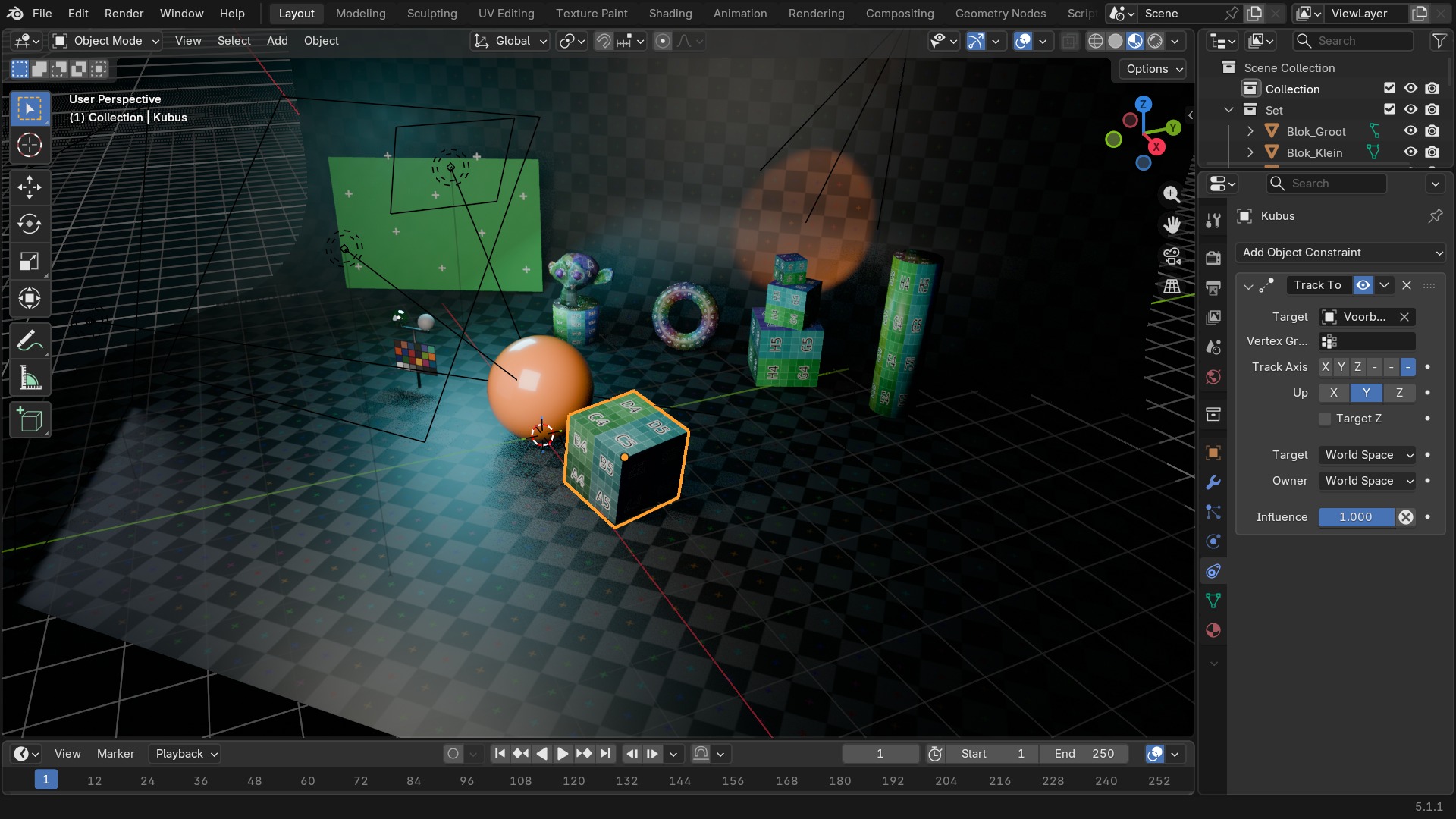
Track To is de klassieke variant, met een expliciete Up-as die bij bepaalde hoeken kan flippen (een gimbal-achtig probleem). Damped Track roteert zo min mogelijk om het doel te volgen, zonder aparte Up-as — meestal de stabielste keuze voor een camera of geschutskoepel die vloeiend moet meedraaien. Locked Track houdt één as volledig vast (het object blijft bv. rechtop) terwijl een andere as naar het doel wijst. Clamp To is een buitenbeentje in deze groep: het klemt de positie (niet de rotatie) van een object vast op een curve, op basis van de dichtstbijzijnde locatie — voor een object dat over een vast pad moet 'glijden' zonder los van de curve te komen.
RECBLENDER 5.1 · CONSTRAINT-TRACKING00:00:00:001920×1080Tracking (vervolg): Spline IK en Stretch To
| Instelling | Type | Standaard | Bereik | Wat hij doet (tooltip uit Blender) |
|---|---|---|---|---|
| Name | STRING | – | – | Constraint name |
| Type | ENUM | CAMERA_SOLVER | Camera Solver, Follow Track, Object Solver, Copy Location, Copy Rotation, Copy Scale, Copy Transforms, Limit Distance, Limit Location, Limit Rotation, Limit Scale, Maintain Volume, Transformation, Transform Cache, Clamp To, Damped Track, Inverse Kinematics, Locked Track, Spline IK, Stretch To, Track To, Action, Armature, Child Of, Floor, Follow Path, Geometry Attribute, Pivot, Shrinkwrap | |
| Override Constraint | BOOLEAN | aan | – | In a local override object, whether this constraint comes from the linked reference object, or is local to the override |
| Owner Space | ENUM | WORLD | World Space, Custom Space, Pose Space, Local With Parent, Local Space | Space that owner is evaluated in |
| Target Space | ENUM | WORLD | World Space, Custom Space, Pose Space, Local With Parent, Local Space, Local Space (Owner Orientation) | Space that target is evaluated in |
| Object | POINTER | – | – | Object for Custom Space |
| Sub-Target | STRING | – | – | Armature bone, mesh or lattice vertex group, ... |
| Disable | BOOLEAN | uit | – | Enable/Disable Constraint |
| Enabled | BOOLEAN | aan | – | Use the results of this constraint |
| Expanded | BOOLEAN | uit | – | Constraint's panel is expanded in UI |
| Valid | BOOLEAN | aan | – | Constraint has valid settings and can be evaluated |
| Active | BOOLEAN | uit | – | Constraint is the one being edited |
| Influence | FLOAT | 0 | 0 – 1 | Amount of influence constraint will have on the final solution |
| Lin error | FLOAT | 0 | -10000 – 10000 | Amount of residual error in Blender space unit for constraints that work on position |
| Rotation error | FLOAT | 0 | -10000 – 10000 | Amount of residual error in radians for constraints that work on orientation |
| Target | POINTER | – | – | Curve that controls this relationship |
| Chain Length | INT | 0 | 1 – 255 | How many bones are included in the chain |
| Joint Bindings | FLOAT | 0 | 0 – 1 | (EXPERIENCED USERS ONLY) The relative positions of the joints along the chain, as percentages |
| Chain Offset | BOOLEAN | uit | – | Offset the entire chain relative to the root joint |
| Even Divisions | BOOLEAN | uit | – | Ignore the relative lengths of the bones when fitting to the curve |
| Use Curve Radius | BOOLEAN | aan | – | Average radius of the endpoints is used to tweak the X and Z Scaling of the bones, on top of XZ Scale mode |
| XZ Scale Mode | ENUM | NONE | None, Bone Original, Inverse Scale, Volume Preservation | Method used for determining the scaling of the X and Z axes of the bones |
| Y Scale Mode | ENUM | NONE | None, Fit Curve, Bone Original | Method used for determining the scaling of the Y axis of the bones, on top of the shape and scaling of the curve itself |
| Use Original Scale | BOOLEAN | uit | – | Apply volume preservation over the original scaling |
| Volume Variation | FLOAT | 0 | 0 – 100 | Factor between volume variation and stretching |
| Use Volume Variation Minimum | BOOLEAN | uit | – | Use lower limit for volume variation |
| Use Volume Variation Maximum | BOOLEAN | uit | – | Use upper limit for volume variation |
| Volume Variation Minimum | FLOAT | 0 | 0 – 1 | Minimum volume stretching factor |
| Volume Variation Maximum | FLOAT | 0 | 1 – 100 | Maximum volume stretching factor |
| Volume Variation Smoothness | FLOAT | 0 | 0 – 1 | Strength of volume stretching clamping |
| Instelling | Type | Standaard | Bereik | Wat hij doet (tooltip uit Blender) |
|---|---|---|---|---|
| Name | STRING | – | – | Constraint name |
| Type | ENUM | CAMERA_SOLVER | Camera Solver, Follow Track, Object Solver, Copy Location, Copy Rotation, Copy Scale, Copy Transforms, Limit Distance, Limit Location, Limit Rotation, Limit Scale, Maintain Volume, Transformation, Transform Cache, Clamp To, Damped Track, Inverse Kinematics, Locked Track, Spline IK, Stretch To, Track To, Action, Armature, Child Of, Floor, Follow Path, Geometry Attribute, Pivot, Shrinkwrap | |
| Override Constraint | BOOLEAN | aan | – | In a local override object, whether this constraint comes from the linked reference object, or is local to the override |
| Owner Space | ENUM | WORLD | World Space, Custom Space, Pose Space, Local With Parent, Local Space | Space that owner is evaluated in |
| Target Space | ENUM | WORLD | World Space, Custom Space, Pose Space, Local With Parent, Local Space, Local Space (Owner Orientation) | Space that target is evaluated in |
| Object | POINTER | – | – | Object for Custom Space |
| Sub-Target | STRING | – | – | Armature bone, mesh or lattice vertex group, ... |
| Disable | BOOLEAN | uit | – | Enable/Disable Constraint |
| Enabled | BOOLEAN | aan | – | Use the results of this constraint |
| Expanded | BOOLEAN | uit | – | Constraint's panel is expanded in UI |
| Valid | BOOLEAN | aan | – | Constraint has valid settings and can be evaluated |
| Active | BOOLEAN | uit | – | Constraint is the one being edited |
| Influence | FLOAT | 0 | 0 – 1 | Amount of influence constraint will have on the final solution |
| Lin error | FLOAT | 0 | -10000 – 10000 | Amount of residual error in Blender space unit for constraints that work on position |
| Rotation error | FLOAT | 0 | -10000 – 10000 | Amount of residual error in radians for constraints that work on orientation |
| Head/Tail | FLOAT | 0 | 0 – 1 | Target along length of bone: Head is 0, Tail is 1 |
| Follow B-Bone | BOOLEAN | uit | – | Follow shape of B-Bone segments when calculating Head/Tail position |
| Target | POINTER | – | – | Target object |
| Sub-Target | STRING | – | – | Armature bone, mesh or lattice vertex group, ... |
| Maintain Volume | ENUM | VOLUME_XZX | XZ, X, Z, None | Maintain the object's volume as it stretches |
| Keep Axis | ENUM | PLANE_X | XZ, ZX, Swing | The rotation type and axis order to use |
| Original Length | FLOAT | 0 | 0 – 100 | Length at rest position |
| Volume Variation | FLOAT | 0 | 0 – 100 | Factor between volume variation and stretching |
| Use Volume Variation Minimum | BOOLEAN | uit | – | Use lower limit for volume variation |
| Use Volume Variation Maximum | BOOLEAN | uit | – | Use upper limit for volume variation |
| Volume Variation Minimum | FLOAT | 0 | 0 – 1 | Minimum volume stretching factor |
| Volume Variation Maximum | FLOAT | 0 | 1 – 100 | Maximum volume stretching factor |
| Volume Variation Smoothness | FLOAT | 0 | 0 – 1 | Strength of volume stretching clamping |
| Instelling | Type | Standaard | Bereik | Wat hij doet (tooltip uit Blender) |
|---|---|---|---|---|
| Name | STRING | – | – | Constraint name |
| Type | ENUM | CAMERA_SOLVER | Camera Solver, Follow Track, Object Solver, Copy Location, Copy Rotation, Copy Scale, Copy Transforms, Limit Distance, Limit Location, Limit Rotation, Limit Scale, Maintain Volume, Transformation, Transform Cache, Clamp To, Damped Track, Inverse Kinematics, Locked Track, Spline IK, Stretch To, Track To, Action, Armature, Child Of, Floor, Follow Path, Geometry Attribute, Pivot, Shrinkwrap | |
| Override Constraint | BOOLEAN | aan | – | In a local override object, whether this constraint comes from the linked reference object, or is local to the override |
| Owner Space | ENUM | WORLD | World Space, Custom Space, Pose Space, Local With Parent, Local Space | Space that owner is evaluated in |
| Target Space | ENUM | WORLD | World Space, Custom Space, Pose Space, Local With Parent, Local Space, Local Space (Owner Orientation) | Space that target is evaluated in |
| Object | POINTER | – | – | Object for Custom Space |
| Sub-Target | STRING | – | – | Armature bone, mesh or lattice vertex group, ... |
| Disable | BOOLEAN | uit | – | Enable/Disable Constraint |
| Enabled | BOOLEAN | aan | – | Use the results of this constraint |
| Expanded | BOOLEAN | uit | – | Constraint's panel is expanded in UI |
| Valid | BOOLEAN | aan | – | Constraint has valid settings and can be evaluated |
| Active | BOOLEAN | uit | – | Constraint is the one being edited |
| Influence | FLOAT | 0 | 0 – 1 | Amount of influence constraint will have on the final solution |
| Lin error | FLOAT | 0 | -10000 – 10000 | Amount of residual error in Blender space unit for constraints that work on position |
| Rotation error | FLOAT | 0 | -10000 – 10000 | Amount of residual error in radians for constraints that work on orientation |
| Head/Tail | FLOAT | 0 | 0 – 1 | Target along length of bone: Head is 0, Tail is 1 |
| Follow B-Bone | BOOLEAN | uit | – | Follow shape of B-Bone segments when calculating Head/Tail position |
| Target | POINTER | – | – | Target object |
| Sub-Target | STRING | – | – | Armature bone, mesh or lattice vertex group, ... |
| Track Axis | ENUM | TRACK_X | X, Y, Z, -X, -Y, -Z | Axis that points to the target object |
| Up Axis | ENUM | UP_X | X, Y, Z | Axis that points upward |
| Target Z | BOOLEAN | uit | – | Target's Z axis, not World Z axis, will constrain the Up direction |
Spline IK: een botketting die een curve volgt
Spline IK is geen constraint voor een los object, maar voor een keten botten (hoofdstuk 93): de botten buigen mee met de vorm van een curve-object, met instellingen voor hoeveel botten meedoen (Chain Length) en hoe de dikte langs de keten verandert (XZ Scale Mode). De klassieke toepassing is een staart, tentakel of slang: de animator vervormt de curve met een paar controlepunten, en de hele botketen volgt automatisch mee — sneller dan elk bot apart met de hand poseren.
 RECRENDER · EEVEE00:00:00:001280×720
Transform, deel 1 — Copy
Halen hun waarde rechtstreeks van een doel-object: verplaats het doel, en het beperkte object volgt mee.
| Instelling | Type | Standaard | Bereik | Wat hij doet (tooltip uit Blender) |
|---|---|---|---|---|
| Name | STRING | – | – | Constraint name |
| Type | ENUM | CAMERA_SOLVER | Camera Solver, Follow Track, Object Solver, Copy Location, Copy Rotation, Copy Scale, Copy Transforms, Limit Distance, Limit Location, Limit Rotation, Limit Scale, Maintain Volume, Transformation, Transform Cache, Clamp To, Damped Track, Inverse Kinematics, Locked Track, Spline IK, Stretch To, Track To, Action, Armature, Child Of, Floor, Follow Path, Geometry Attribute, Pivot, Shrinkwrap | |
| Override Constraint | BOOLEAN | aan | – | In a local override object, whether this constraint comes from the linked reference object, or is local to the override |
| Owner Space | ENUM | WORLD | World Space, Custom Space, Pose Space, Local With Parent, Local Space | Space that owner is evaluated in |
| Target Space | ENUM | WORLD | World Space, Custom Space, Pose Space, Local With Parent, Local Space, Local Space (Owner Orientation) | Space that target is evaluated in |
| Object | POINTER | – | – | Object for Custom Space |
| Sub-Target | STRING | – | – | Armature bone, mesh or lattice vertex group, ... |
| Disable | BOOLEAN | uit | – | Enable/Disable Constraint |
| Enabled | BOOLEAN | aan | – | Use the results of this constraint |
| Expanded | BOOLEAN | uit | – | Constraint's panel is expanded in UI |
| Valid | BOOLEAN | aan | – | Constraint has valid settings and can be evaluated |
| Active | BOOLEAN | uit | – | Constraint is the one being edited |
| Influence | FLOAT | 0 | 0 – 1 | Amount of influence constraint will have on the final solution |
| Lin error | FLOAT | 0 | -10000 – 10000 | Amount of residual error in Blender space unit for constraints that work on position |
| Rotation error | FLOAT | 0 | -10000 – 10000 | Amount of residual error in radians for constraints that work on orientation |
| Head/Tail | FLOAT | 0 | 0 – 1 | Target along length of bone: Head is 0, Tail is 1 |
| Follow B-Bone | BOOLEAN | uit | – | Follow shape of B-Bone segments when calculating Head/Tail position |
| Target | POINTER | – | – | Target object |
| Sub-Target | STRING | – | – | Armature bone, mesh or lattice vertex group, ... |
| Copy X | BOOLEAN | uit | – | Copy the target's X location |
| Copy Y | BOOLEAN | uit | – | Copy the target's Y location |
| Copy Z | BOOLEAN | uit | – | Copy the target's Z location |
| Invert X | BOOLEAN | uit | – | Invert the X location |
| Invert Y | BOOLEAN | uit | – | Invert the Y location |
| Invert Z | BOOLEAN | uit | – | Invert the Z location |
| Offset | BOOLEAN | uit | – | Add original location into copied location |
| Instelling | Type | Standaard | Bereik | Wat hij doet (tooltip uit Blender) |
|---|---|---|---|---|
| Name | STRING | – | – | Constraint name |
| Type | ENUM | CAMERA_SOLVER | Camera Solver, Follow Track, Object Solver, Copy Location, Copy Rotation, Copy Scale, Copy Transforms, Limit Distance, Limit Location, Limit Rotation, Limit Scale, Maintain Volume, Transformation, Transform Cache, Clamp To, Damped Track, Inverse Kinematics, Locked Track, Spline IK, Stretch To, Track To, Action, Armature, Child Of, Floor, Follow Path, Geometry Attribute, Pivot, Shrinkwrap | |
| Override Constraint | BOOLEAN | aan | – | In a local override object, whether this constraint comes from the linked reference object, or is local to the override |
| Owner Space | ENUM | WORLD | World Space, Custom Space, Pose Space, Local With Parent, Local Space | Space that owner is evaluated in |
| Target Space | ENUM | WORLD | World Space, Custom Space, Pose Space, Local With Parent, Local Space, Local Space (Owner Orientation) | Space that target is evaluated in |
| Object | POINTER | – | – | Object for Custom Space |
| Sub-Target | STRING | – | – | Armature bone, mesh or lattice vertex group, ... |
| Disable | BOOLEAN | uit | – | Enable/Disable Constraint |
| Enabled | BOOLEAN | aan | – | Use the results of this constraint |
| Expanded | BOOLEAN | uit | – | Constraint's panel is expanded in UI |
| Valid | BOOLEAN | aan | – | Constraint has valid settings and can be evaluated |
| Active | BOOLEAN | uit | – | Constraint is the one being edited |
| Influence | FLOAT | 0 | 0 – 1 | Amount of influence constraint will have on the final solution |
| Lin error | FLOAT | 0 | -10000 – 10000 | Amount of residual error in Blender space unit for constraints that work on position |
| Rotation error | FLOAT | 0 | -10000 – 10000 | Amount of residual error in radians for constraints that work on orientation |
| Target | POINTER | – | – | Target object |
| Sub-Target | STRING | – | – | Armature bone, mesh or lattice vertex group, ... |
| Copy X | BOOLEAN | uit | – | Copy the target's X rotation |
| Copy Y | BOOLEAN | uit | – | Copy the target's Y rotation |
| Copy Z | BOOLEAN | uit | – | Copy the target's Z rotation |
| Invert X | BOOLEAN | uit | – | Invert the X rotation |
| Invert Y | BOOLEAN | uit | – | Invert the Y rotation |
| Invert Z | BOOLEAN | uit | – | Invert the Z rotation |
| Euler Order | ENUM | AUTO | Default, XYZ Euler, XZY Euler, YXZ Euler, YZX Euler, ZXY Euler, ZYX Euler | Explicitly specify the euler rotation order |
| Mix Mode | ENUM | REPLACE | Replace, Add, Before Original, After Original, Offset (Legacy) | Specify how the copied and existing rotations are combined |
| Offset | BOOLEAN | uit | – | DEPRECATED: Add original rotation into copied rotation |
| Instelling | Type | Standaard | Bereik | Wat hij doet (tooltip uit Blender) |
|---|---|---|---|---|
| Name | STRING | – | – | Constraint name |
| Type | ENUM | CAMERA_SOLVER | Camera Solver, Follow Track, Object Solver, Copy Location, Copy Rotation, Copy Scale, Copy Transforms, Limit Distance, Limit Location, Limit Rotation, Limit Scale, Maintain Volume, Transformation, Transform Cache, Clamp To, Damped Track, Inverse Kinematics, Locked Track, Spline IK, Stretch To, Track To, Action, Armature, Child Of, Floor, Follow Path, Geometry Attribute, Pivot, Shrinkwrap | |
| Override Constraint | BOOLEAN | aan | – | In a local override object, whether this constraint comes from the linked reference object, or is local to the override |
| Owner Space | ENUM | WORLD | World Space, Custom Space, Pose Space, Local With Parent, Local Space | Space that owner is evaluated in |
| Target Space | ENUM | WORLD | World Space, Custom Space, Pose Space, Local With Parent, Local Space, Local Space (Owner Orientation) | Space that target is evaluated in |
| Object | POINTER | – | – | Object for Custom Space |
| Sub-Target | STRING | – | – | Armature bone, mesh or lattice vertex group, ... |
| Disable | BOOLEAN | uit | – | Enable/Disable Constraint |
| Enabled | BOOLEAN | aan | – | Use the results of this constraint |
| Expanded | BOOLEAN | uit | – | Constraint's panel is expanded in UI |
| Valid | BOOLEAN | aan | – | Constraint has valid settings and can be evaluated |
| Active | BOOLEAN | uit | – | Constraint is the one being edited |
| Influence | FLOAT | 0 | 0 – 1 | Amount of influence constraint will have on the final solution |
| Lin error | FLOAT | 0 | -10000 – 10000 | Amount of residual error in Blender space unit for constraints that work on position |
| Rotation error | FLOAT | 0 | -10000 – 10000 | Amount of residual error in radians for constraints that work on orientation |
| Target | POINTER | – | – | Target object |
| Sub-Target | STRING | – | – | Armature bone, mesh or lattice vertex group, ... |
| Copy X | BOOLEAN | uit | – | Copy the target's X scale |
| Copy Y | BOOLEAN | uit | – | Copy the target's Y scale |
| Copy Z | BOOLEAN | uit | – | Copy the target's Z scale |
| Power | FLOAT | 1 | – | Raise the target's scale to the specified power |
| Make Uniform | BOOLEAN | uit | – | Redistribute the copied change in volume equally between the three axes of the owner |
| Offset | BOOLEAN | uit | – | Combine original scale with copied scale |
| Additive | BOOLEAN | aan | – | Use addition instead of multiplication to combine scale (2.7 compatibility) |
| Instelling | Type | Standaard | Bereik | Wat hij doet (tooltip uit Blender) |
|---|---|---|---|---|
| Name | STRING | – | – | Constraint name |
| Type | ENUM | CAMERA_SOLVER | Camera Solver, Follow Track, Object Solver, Copy Location, Copy Rotation, Copy Scale, Copy Transforms, Limit Distance, Limit Location, Limit Rotation, Limit Scale, Maintain Volume, Transformation, Transform Cache, Clamp To, Damped Track, Inverse Kinematics, Locked Track, Spline IK, Stretch To, Track To, Action, Armature, Child Of, Floor, Follow Path, Geometry Attribute, Pivot, Shrinkwrap | |
| Override Constraint | BOOLEAN | aan | – | In a local override object, whether this constraint comes from the linked reference object, or is local to the override |
| Owner Space | ENUM | WORLD | World Space, Custom Space, Pose Space, Local With Parent, Local Space | Space that owner is evaluated in |
| Target Space | ENUM | WORLD | World Space, Custom Space, Pose Space, Local With Parent, Local Space, Local Space (Owner Orientation) | Space that target is evaluated in |
| Object | POINTER | – | – | Object for Custom Space |
| Sub-Target | STRING | – | – | Armature bone, mesh or lattice vertex group, ... |
| Disable | BOOLEAN | uit | – | Enable/Disable Constraint |
| Enabled | BOOLEAN | aan | – | Use the results of this constraint |
| Expanded | BOOLEAN | uit | – | Constraint's panel is expanded in UI |
| Valid | BOOLEAN | aan | – | Constraint has valid settings and can be evaluated |
| Active | BOOLEAN | uit | – | Constraint is the one being edited |
| Influence | FLOAT | 0 | 0 – 1 | Amount of influence constraint will have on the final solution |
| Lin error | FLOAT | 0 | -10000 – 10000 | Amount of residual error in Blender space unit for constraints that work on position |
| Rotation error | FLOAT | 0 | -10000 – 10000 | Amount of residual error in radians for constraints that work on orientation |
| Head/Tail | FLOAT | 0 | 0 – 1 | Target along length of bone: Head is 0, Tail is 1 |
| Follow B-Bone | BOOLEAN | uit | – | Follow shape of B-Bone segments when calculating Head/Tail position |
| Target | POINTER | – | – | Target object |
| Sub-Target | STRING | – | – | Armature bone, mesh or lattice vertex group, ... |
| Remove Target Shear | BOOLEAN | uit | – | Remove shear from the target transformation before combining |
| Mix Mode | ENUM | REPLACE | Replace, Before Original (Full), Before Original (Aligned), Before Original (Split Channels), After Original (Full), After Original (Aligned), After Original (Split Channels) | Specify how the copied and existing transformations are combined |
Transform, deel 2 — Limit
Knijpen de eigen transform van het object binnen een minimum en maximum, zonder doel-object nodig te hebben.
| Instelling | Type | Standaard | Bereik | Wat hij doet (tooltip uit Blender) |
|---|---|---|---|---|
| Name | STRING | – | – | Constraint name |
| Type | ENUM | CAMERA_SOLVER | Camera Solver, Follow Track, Object Solver, Copy Location, Copy Rotation, Copy Scale, Copy Transforms, Limit Distance, Limit Location, Limit Rotation, Limit Scale, Maintain Volume, Transformation, Transform Cache, Clamp To, Damped Track, Inverse Kinematics, Locked Track, Spline IK, Stretch To, Track To, Action, Armature, Child Of, Floor, Follow Path, Geometry Attribute, Pivot, Shrinkwrap | |
| Override Constraint | BOOLEAN | aan | – | In a local override object, whether this constraint comes from the linked reference object, or is local to the override |
| Owner Space | ENUM | WORLD | World Space, Custom Space, Pose Space, Local With Parent, Local Space | Space that owner is evaluated in |
| Target Space | ENUM | WORLD | World Space, Custom Space, Pose Space, Local With Parent, Local Space, Local Space (Owner Orientation) | Space that target is evaluated in |
| Object | POINTER | – | – | Object for Custom Space |
| Sub-Target | STRING | – | – | Armature bone, mesh or lattice vertex group, ... |
| Disable | BOOLEAN | uit | – | Enable/Disable Constraint |
| Enabled | BOOLEAN | aan | – | Use the results of this constraint |
| Expanded | BOOLEAN | uit | – | Constraint's panel is expanded in UI |
| Valid | BOOLEAN | aan | – | Constraint has valid settings and can be evaluated |
| Active | BOOLEAN | uit | – | Constraint is the one being edited |
| Influence | FLOAT | 0 | 0 – 1 | Amount of influence constraint will have on the final solution |
| Lin error | FLOAT | 0 | -10000 – 10000 | Amount of residual error in Blender space unit for constraints that work on position |
| Rotation error | FLOAT | 0 | -10000 – 10000 | Amount of residual error in radians for constraints that work on orientation |
| Head/Tail | FLOAT | 0 | 0 – 1 | Target along length of bone: Head is 0, Tail is 1 |
| Follow B-Bone | BOOLEAN | uit | – | Follow shape of B-Bone segments when calculating Head/Tail position |
| Target | POINTER | – | – | Target object |
| Sub-Target | STRING | – | – | Armature bone, mesh or lattice vertex group, ... |
| Distance | FLOAT | 0 | 0 – 100 | Radius of limiting sphere |
| Limit Mode | ENUM | LIMITDIST_INSIDE | Inside, Outside, On Surface | Distances in relation to sphere of influence to allow |
| Affect Transform | BOOLEAN | uit | – | Transforms are affected by this constraint as well |
| Instelling | Type | Standaard | Bereik | Wat hij doet (tooltip uit Blender) |
|---|---|---|---|---|
| Name | STRING | – | – | Constraint name |
| Type | ENUM | CAMERA_SOLVER | Camera Solver, Follow Track, Object Solver, Copy Location, Copy Rotation, Copy Scale, Copy Transforms, Limit Distance, Limit Location, Limit Rotation, Limit Scale, Maintain Volume, Transformation, Transform Cache, Clamp To, Damped Track, Inverse Kinematics, Locked Track, Spline IK, Stretch To, Track To, Action, Armature, Child Of, Floor, Follow Path, Geometry Attribute, Pivot, Shrinkwrap | |
| Override Constraint | BOOLEAN | aan | – | In a local override object, whether this constraint comes from the linked reference object, or is local to the override |
| Owner Space | ENUM | WORLD | World Space, Custom Space, Pose Space, Local With Parent, Local Space | Space that owner is evaluated in |
| Target Space | ENUM | WORLD | World Space, Custom Space, Pose Space, Local With Parent, Local Space, Local Space (Owner Orientation) | Space that target is evaluated in |
| Object | POINTER | – | – | Object for Custom Space |
| Sub-Target | STRING | – | – | Armature bone, mesh or lattice vertex group, ... |
| Disable | BOOLEAN | uit | – | Enable/Disable Constraint |
| Enabled | BOOLEAN | aan | – | Use the results of this constraint |
| Expanded | BOOLEAN | uit | – | Constraint's panel is expanded in UI |
| Valid | BOOLEAN | aan | – | Constraint has valid settings and can be evaluated |
| Active | BOOLEAN | uit | – | Constraint is the one being edited |
| Influence | FLOAT | 0 | 0 – 1 | Amount of influence constraint will have on the final solution |
| Lin error | FLOAT | 0 | -10000 – 10000 | Amount of residual error in Blender space unit for constraints that work on position |
| Rotation error | FLOAT | 0 | -10000 – 10000 | Amount of residual error in radians for constraints that work on orientation |
| Minimum X | BOOLEAN | uit | – | Use the minimum X value |
| Minimum Y | BOOLEAN | uit | – | Use the minimum Y value |
| Minimum Z | BOOLEAN | uit | – | Use the minimum Z value |
| Maximum X | BOOLEAN | uit | – | Use the maximum X value |
| Maximum Y | BOOLEAN | uit | – | Use the maximum Y value |
| Maximum Z | BOOLEAN | uit | – | Use the maximum Z value |
| Minimum X | FLOAT | 0 | -1000 – 1000 | Lowest X value to allow |
| Minimum Y | FLOAT | 0 | -1000 – 1000 | Lowest Y value to allow |
| Minimum Z | FLOAT | 0 | -1000 – 1000 | Lowest Z value to allow |
| Maximum X | FLOAT | 0 | -1000 – 1000 | Highest X value to allow |
| Maximum Y | FLOAT | 0 | -1000 – 1000 | Highest Y value to allow |
| Maximum Z | FLOAT | 0 | -1000 – 1000 | Highest Z value to allow |
| Affect Transform | BOOLEAN | uit | – | Transform tools are affected by this constraint as well |
| Instelling | Type | Standaard | Bereik | Wat hij doet (tooltip uit Blender) |
|---|---|---|---|---|
| Name | STRING | – | – | Constraint name |
| Type | ENUM | CAMERA_SOLVER | Camera Solver, Follow Track, Object Solver, Copy Location, Copy Rotation, Copy Scale, Copy Transforms, Limit Distance, Limit Location, Limit Rotation, Limit Scale, Maintain Volume, Transformation, Transform Cache, Clamp To, Damped Track, Inverse Kinematics, Locked Track, Spline IK, Stretch To, Track To, Action, Armature, Child Of, Floor, Follow Path, Geometry Attribute, Pivot, Shrinkwrap | |
| Override Constraint | BOOLEAN | aan | – | In a local override object, whether this constraint comes from the linked reference object, or is local to the override |
| Owner Space | ENUM | WORLD | World Space, Custom Space, Pose Space, Local With Parent, Local Space | Space that owner is evaluated in |
| Target Space | ENUM | WORLD | World Space, Custom Space, Pose Space, Local With Parent, Local Space, Local Space (Owner Orientation) | Space that target is evaluated in |
| Object | POINTER | – | – | Object for Custom Space |
| Sub-Target | STRING | – | – | Armature bone, mesh or lattice vertex group, ... |
| Disable | BOOLEAN | uit | – | Enable/Disable Constraint |
| Enabled | BOOLEAN | aan | – | Use the results of this constraint |
| Expanded | BOOLEAN | uit | – | Constraint's panel is expanded in UI |
| Valid | BOOLEAN | aan | – | Constraint has valid settings and can be evaluated |
| Active | BOOLEAN | uit | – | Constraint is the one being edited |
| Influence | FLOAT | 0 | 0 – 1 | Amount of influence constraint will have on the final solution |
| Lin error | FLOAT | 0 | -10000 – 10000 | Amount of residual error in Blender space unit for constraints that work on position |
| Rotation error | FLOAT | 0 | -10000 – 10000 | Amount of residual error in radians for constraints that work on orientation |
| Limit X | BOOLEAN | uit | – | Use the minimum X value |
| Limit Y | BOOLEAN | uit | – | Use the minimum Y value |
| Limit Z | BOOLEAN | uit | – | Use the minimum Z value |
| Minimum X | FLOAT | 0 | -6.2832 – 6.2832 | Lower X angle bound |
| Minimum Y | FLOAT | 0 | -6.2832 – 6.2832 | Lower Y angle bound |
| Minimum Z | FLOAT | 0 | -6.2832 – 6.2832 | Lower Z angle bound |
| Maximum X | FLOAT | 0 | -6.2832 – 6.2832 | Upper X angle bound |
| Maximum Y | FLOAT | 0 | -6.2832 – 6.2832 | Upper Y angle bound |
| Maximum Z | FLOAT | 0 | -6.2832 – 6.2832 | Upper Z angle bound |
| Euler Order | ENUM | AUTO | Default, XYZ Euler, XZY Euler, YXZ Euler, YZX Euler, ZXY Euler, ZYX Euler | Explicitly specify the euler rotation order |
| Affect Transform | BOOLEAN | uit | – | Transform tools are affected by this constraint as well |
| Legacy Behavior | BOOLEAN | uit | – | Use the old semi-broken behavior that does not understand that rotations loop around |
| Instelling | Type | Standaard | Bereik | Wat hij doet (tooltip uit Blender) |
|---|---|---|---|---|
| Name | STRING | – | – | Constraint name |
| Type | ENUM | CAMERA_SOLVER | Camera Solver, Follow Track, Object Solver, Copy Location, Copy Rotation, Copy Scale, Copy Transforms, Limit Distance, Limit Location, Limit Rotation, Limit Scale, Maintain Volume, Transformation, Transform Cache, Clamp To, Damped Track, Inverse Kinematics, Locked Track, Spline IK, Stretch To, Track To, Action, Armature, Child Of, Floor, Follow Path, Geometry Attribute, Pivot, Shrinkwrap | |
| Override Constraint | BOOLEAN | aan | – | In a local override object, whether this constraint comes from the linked reference object, or is local to the override |
| Owner Space | ENUM | WORLD | World Space, Custom Space, Pose Space, Local With Parent, Local Space | Space that owner is evaluated in |
| Target Space | ENUM | WORLD | World Space, Custom Space, Pose Space, Local With Parent, Local Space, Local Space (Owner Orientation) | Space that target is evaluated in |
| Object | POINTER | – | – | Object for Custom Space |
| Sub-Target | STRING | – | – | Armature bone, mesh or lattice vertex group, ... |
| Disable | BOOLEAN | uit | – | Enable/Disable Constraint |
| Enabled | BOOLEAN | aan | – | Use the results of this constraint |
| Expanded | BOOLEAN | uit | – | Constraint's panel is expanded in UI |
| Valid | BOOLEAN | aan | – | Constraint has valid settings and can be evaluated |
| Active | BOOLEAN | uit | – | Constraint is the one being edited |
| Influence | FLOAT | 0 | 0 – 1 | Amount of influence constraint will have on the final solution |
| Lin error | FLOAT | 0 | -10000 – 10000 | Amount of residual error in Blender space unit for constraints that work on position |
| Rotation error | FLOAT | 0 | -10000 – 10000 | Amount of residual error in radians for constraints that work on orientation |
| Minimum X | BOOLEAN | uit | – | Use the minimum X value |
| Minimum Y | BOOLEAN | uit | – | Use the minimum Y value |
| Minimum Z | BOOLEAN | uit | – | Use the minimum Z value |
| Maximum X | BOOLEAN | uit | – | Use the maximum X value |
| Maximum Y | BOOLEAN | uit | – | Use the maximum Y value |
| Maximum Z | BOOLEAN | uit | – | Use the maximum Z value |
| Minimum X | FLOAT | 0 | -1000 – 1000 | Lowest X value to allow |
| Minimum Y | FLOAT | 0 | -1000 – 1000 | Lowest Y value to allow |
| Minimum Z | FLOAT | 0 | -1000 – 1000 | Lowest Z value to allow |
| Maximum X | FLOAT | 0 | -1000 – 1000 | Highest X value to allow |
| Maximum Y | FLOAT | 0 | -1000 – 1000 | Highest Y value to allow |
| Maximum Z | FLOAT | 0 | -1000 – 1000 | Highest Z value to allow |
| Affect Transform | BOOLEAN | uit | – | Transform tools are affected by this constraint as well |
Copy tegenover Limit, en waarom je ze vaak combineert
Copy * en Limit * werken tegengesteld: de ene haalt een waarde van buiten, de andere begrenst de eigen waarde. Beide combineer je vaak op één object: een rig-controller die de rotatie van een ander bot kopieert via Copy Rotation, met daaronder een Limit Rotation die voorkomt dat een elleboog de verkeerde kant op buigt. De volgorde in de stapel is hierbij beslissend — een Limit boven een Copy zou de begrenzing toepassen vóór de kopie er is, en dus niets doen.
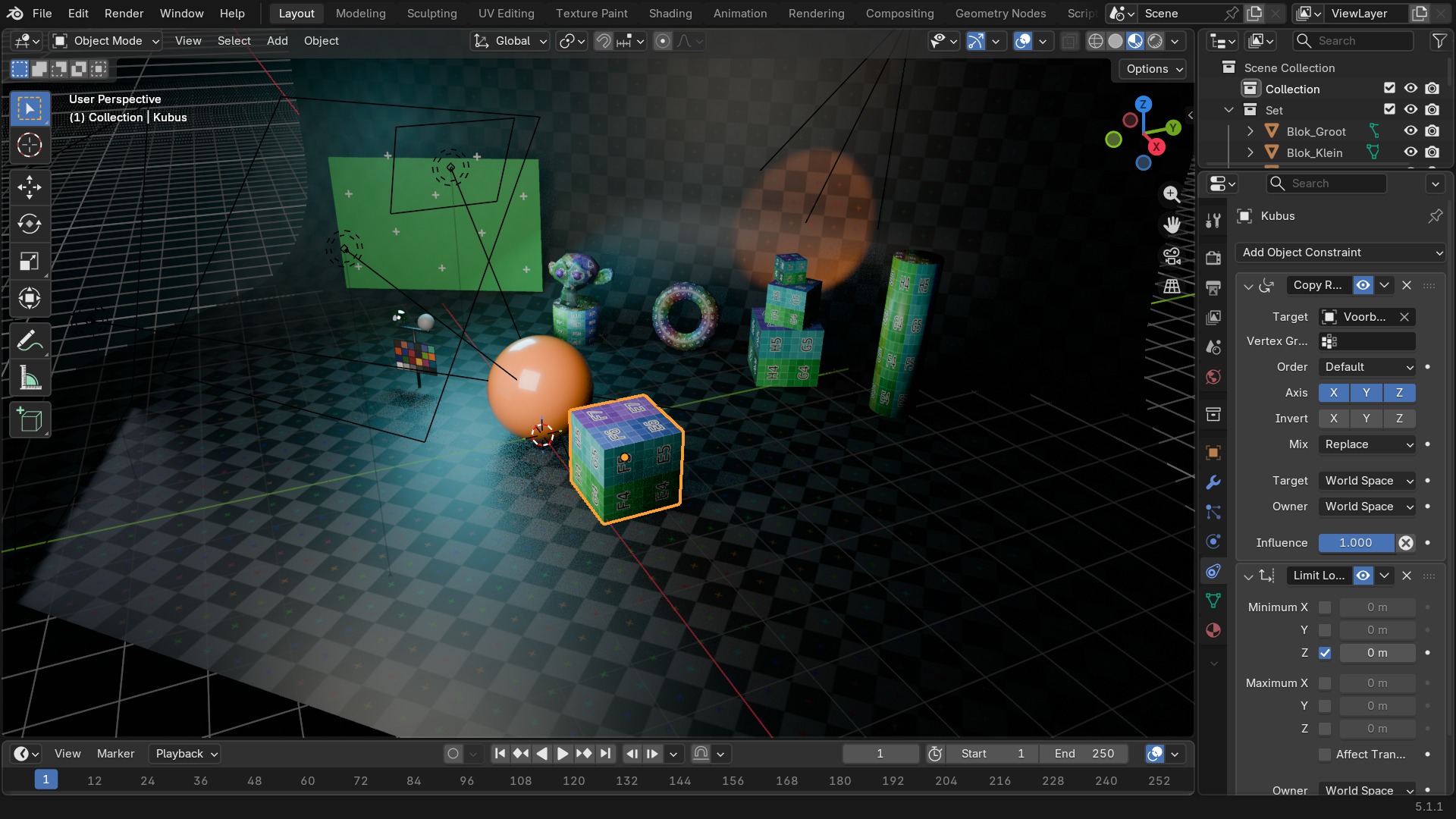 RECBLENDER 5.1 · CONSTRAINT-COPYVSLIMIT00:00:00:001920×1080
Transform, deel 3 — Maintain Volume en Transform
| Instelling | Type | Standaard | Bereik | Wat hij doet (tooltip uit Blender) |
|---|---|---|---|---|
| Name | STRING | – | – | Constraint name |
| Type | ENUM | CAMERA_SOLVER | Camera Solver, Follow Track, Object Solver, Copy Location, Copy Rotation, Copy Scale, Copy Transforms, Limit Distance, Limit Location, Limit Rotation, Limit Scale, Maintain Volume, Transformation, Transform Cache, Clamp To, Damped Track, Inverse Kinematics, Locked Track, Spline IK, Stretch To, Track To, Action, Armature, Child Of, Floor, Follow Path, Geometry Attribute, Pivot, Shrinkwrap | |
| Override Constraint | BOOLEAN | aan | – | In a local override object, whether this constraint comes from the linked reference object, or is local to the override |
| Owner Space | ENUM | WORLD | World Space, Custom Space, Pose Space, Local With Parent, Local Space | Space that owner is evaluated in |
| Target Space | ENUM | WORLD | World Space, Custom Space, Pose Space, Local With Parent, Local Space, Local Space (Owner Orientation) | Space that target is evaluated in |
| Object | POINTER | – | – | Object for Custom Space |
| Sub-Target | STRING | – | – | Armature bone, mesh or lattice vertex group, ... |
| Disable | BOOLEAN | uit | – | Enable/Disable Constraint |
| Enabled | BOOLEAN | aan | – | Use the results of this constraint |
| Expanded | BOOLEAN | uit | – | Constraint's panel is expanded in UI |
| Valid | BOOLEAN | aan | – | Constraint has valid settings and can be evaluated |
| Active | BOOLEAN | uit | – | Constraint is the one being edited |
| Influence | FLOAT | 0 | 0 – 1 | Amount of influence constraint will have on the final solution |
| Lin error | FLOAT | 0 | -10000 – 10000 | Amount of residual error in Blender space unit for constraints that work on position |
| Rotation error | FLOAT | 0 | -10000 – 10000 | Amount of residual error in radians for constraints that work on orientation |
| Free Axis | ENUM | SAMEVOL_X | X, Y, Z | The free scaling axis of the object |
| Mode | ENUM | STRICT | Strict, Uniform, Single Axis | The way the constraint treats original non-free axis scaling |
| Volume | FLOAT | 0 | 0.001 – 100 | Volume of the bone at rest |
| Instelling | Type | Standaard | Bereik | Wat hij doet (tooltip uit Blender) |
|---|
| Instelling | Type | Standaard | Bereik | Wat hij doet (tooltip uit Blender) |
|---|---|---|---|---|
| Name | STRING | – | – | Constraint name |
| Type | ENUM | CAMERA_SOLVER | Camera Solver, Follow Track, Object Solver, Copy Location, Copy Rotation, Copy Scale, Copy Transforms, Limit Distance, Limit Location, Limit Rotation, Limit Scale, Maintain Volume, Transformation, Transform Cache, Clamp To, Damped Track, Inverse Kinematics, Locked Track, Spline IK, Stretch To, Track To, Action, Armature, Child Of, Floor, Follow Path, Geometry Attribute, Pivot, Shrinkwrap | |
| Override Constraint | BOOLEAN | aan | – | In a local override object, whether this constraint comes from the linked reference object, or is local to the override |
| Owner Space | ENUM | WORLD | World Space, Custom Space, Pose Space, Local With Parent, Local Space | Space that owner is evaluated in |
| Target Space | ENUM | WORLD | World Space, Custom Space, Pose Space, Local With Parent, Local Space, Local Space (Owner Orientation) | Space that target is evaluated in |
| Object | POINTER | – | – | Object for Custom Space |
| Sub-Target | STRING | – | – | Armature bone, mesh or lattice vertex group, ... |
| Disable | BOOLEAN | uit | – | Enable/Disable Constraint |
| Enabled | BOOLEAN | aan | – | Use the results of this constraint |
| Expanded | BOOLEAN | uit | – | Constraint's panel is expanded in UI |
| Valid | BOOLEAN | aan | – | Constraint has valid settings and can be evaluated |
| Active | BOOLEAN | uit | – | Constraint is the one being edited |
| Influence | FLOAT | 0 | 0 – 1 | Amount of influence constraint will have on the final solution |
| Lin error | FLOAT | 0 | -10000 – 10000 | Amount of residual error in Blender space unit for constraints that work on position |
| Rotation error | FLOAT | 0 | -10000 – 10000 | Amount of residual error in radians for constraints that work on orientation |
| Cache File | POINTER | – | – | |
| Object Path | STRING | – | – | Path to the object in the Alembic archive used to lookup the transform matrix |
Maintain Volume en Transformation: de twee specialisten
Maintain Volume compenseert bij het uitrekken van een object langs één as automatisch de andere twee assen, zodat het volume ongeveer gelijk blijft — zoals een spierbult die breder wordt als een arm buigt. Transformation (TRANSFORM in de data) is de meest flexibele van de hele lijst: hij zet een waarde op één transform-kanaal van het doel om naar een ándere op het beperkte object, met een instelbare Map From/Map To en interpolatiecurve — bijvoorbeeld de X-rotatie van een deurhandvat omzetten naar de Z-locatie van een schuifdeur. Transform Cache leest een gebakken transform uit een Alembic- of USD-cache, voor gecombineerde workflows met externe simulatiesoftware.
RECBLENDER 5.1 · CONSTRAINT-COPYVSLIMIT00:00:00:001920×1080Relationship, deel 1
| Instelling | Type | Standaard | Bereik | Wat hij doet (tooltip uit Blender) |
|---|---|---|---|---|
| Name | STRING | – | – | Constraint name |
| Type | ENUM | CAMERA_SOLVER | Camera Solver, Follow Track, Object Solver, Copy Location, Copy Rotation, Copy Scale, Copy Transforms, Limit Distance, Limit Location, Limit Rotation, Limit Scale, Maintain Volume, Transformation, Transform Cache, Clamp To, Damped Track, Inverse Kinematics, Locked Track, Spline IK, Stretch To, Track To, Action, Armature, Child Of, Floor, Follow Path, Geometry Attribute, Pivot, Shrinkwrap | |
| Override Constraint | BOOLEAN | aan | – | In a local override object, whether this constraint comes from the linked reference object, or is local to the override |
| Owner Space | ENUM | WORLD | World Space, Custom Space, Pose Space, Local With Parent, Local Space | Space that owner is evaluated in |
| Target Space | ENUM | WORLD | World Space, Custom Space, Pose Space, Local With Parent, Local Space, Local Space (Owner Orientation) | Space that target is evaluated in |
| Object | POINTER | – | – | Object for Custom Space |
| Sub-Target | STRING | – | – | Armature bone, mesh or lattice vertex group, ... |
| Disable | BOOLEAN | uit | – | Enable/Disable Constraint |
| Enabled | BOOLEAN | aan | – | Use the results of this constraint |
| Expanded | BOOLEAN | uit | – | Constraint's panel is expanded in UI |
| Valid | BOOLEAN | aan | – | Constraint has valid settings and can be evaluated |
| Active | BOOLEAN | uit | – | Constraint is the one being edited |
| Influence | FLOAT | 0 | 0 – 1 | Amount of influence constraint will have on the final solution |
| Lin error | FLOAT | 0 | -10000 – 10000 | Amount of residual error in Blender space unit for constraints that work on position |
| Rotation error | FLOAT | 0 | -10000 – 10000 | Amount of residual error in radians for constraints that work on orientation |
| Target | POINTER | – | – | Target object |
| Sub-Target | STRING | – | – | Armature bone, mesh or lattice vertex group, ... |
| Mix Mode | ENUM | AFTER_FULL | Replace, Before Original (Full), Before Original (Aligned), Before Original (Split Channels), After Original (Full), After Original (Aligned), After Original (Split Channels) | Specify how existing transformations and the action channels are combined |
| Transform Channel | ENUM | ROTATION_X | X Location, Y Location, Z Location, X Rotation, Y Rotation, Z Rotation, X Scale, Y Scale, Z Scale | Transformation channel from the target that is used to key the Action |
| Action | POINTER | – | – | The constraining action |
| Action Slot Handle | INT | 0 | -10000 – 10000 | A number that identifies which sub-set of the Action is considered to be for this Action Constraint |
| Last Action Slot Identifier | STRING | – | – | The identifier of the most recently assigned action slot. The slot identifies which sub-set of the Action is considered to be for this constraint, and its identifier is used to find the right slot when assigning an Action. |
| Action Slot | POINTER | – | – | The slot identifies which sub-set of the Action is considered to be for this strip, and its name is used to find the right slot when assigning another Action |
| Action Slots | COLLECTION | – | – | The list of action slots suitable for this NLA strip |
| Object Action | BOOLEAN | uit | – | Bones only: apply the object's transformation channels of the action to the constrained bone, instead of bone's channels |
| Start Frame | INT | 0 | -1048574 – 1048574 | First frame of the Action to use |
| End Frame | INT | 0 | -1048574 – 1048574 | Last frame of the Action to use |
| Maximum | FLOAT | 0 | -1000 – 1000 | Maximum value for target channel range |
| Minimum | FLOAT | 0 | -1000 – 1000 | Minimum value for target channel range |
| Evaluation Time | FLOAT | 0 | 0 – 1 | Interpolates between Action Start and End frames |
| Use Evaluation Time | BOOLEAN | uit | – | Interpolate between Action Start and End frames, with the Evaluation Time slider instead of the Target object/bone |
| Instelling | Type | Standaard | Bereik | Wat hij doet (tooltip uit Blender) |
|---|---|---|---|---|
| Name | STRING | – | – | Constraint name |
| Type | ENUM | CAMERA_SOLVER | Camera Solver, Follow Track, Object Solver, Copy Location, Copy Rotation, Copy Scale, Copy Transforms, Limit Distance, Limit Location, Limit Rotation, Limit Scale, Maintain Volume, Transformation, Transform Cache, Clamp To, Damped Track, Inverse Kinematics, Locked Track, Spline IK, Stretch To, Track To, Action, Armature, Child Of, Floor, Follow Path, Geometry Attribute, Pivot, Shrinkwrap | |
| Override Constraint | BOOLEAN | aan | – | In a local override object, whether this constraint comes from the linked reference object, or is local to the override |
| Owner Space | ENUM | WORLD | World Space, Custom Space, Pose Space, Local With Parent, Local Space | Space that owner is evaluated in |
| Target Space | ENUM | WORLD | World Space, Custom Space, Pose Space, Local With Parent, Local Space, Local Space (Owner Orientation) | Space that target is evaluated in |
| Object | POINTER | – | – | Object for Custom Space |
| Sub-Target | STRING | – | – | Armature bone, mesh or lattice vertex group, ... |
| Disable | BOOLEAN | uit | – | Enable/Disable Constraint |
| Enabled | BOOLEAN | aan | – | Use the results of this constraint |
| Expanded | BOOLEAN | uit | – | Constraint's panel is expanded in UI |
| Valid | BOOLEAN | aan | – | Constraint has valid settings and can be evaluated |
| Active | BOOLEAN | uit | – | Constraint is the one being edited |
| Influence | FLOAT | 0 | 0 – 1 | Amount of influence constraint will have on the final solution |
| Lin error | FLOAT | 0 | -10000 – 10000 | Amount of residual error in Blender space unit for constraints that work on position |
| Rotation error | FLOAT | 0 | -10000 – 10000 | Amount of residual error in radians for constraints that work on orientation |
| Targets | COLLECTION | – | – | Target Bones |
| Preserve Volume | BOOLEAN | uit | – | Deform rotation interpolation with quaternions |
| Use Envelopes | BOOLEAN | uit | – | Multiply weights by envelope for all bones, instead of acting like Vertex Group based blending. The specified weights are still used, and only the listed bones are considered. |
| Use Current Location | BOOLEAN | uit | – | Use the current bone location for envelopes and choosing B-Bone segments instead of rest position |
| Instelling | Type | Standaard | Bereik | Wat hij doet (tooltip uit Blender) |
|---|---|---|---|---|
| Name | STRING | – | – | Constraint name |
| Type | ENUM | CAMERA_SOLVER | Camera Solver, Follow Track, Object Solver, Copy Location, Copy Rotation, Copy Scale, Copy Transforms, Limit Distance, Limit Location, Limit Rotation, Limit Scale, Maintain Volume, Transformation, Transform Cache, Clamp To, Damped Track, Inverse Kinematics, Locked Track, Spline IK, Stretch To, Track To, Action, Armature, Child Of, Floor, Follow Path, Geometry Attribute, Pivot, Shrinkwrap | |
| Override Constraint | BOOLEAN | aan | – | In a local override object, whether this constraint comes from the linked reference object, or is local to the override |
| Owner Space | ENUM | WORLD | World Space, Custom Space, Pose Space, Local With Parent, Local Space | Space that owner is evaluated in |
| Target Space | ENUM | WORLD | World Space, Custom Space, Pose Space, Local With Parent, Local Space, Local Space (Owner Orientation) | Space that target is evaluated in |
| Object | POINTER | – | – | Object for Custom Space |
| Sub-Target | STRING | – | – | Armature bone, mesh or lattice vertex group, ... |
| Disable | BOOLEAN | uit | – | Enable/Disable Constraint |
| Enabled | BOOLEAN | aan | – | Use the results of this constraint |
| Expanded | BOOLEAN | uit | – | Constraint's panel is expanded in UI |
| Valid | BOOLEAN | aan | – | Constraint has valid settings and can be evaluated |
| Active | BOOLEAN | uit | – | Constraint is the one being edited |
| Influence | FLOAT | 0 | 0 – 1 | Amount of influence constraint will have on the final solution |
| Lin error | FLOAT | 0 | -10000 – 10000 | Amount of residual error in Blender space unit for constraints that work on position |
| Rotation error | FLOAT | 0 | -10000 – 10000 | Amount of residual error in radians for constraints that work on orientation |
| Target | POINTER | – | – | Target object |
| Sub-Target | STRING | – | – | Armature bone, mesh or lattice vertex group, ... |
| Location X | BOOLEAN | uit | – | Use X Location of Parent |
| Location Y | BOOLEAN | uit | – | Use Y Location of Parent |
| Location Z | BOOLEAN | uit | – | Use Z Location of Parent |
| Rotation X | BOOLEAN | uit | – | Use X Rotation of Parent |
| Rotation Y | BOOLEAN | uit | – | Use Y Rotation of Parent |
| Rotation Z | BOOLEAN | uit | – | Use Z Rotation of Parent |
| Scale X | BOOLEAN | uit | – | Use X Scale of Parent |
| Scale Y | BOOLEAN | uit | – | Use Y Scale of Parent |
| Scale Z | BOOLEAN | uit | – | Use Z Scale of Parent |
| Set Inverse Pending | BOOLEAN | uit | – | Set to true to request recalculation of the inverse matrix |
| Inverse Matrix | FLOAT | 0 | -10000 – 10000 | Transformation matrix to apply before |
Child Of: de krachtigste en de gevaarlijkste
Child Of gedraagt zich als parenting, maar dan als constraint: het object erft locatie, rotatie én schaal van een doel, met een Set Inverse-knop die — net als Ctrl+P bij echte parenting — de huidige relatieve transform vastzet als nulpunt. Vergeet je Set Inverse, dan springt het object bij het toevoegen van de constraint naar de oorsprong van het doel: de klassieke "mijn object teleporteert plots weg"-fout bij deze constraint. Armature is de constraint-versie van de Armature-modifier: skinning zonder modifier-stapel, gangbaar op hulpobjecten in plaats van op de hoofdmesh.
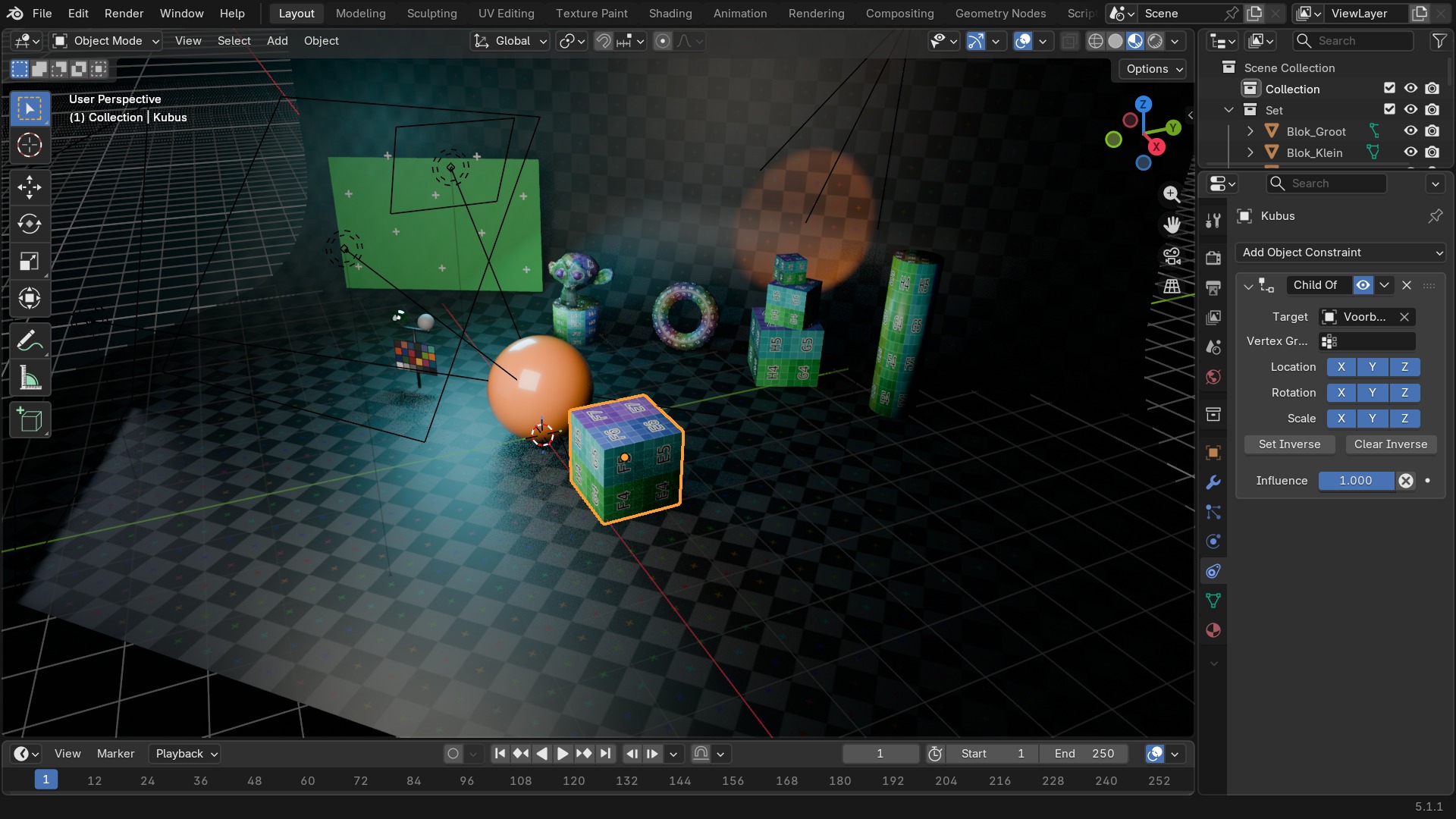 RECBLENDER 5.1 · CONSTRAINT-CHILDOF00:00:00:001920×1080
Relationship, deel 2
| Instelling | Type | Standaard | Bereik | Wat hij doet (tooltip uit Blender) |
|---|---|---|---|---|
| Name | STRING | – | – | Constraint name |
| Type | ENUM | CAMERA_SOLVER | Camera Solver, Follow Track, Object Solver, Copy Location, Copy Rotation, Copy Scale, Copy Transforms, Limit Distance, Limit Location, Limit Rotation, Limit Scale, Maintain Volume, Transformation, Transform Cache, Clamp To, Damped Track, Inverse Kinematics, Locked Track, Spline IK, Stretch To, Track To, Action, Armature, Child Of, Floor, Follow Path, Geometry Attribute, Pivot, Shrinkwrap | |
| Override Constraint | BOOLEAN | aan | – | In a local override object, whether this constraint comes from the linked reference object, or is local to the override |
| Owner Space | ENUM | WORLD | World Space, Custom Space, Pose Space, Local With Parent, Local Space | Space that owner is evaluated in |
| Target Space | ENUM | WORLD | World Space, Custom Space, Pose Space, Local With Parent, Local Space, Local Space (Owner Orientation) | Space that target is evaluated in |
| Object | POINTER | – | – | Object for Custom Space |
| Sub-Target | STRING | – | – | Armature bone, mesh or lattice vertex group, ... |
| Disable | BOOLEAN | uit | – | Enable/Disable Constraint |
| Enabled | BOOLEAN | aan | – | Use the results of this constraint |
| Expanded | BOOLEAN | uit | – | Constraint's panel is expanded in UI |
| Valid | BOOLEAN | aan | – | Constraint has valid settings and can be evaluated |
| Active | BOOLEAN | uit | – | Constraint is the one being edited |
| Influence | FLOAT | 0 | 0 – 1 | Amount of influence constraint will have on the final solution |
| Lin error | FLOAT | 0 | -10000 – 10000 | Amount of residual error in Blender space unit for constraints that work on position |
| Rotation error | FLOAT | 0 | -10000 – 10000 | Amount of residual error in radians for constraints that work on orientation |
| Target | POINTER | – | – | Target object |
| Sub-Target | STRING | – | – | Armature bone, mesh or lattice vertex group, ... |
| Floor Location | ENUM | FLOOR_X | X, Y, Z, -X, -Y, -Z | Location of target that object will not pass through |
| Use Rotation | BOOLEAN | uit | – | Use the target's rotation to determine floor |
| Offset | FLOAT | 0 | -100 – 100 | Offset of floor from object origin |
| Instelling | Type | Standaard | Bereik | Wat hij doet (tooltip uit Blender) |
|---|---|---|---|---|
| Name | STRING | – | – | Constraint name |
| Type | ENUM | CAMERA_SOLVER | Camera Solver, Follow Track, Object Solver, Copy Location, Copy Rotation, Copy Scale, Copy Transforms, Limit Distance, Limit Location, Limit Rotation, Limit Scale, Maintain Volume, Transformation, Transform Cache, Clamp To, Damped Track, Inverse Kinematics, Locked Track, Spline IK, Stretch To, Track To, Action, Armature, Child Of, Floor, Follow Path, Geometry Attribute, Pivot, Shrinkwrap | |
| Override Constraint | BOOLEAN | aan | – | In a local override object, whether this constraint comes from the linked reference object, or is local to the override |
| Owner Space | ENUM | WORLD | World Space, Custom Space, Pose Space, Local With Parent, Local Space | Space that owner is evaluated in |
| Target Space | ENUM | WORLD | World Space, Custom Space, Pose Space, Local With Parent, Local Space, Local Space (Owner Orientation) | Space that target is evaluated in |
| Object | POINTER | – | – | Object for Custom Space |
| Sub-Target | STRING | – | – | Armature bone, mesh or lattice vertex group, ... |
| Disable | BOOLEAN | uit | – | Enable/Disable Constraint |
| Enabled | BOOLEAN | aan | – | Use the results of this constraint |
| Expanded | BOOLEAN | uit | – | Constraint's panel is expanded in UI |
| Valid | BOOLEAN | aan | – | Constraint has valid settings and can be evaluated |
| Active | BOOLEAN | uit | – | Constraint is the one being edited |
| Influence | FLOAT | 0 | 0 – 1 | Amount of influence constraint will have on the final solution |
| Lin error | FLOAT | 0 | -10000 – 10000 | Amount of residual error in Blender space unit for constraints that work on position |
| Rotation error | FLOAT | 0 | -10000 – 10000 | Amount of residual error in radians for constraints that work on orientation |
| Target | POINTER | – | – | Target Curve object |
| Offset | FLOAT | 0 | -1048574 – 1048574 | Offset from the position corresponding to the time frame |
| Offset Factor | FLOAT | 0 | 0 – 1 | Percentage value defining target position along length of curve |
| Forward Axis | ENUM | FORWARD_X | X, Y, Z, -X, -Y, -Z | Axis that points forward along the path |
| Up Axis | ENUM | UP_X | X, Y, Z | Axis that points upward |
| Follow Curve | BOOLEAN | uit | – | Object will follow the heading and banking of the curve |
| Fixed Position | BOOLEAN | uit | – | Object will stay locked to a single point somewhere along the length of the curve regardless of time |
| Curve Radius | BOOLEAN | uit | – | Object is scaled by the curve radius |
| Instelling | Type | Standaard | Bereik | Wat hij doet (tooltip uit Blender) |
|---|---|---|---|---|
| Name | STRING | – | – | Constraint name |
| Type | ENUM | CAMERA_SOLVER | Camera Solver, Follow Track, Object Solver, Copy Location, Copy Rotation, Copy Scale, Copy Transforms, Limit Distance, Limit Location, Limit Rotation, Limit Scale, Maintain Volume, Transformation, Transform Cache, Clamp To, Damped Track, Inverse Kinematics, Locked Track, Spline IK, Stretch To, Track To, Action, Armature, Child Of, Floor, Follow Path, Geometry Attribute, Pivot, Shrinkwrap | |
| Override Constraint | BOOLEAN | aan | – | In a local override object, whether this constraint comes from the linked reference object, or is local to the override |
| Owner Space | ENUM | WORLD | World Space, Custom Space, Pose Space, Local With Parent, Local Space | Space that owner is evaluated in |
| Target Space | ENUM | WORLD | World Space, Custom Space, Pose Space, Local With Parent, Local Space, Local Space (Owner Orientation) | Space that target is evaluated in |
| Object | POINTER | – | – | Object for Custom Space |
| Sub-Target | STRING | – | – | Armature bone, mesh or lattice vertex group, ... |
| Disable | BOOLEAN | uit | – | Enable/Disable Constraint |
| Enabled | BOOLEAN | aan | – | Use the results of this constraint |
| Expanded | BOOLEAN | uit | – | Constraint's panel is expanded in UI |
| Valid | BOOLEAN | aan | – | Constraint has valid settings and can be evaluated |
| Active | BOOLEAN | uit | – | Constraint is the one being edited |
| Influence | FLOAT | 0 | 0 – 1 | Amount of influence constraint will have on the final solution |
| Lin error | FLOAT | 0 | -10000 – 10000 | Amount of residual error in Blender space unit for constraints that work on position |
| Rotation error | FLOAT | 0 | -10000 – 10000 | Amount of residual error in radians for constraints that work on orientation |
| Target | POINTER | – | – | Target geometry object |
| Attribute Name | STRING | – | – | Name of the attribute to retrieve the transform from |
| Domain Type | ENUM | POINT | Point, Edge, Face, Face Corner, Spline, Instance | Attribute domain |
| Target Transform | BOOLEAN | uit | – | Apply the target object's world transform on top of the attribute's transform |
| Data Type | ENUM | VECTOR | Vector, Quaternion, 4x4 Matrix | Select data type of attribute |
| Sample Index | INT | 0 | 0 – onbegrensd | Sample Index |
| Mix Location | BOOLEAN | uit | – | Mix Location |
| Mix Rotation | BOOLEAN | uit | – | Mix Rotation |
| Mix Scale | BOOLEAN | uit | – | Mix Scale |
| Mix Mode | ENUM | REPLACE | Replace, Before Original (Full), Before Original (Split Channels), After Original (Full), After Original (Split Channels) | Specify how the copied and existing transformations are combined |
Floor en Follow Path
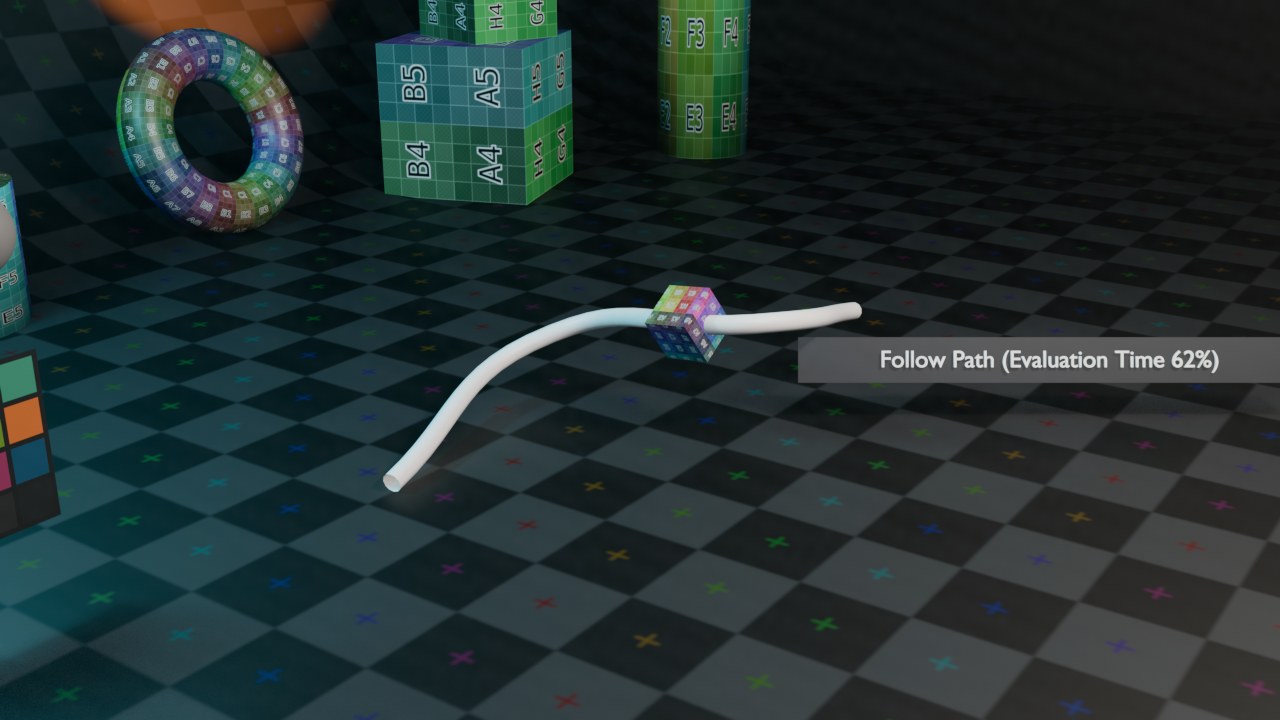
Floor voorkomt dat een object door een vlak van het doel-object zakt — géén botsingsdetectie zoals bij physics (hoofdstuk 97), maar een harde vlakke grens langs één as, met Offset voor de exacte hoogte. Follow Path plaatst een object op een curve en laat het meebewegen naarmate Evaluation Time of een keyframe op de curve zelf vordert — de basis voor elk object dat een vast tracé aflegt: een trein op rails, een camera langs een vliegroute.
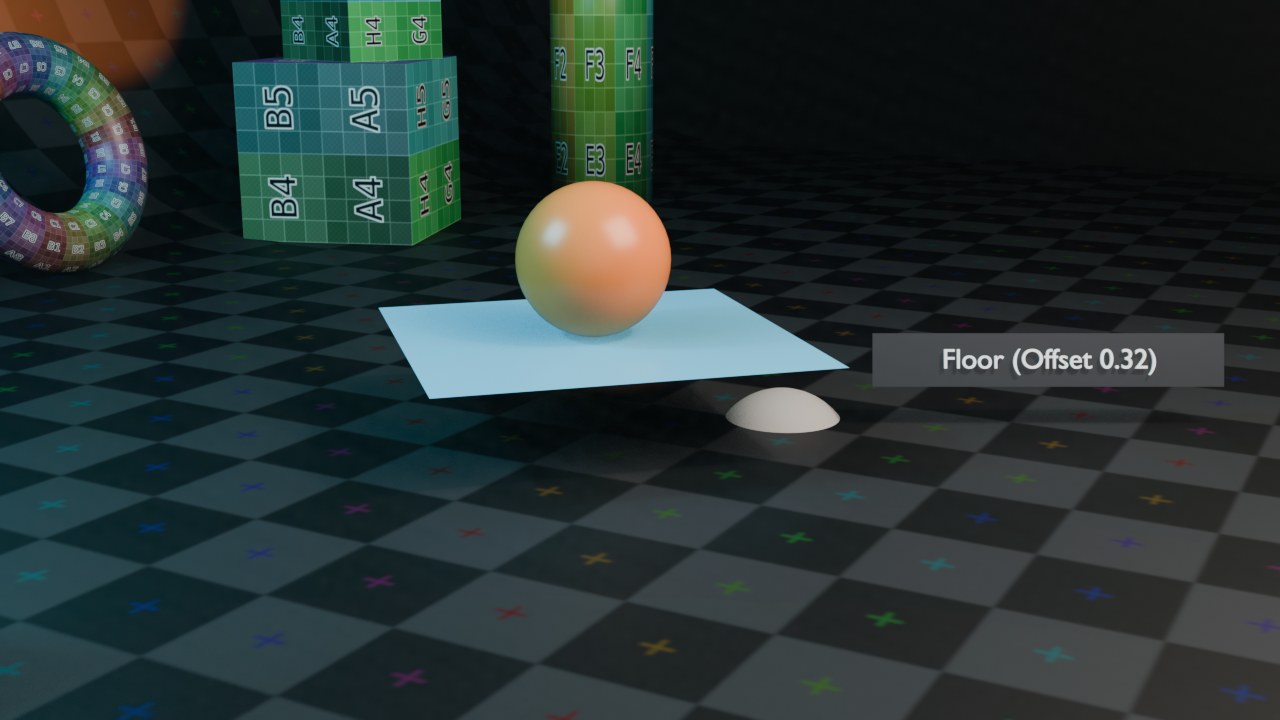 RECRENDER · EEVEE00:00:00:001280×720
Vijf constraints in de praktijk, met doelobject en hulplijnen zichtbaar
Elke render hieronder is een ECHTE bpy.types.Constraint op een object in de studioset (geen nagebouwd effect) — met het doelobject, een hulplijn of een referentievorm mee in beeld, zodat je in één oogopslag ziet wat de constraint heeft veranderd.
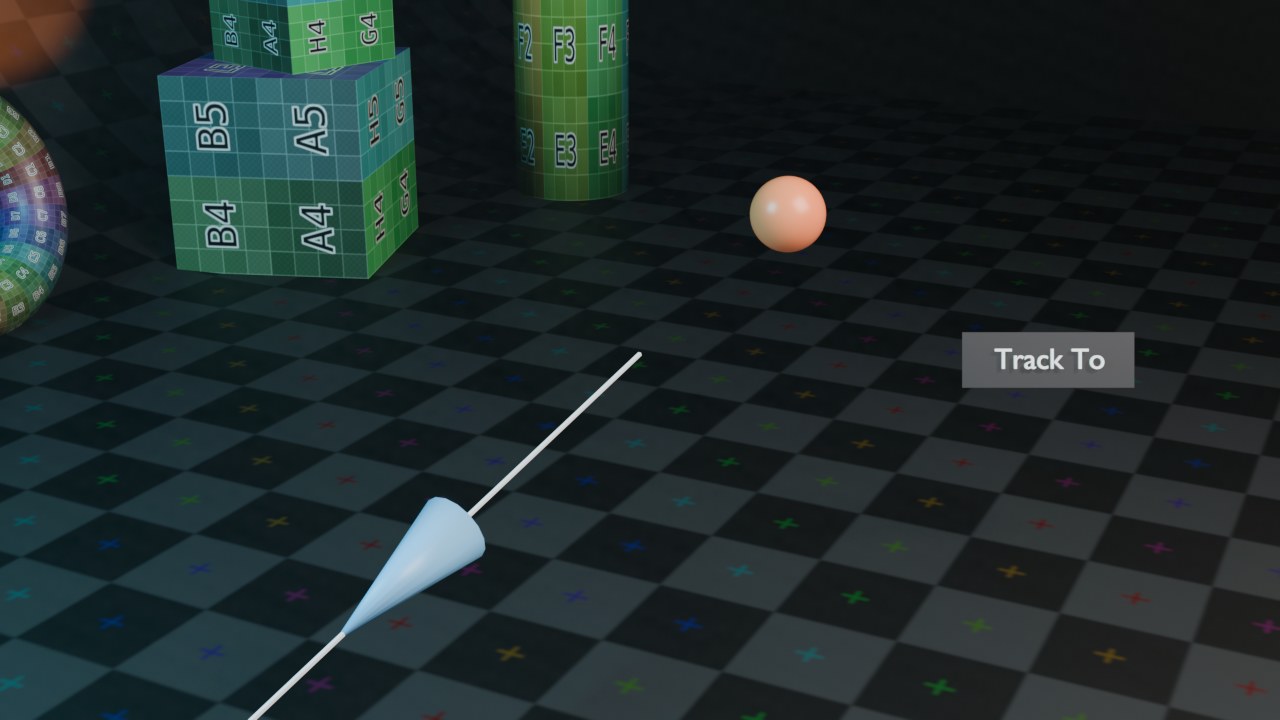 RECRENDER · EEVEE00:00:00:001280×720
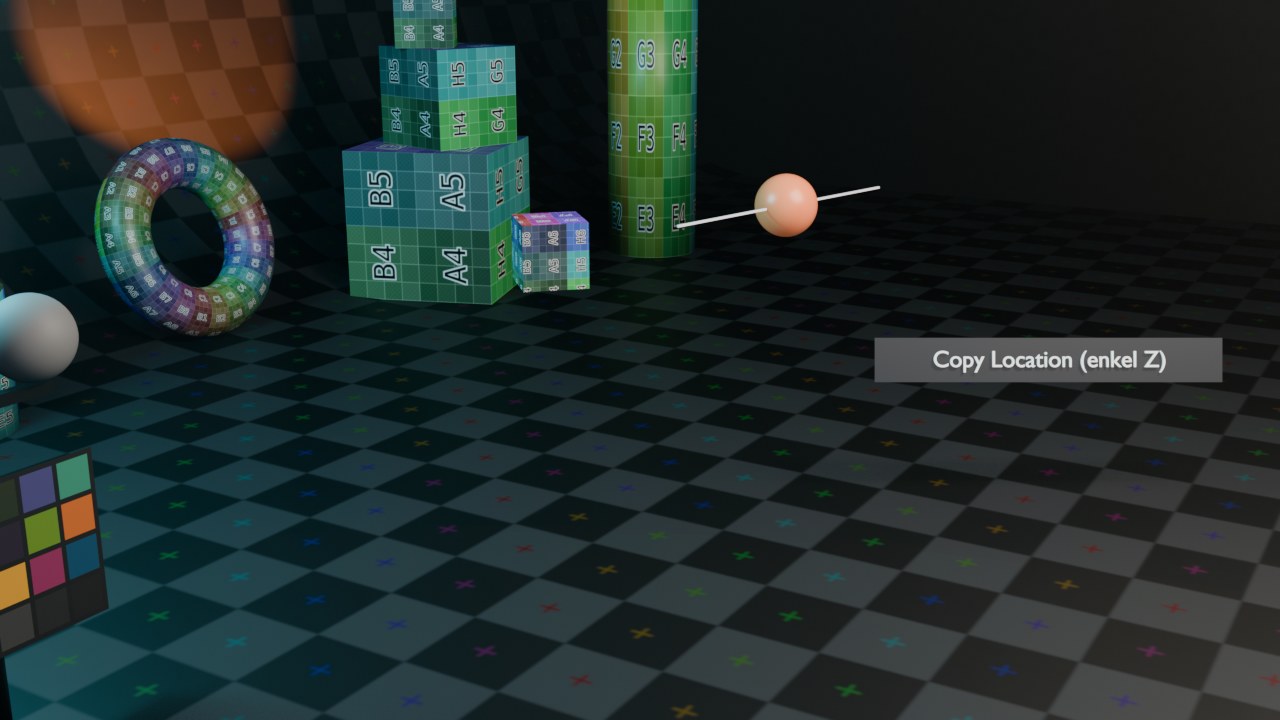 RECRENDER · EEVEE00:00:00:001280×720
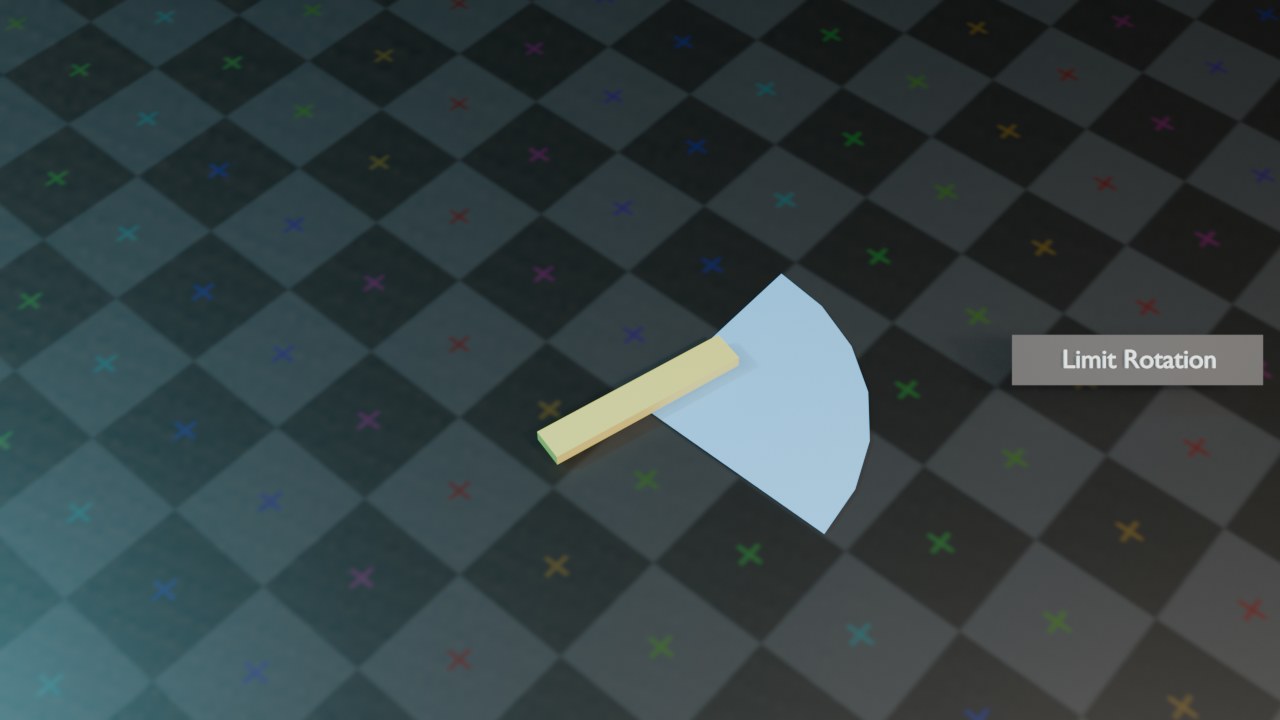 RECRENDER · EEVEE00:00:00:001280×720RECRENDER · EEVEE00:00:00:001280×720RECRENDER · EEVEE00:00:00:001280×720
Relationship, deel 3 — IK, Pivot, Shrinkwrap
| Instelling | Type | Standaard | Bereik | Wat hij doet (tooltip uit Blender) |
|---|
| Instelling | Type | Standaard | Bereik | Wat hij doet (tooltip uit Blender) |
|---|---|---|---|---|
| Name | STRING | – | – | Constraint name |
| Type | ENUM | CAMERA_SOLVER | Camera Solver, Follow Track, Object Solver, Copy Location, Copy Rotation, Copy Scale, Copy Transforms, Limit Distance, Limit Location, Limit Rotation, Limit Scale, Maintain Volume, Transformation, Transform Cache, Clamp To, Damped Track, Inverse Kinematics, Locked Track, Spline IK, Stretch To, Track To, Action, Armature, Child Of, Floor, Follow Path, Geometry Attribute, Pivot, Shrinkwrap | |
| Override Constraint | BOOLEAN | aan | – | In a local override object, whether this constraint comes from the linked reference object, or is local to the override |
| Owner Space | ENUM | WORLD | World Space, Custom Space, Pose Space, Local With Parent, Local Space | Space that owner is evaluated in |
| Target Space | ENUM | WORLD | World Space, Custom Space, Pose Space, Local With Parent, Local Space, Local Space (Owner Orientation) | Space that target is evaluated in |
| Object | POINTER | – | – | Object for Custom Space |
| Sub-Target | STRING | – | – | Armature bone, mesh or lattice vertex group, ... |
| Disable | BOOLEAN | uit | – | Enable/Disable Constraint |
| Enabled | BOOLEAN | aan | – | Use the results of this constraint |
| Expanded | BOOLEAN | uit | – | Constraint's panel is expanded in UI |
| Valid | BOOLEAN | aan | – | Constraint has valid settings and can be evaluated |
| Active | BOOLEAN | uit | – | Constraint is the one being edited |
| Influence | FLOAT | 0 | 0 – 1 | Amount of influence constraint will have on the final solution |
| Lin error | FLOAT | 0 | -10000 – 10000 | Amount of residual error in Blender space unit for constraints that work on position |
| Rotation error | FLOAT | 0 | -10000 – 10000 | Amount of residual error in radians for constraints that work on orientation |
| Head/Tail | FLOAT | 0 | 0 – 1 | Target along length of bone: Head is 0, Tail is 1 |
| Follow B-Bone | BOOLEAN | uit | – | Follow shape of B-Bone segments when calculating Head/Tail position |
| Target | POINTER | – | – | Target Object, defining the position of the pivot when defined |
| Sub-Target | STRING | – | – | |
| Use Relative Offset | BOOLEAN | aan | – | Offset will be an absolute point in space instead of relative to the target |
| Offset | FLOAT | 0 | -10000 – 10000 | Offset of pivot from target (when set), or from owner's location (when Fixed Position is off), or the absolute pivot point |
| Enabled Rotation Range | ENUM | NX | Always, -X Rotation, -Y Rotation, -Z Rotation, X Rotation, Y Rotation, Z Rotation | Rotation range on which pivoting should occur |
| Instelling | Type | Standaard | Bereik | Wat hij doet (tooltip uit Blender) |
|---|---|---|---|---|
| Name | STRING | – | – | Constraint name |
| Type | ENUM | CAMERA_SOLVER | Camera Solver, Follow Track, Object Solver, Copy Location, Copy Rotation, Copy Scale, Copy Transforms, Limit Distance, Limit Location, Limit Rotation, Limit Scale, Maintain Volume, Transformation, Transform Cache, Clamp To, Damped Track, Inverse Kinematics, Locked Track, Spline IK, Stretch To, Track To, Action, Armature, Child Of, Floor, Follow Path, Geometry Attribute, Pivot, Shrinkwrap | |
| Override Constraint | BOOLEAN | aan | – | In a local override object, whether this constraint comes from the linked reference object, or is local to the override |
| Owner Space | ENUM | WORLD | World Space, Custom Space, Pose Space, Local With Parent, Local Space | Space that owner is evaluated in |
| Target Space | ENUM | WORLD | World Space, Custom Space, Pose Space, Local With Parent, Local Space, Local Space (Owner Orientation) | Space that target is evaluated in |
| Object | POINTER | – | – | Object for Custom Space |
| Sub-Target | STRING | – | – | Armature bone, mesh or lattice vertex group, ... |
| Disable | BOOLEAN | uit | – | Enable/Disable Constraint |
| Enabled | BOOLEAN | aan | – | Use the results of this constraint |
| Expanded | BOOLEAN | uit | – | Constraint's panel is expanded in UI |
| Valid | BOOLEAN | aan | – | Constraint has valid settings and can be evaluated |
| Active | BOOLEAN | uit | – | Constraint is the one being edited |
| Influence | FLOAT | 0 | 0 – 1 | Amount of influence constraint will have on the final solution |
| Lin error | FLOAT | 0 | -10000 – 10000 | Amount of residual error in Blender space unit for constraints that work on position |
| Rotation error | FLOAT | 0 | -10000 – 10000 | Amount of residual error in radians for constraints that work on orientation |
| Target | POINTER | – | – | Target Mesh object |
| Shrinkwrap Type | ENUM | NEAREST_SURFACE | Nearest Surface Point, Project, Nearest Vertex, Target Normal Project | Select type of shrinkwrap algorithm for target position |
| Snap Mode | ENUM | ON_SURFACE | On Surface, Inside, Outside, Outside Surface, Above Surface | Select how to constrain the object to the target surface |
| Distance | FLOAT | 0 | 0 – 100 | Distance to Target |
| Project Axis | ENUM | POS_X | +X, +Y, +Z, -X, -Y, -Z | Axis constrain to |
| Axis Space | ENUM | WORLD | World Space, Custom Space, Pose Space, Local With Parent, Local Space | Space for the projection axis |
| Project Distance | FLOAT | 0 | 0 – 100 | Limit the distance used for projection (zero disables) |
| Project Opposite | BOOLEAN | uit | – | Project in both specified and opposite directions |
| Face Cull | ENUM | OFF | Off, Front, Back | Stop vertices from projecting to a face on the target when facing towards/away |
| Invert Cull | BOOLEAN | uit | – | When projecting in the opposite direction invert the face cull mode |
| Align Axis To Normal | BOOLEAN | uit | – | Align the specified axis to the surface normal |
| Track Axis | ENUM | TRACK_X | X, Y, Z, -X, -Y, -Z | Axis that is aligned to the normal |
IK, Pivot en Shrinkwrap: drie totaal verschillende toepassingen
Inverse Kinematics (IK) draait de normale botlogica om: in plaats van elk bot afzonderlijk te roteren (Forward Kinematics), sleep je het eindpunt van een keten en berekent Blender de tussenliggende hoeken — de standaardmanier om een been of arm te poseren (hoofdstuk 93 gaat hier dieper op in). Pivot verschuift het draaipunt van een rotatie naar een ander object, voor scharnierbewegingen die niet rond de eigen origin draaien. Shrinkwrap trekt een object naar het oppervlak van een doelmesh — gangbaar om een oog strak op een schedelvorm te houden, of kleding dicht bij een lichaam te laten aansluiten zonder er doorheen te steken.
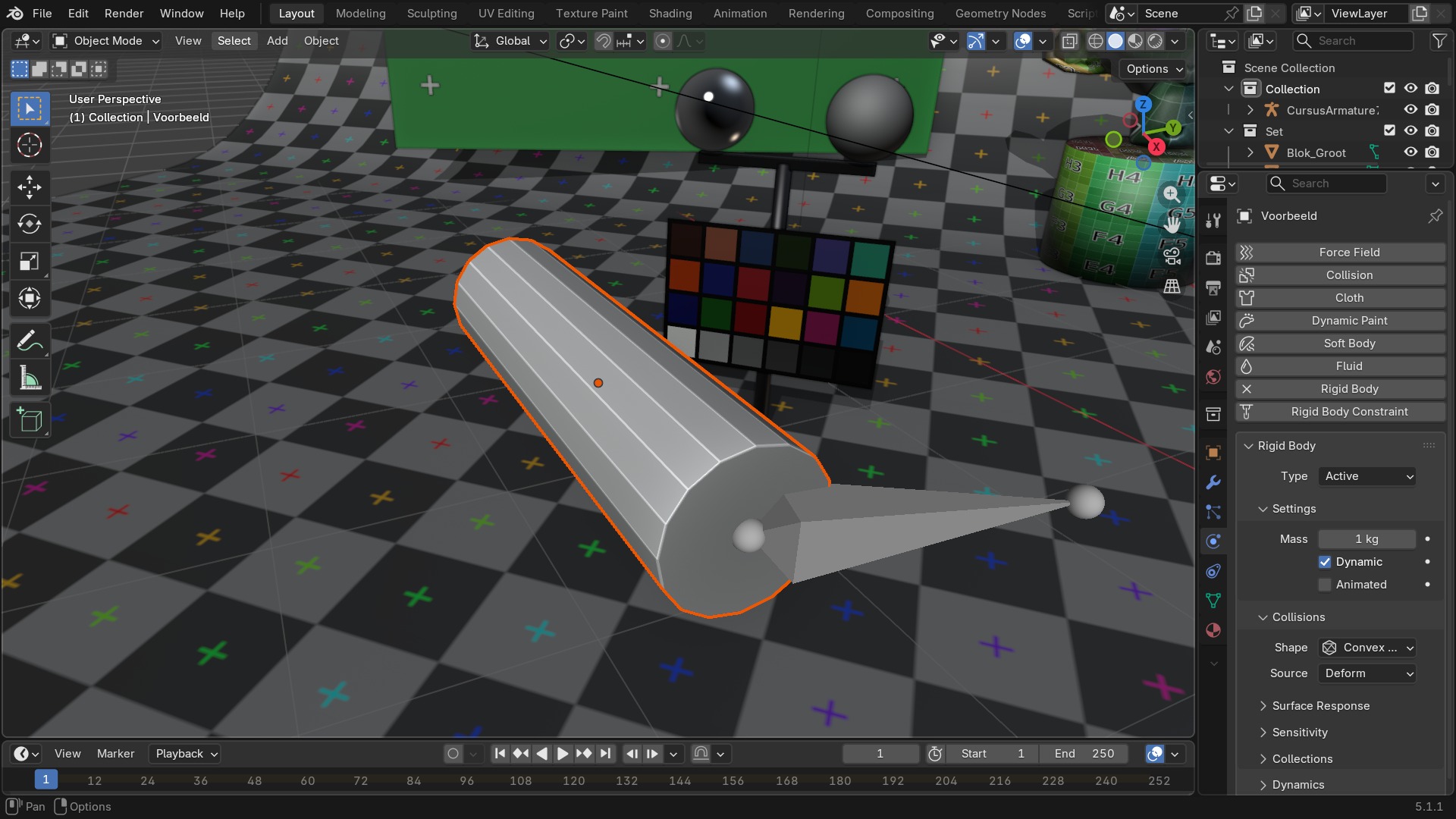 RECBLENDER 5.1 · CONSTRAINT-IK-SHRINKWRAP00:00:00:001920×1080
Sneltoetsen — werken met constraints in Pose Mode
| Toets | Actie | Operator |
|---|---|---|
| G | Move | transform.translate |
| R | Rotate | transform.rotate |
| S | Resize | transform.resize |
| LEFTMOUSE | Move | transform.translate |
| Ctrl+M | Mirror | transform.mirror |
| Ctrl+P | Make Parent | object.parent_set |
| Alt+H | Reveal Selected | pose.reveal |
| H | Hide Selected | pose.hide |
| Shift+H | Hide Selected | pose.hide |
| Ctrl+A | Apply | wm.call_menu |
| Alt+R | Clear Pose Rotation | pose.rot_clear |
| Alt+G | Clear Pose Location | pose.loc_clear |
| Alt+S | Clear Pose Scale | pose.scale_clear |
| Alt+F | Flip Quaternions | pose.quaternions_flip |
| Ctrl+R | Set Rotation Mode | pose.rotation_mode_set |
| Ctrl+C | Copy Pose | pose.copy |
| Ctrl+V | Paste Pose | pose.paste |
| Ctrl+Shift+V | Paste Pose | pose.paste |
| A | (De)select All | pose.select_all |
| Alt+A | (De)select All | pose.select_all |
| Ctrl+I | (De)select All | pose.select_all |
| A | (De)select All | pose.select_all |
| Shift+P | Select Parent Bone | pose.select_parent |
| LEFT_BRACKET | Select Hierarchy | pose.select_hierarchy |
| Shift+LEFT_BRACKET | Select Hierarchy | pose.select_hierarchy |
| RIGHT_BRACKET | Select Hierarchy | pose.select_hierarchy |
| Shift+RIGHT_BRACKET | Select Hierarchy | pose.select_hierarchy |
| Ctrl+L | Select Connected | pose.select_linked |
| L | Select Connected | pose.select_linked_pick |
| Shift+G | Select Grouped | pose.select_grouped |
| Ctrl+Shift+M | Select Mirror | pose.select_mirror |
| Ctrl+Shift+C | Add Constraint (with Targets) | pose.constraint_add_with_targets |
| Ctrl+Alt+C | Clear Pose Constraints | pose.constraints_clear |
| Shift+I | Add IK to Bone | pose.ik_add |
| Ctrl+Alt+I | Remove IK | pose.ik_clear |
| Shift+W | Toggle Bone Options | wm.call_menu |
| Ctrl+Shift+W | Enable Bone Options | wm.call_menu |
| Alt+W | Disable Bone Options | wm.call_menu |
| Shift+M | Assign to Collection | armature.assign_to_collection |
| M | Move to Collection | armature.move_to_collection |
| Ctrl+Alt+Shift+S | Scale B-Bone | transform.bbone_resize |
| K | Insert Keyframe Menu | anim.keyframe_insert_menu |
| Alt+I | Delete Keyframe | anim.keyframe_delete_v3d |
| Shift+K | Set Active Keying Set | anim.keying_set_active_set |
| Ctrl+E | Push Pose from Breakdown | pose.push |
| Alt+E | Relax Pose to Breakdown | pose.relax |
| Shift+E | Pose Breakdowner | pose.breakdown |
| Alt+Shift+E | Blend to Neighbor | pose.blend_to_neighbor |
| Alt+P | Propagate | wm.call_menu |
| RIGHTMOUSE | Pose | wm.call_menu |
| APP | Pose | wm.call_menu |
| Alt+Shift+W | Select Selection Set | wm.call_menu |
| I | Insert Keyframe | anim.keyframe_insert |
Zelf proberen: een lamp die een doelobject blijft volgen
Zet een Damped Track-constraint op een lamp zodat hij een bewegend doelobject blijft belichten, met een Limit Rotation als veiligheidsgrens.
- 1Open
blends/start_lamp_volgen.blend— een lamp en een los Empty-object dat je kan verplaatsen. - 2Voeg op de lamp een
Damped Track-constraint toe met de Empty als Target en-Zals Track Axis. - 3Verplaats de Empty in de 3D Viewport en controleer of de lamp meedraait.
- 4Voeg daaronder een
Limit Rotationtoe die de X-rotatie tussen -60° en 60° houdt. - 5Verplaats de Empty voorbij die grens en zie hoe de lamp niet verder meedraait.